Best Features To Look For In Cloud Payroll Software
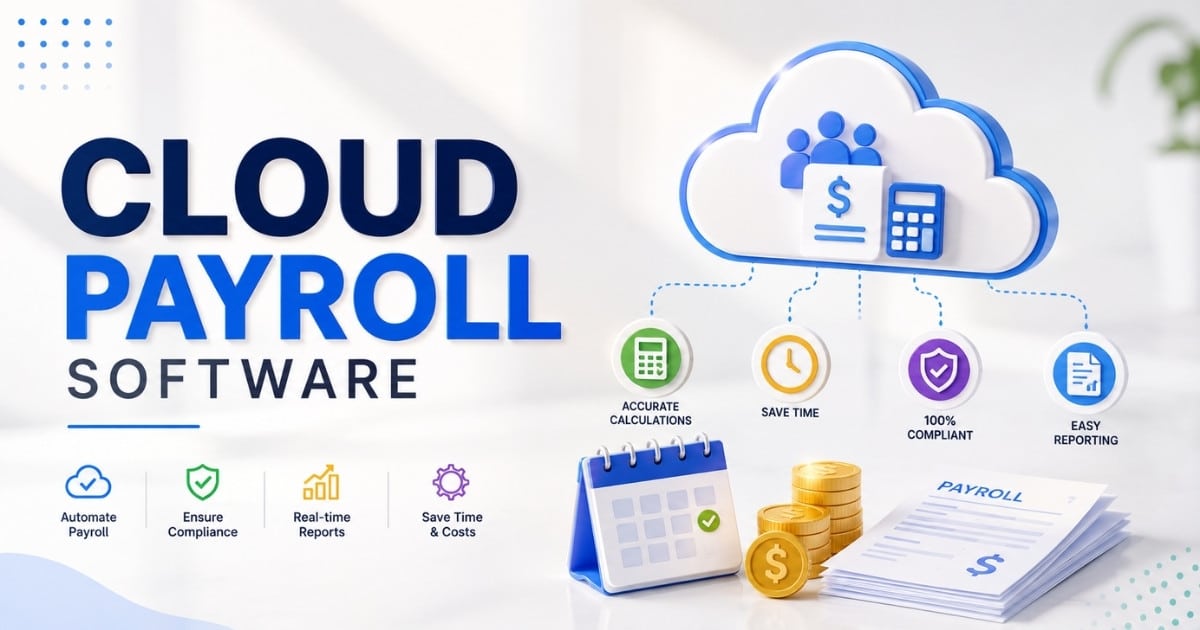
Table of Contents
Cloud payroll software has transformed dramatically since 2020, driven by the global shift to remote work that exposed the limitations of desktop-based tools requiring physical servers and manual updates. By 2022, adoption surged as 68% of US mid-sized businesses migrated to cloud HR suites according to Gartner reports, integrating payroll with HRIS, time tracking, and benefits into unified platforms.
Today, businesses face complex challenges around multi-location teams, hybrid workforces with variable hours, and escalating payroll costs from overtime and compliance penalties. Organizations from 10 to 1,000 employees now expect payroll automation, self-service capabilities, and real-time compliance as standard features rather than premium extras.
This article walks through the best features to prioritize when evaluating cloud payroll software, explains how these capabilities support workforce management, and demonstrates why solutions like Payrun stand out for growing businesses seeking reliable, efficient payroll operations.

What Is Cloud Payroll Software
Cloud payroll software is a web-based solution that helps businesses process payroll, manage payroll taxes, and automate payroll and HR operations from one centralized platform. Companies use cloud systems to run payroll faster while reducing manual data entry and minimizing errors linked to legacy systems.
Modern payroll platforms handle employee payments, tax withholdings, local tax filings, and employee benefits automatically through secure online workflows. Many businesses also use cloud payroll software to track workforce costs, manage tax liabilities, and improve reporting accuracy. Key features often include employee self-service tools, compliance monitoring, and integrations with accounting platforms. Solutions like HR Pro Payroll and ADP Workforce support businesses that need scalable payroll operations without complex infrastructure. Cloud payroll software also improves flexibility, helping companies process payroll efficiently from any location while maintaining accurate records and compliance.
Best Features To Look For In Cloud Payroll Software
This section forms the core of this guide, covering the most important capabilities to evaluate before selecting a payroll provider. Each subsection addresses a specific feature area with concrete advice on what to ask vendors during demos and trials. When assessing cloud based payroll software, look beyond surface-level checklists to understand how each feature performs in real-world scenarios relevant to your operations.
Core Payroll Automation And Accuracy
Fully automated gross-to-net calculations form the foundation of any effective payroll software. This includes automatic handling of overtime at applicable rates, bonuses prorated by tenure, allowances like meal reimbursements, and statutory deductions for taxes, insurance, and retirement contributions. Cloud payroll software automates payroll processing, reducing manual errors and increasing efficiency by handling calculations for overtime, bonuses, and deductions in real time.
Automated payroll processing dramatically reduces human error while shortening pay runs from hours to minutes. According to industry data, automation cuts calculation errors by 95% and can reduce weekly processing time from four hours to under ten minutes. Resources outlining automated payroll software features and benefits reinforce how these capabilities ensure employees are paid accurately and on time without repeated corrections.
Look for payroll tools that handle arrears processing, retroactive pay adjustments applied across multiple periods, and pro-rated salaries for employees joining or leaving mid-cycle. The system should support configurable pay schedules including weekly, fortnightly, and monthly cycles, with the ability to manage multiple pay groups within a single payroll system.
Compliance, Tax Rules, And Local Regulations
Modern payroll software must keep tax tables and statutory rules updated automatically without manual downloads or patches. Cloud based payroll software automates tax compliance by calculating taxes according to the latest local, state, and federal rules, which is essential for businesses operating across multiple jurisdictions, especially for smaller employers that rely on payroll compliance guidance for small businesses.
Built-in validation checks that flag missing information, incorrect IDs, or out-of-range values before payroll is finalized prevent costly errors. Cloud payroll software typically includes automated tax compliance features that calculate taxes according to the latest regulations and generate necessary forms for various jurisdictions.
Support for region-specific legislation is critical, including differing tax bands, social contributions, and statutory leave requirements across states or countries. Cloud payroll software should provide features for automatic tax filing and reporting, including the generation of W-2s and 1099s. These tax forms must be accurate and delivered on time to avoid penalties.
Integrated Time, Attendance, And Leave Management
Unifying timesheets, rosters, and leave requests with payroll in a single cloud based HR platform eliminates duplicate data entry and reduces discrepancies. Real-time API sync imports clock-ins directly to payroll, automatically calculating shift premiums like night differentials and overtime allowances.
When time and attendance data flows seamlessly into payroll runs, organizations avoid the 15% discrepancy rates that plague disconnected systems. Features like biometric clock-ins, GPS attendance systems for field teams with 95% accuracy, and geofencing ensure attendance data is reliable.
Mobile or kiosk-based clock-in options provide flexibility for different work environments. Automated leave balance calculations update in real time, deducting approved time off directly within the payroll system without manual adjustment. This integration supports accurate payroll without reconciliation headaches.
Self-Service Portals For Employees And Managers
Employee self service reduces HR workload significantly by allowing staff to download payslips, view tax summaries, update bank details, and access historical pay information independently. Well-designed employee self service portals for modern HR empower employees to access their payroll information independently, which enhances satisfaction and reduces the workload on HR teams.
Manager self-service features include approving leave requests, reviewing timesheets before payroll processing, and viewing projected labor costs for their teams. These capabilities streamline day-to-day operations and reduce the administrative burden on HR departments.
Mobile-friendly design is essential, with responsive interfaces suitable for workers who may not have desktop access. One platform reported 70% adoption of its mobile app, resulting in a 60% reduction in routine HR queries about pay and leave balances.
Reporting, Analytics, And Payroll Cost Visibility
Configurable payroll reports showing labor costs by department, cost centers, project, and location enable better financial planning. Real-time dashboards help leadership track payroll trends such as overtime spikes, absenteeism patterns, and headcount changes as they occur.
Cloud payroll systems centralize employee data, making it easier for HR and payroll teams to track information, generate reports, and ensure timely payments, which streamlines decision-making processes. The ability to drill down from high-level summaries to individual employee records provides the detail needed for accurate analysis, and aligns closely with the documented benefits of payroll automation software for faster, more accurate reporting.
Exporting payroll data to tools like BI platforms or spreadsheets supports financial reporting requirements while maintaining the payroll system as the single source of truth. Scheduled reports delivered automatically save significant time for finance teams who previously compiled data manually.
Scalability, Flexibility, And Multi-Entity Support
A future-ready cloud based payroll system should support growth from a single site to multi-location or multi-entity operations without requiring a platform change. Cloud payroll solutions are designed to scale with business growth, accommodating increases in employee numbers and payroll transactions without the need for significant infrastructure changes, which is particularly important when selecting payroll software for startups and growing teams.
Multi-company hierarchies, separate legal entities, and centralized group reporting under one login simplify administration for growing organizations. Support for multiple pay currencies, localized settings, and distinct payroll rules enables global payroll capabilities even when using a single vendor platform.
The scalability of cloud payroll systems allows businesses to expand into new markets and hire talent in different countries without needing to switch providers or overhaul their payroll systems. Configuration through no-code builders rather than custom development makes adding new business units, cost centers, or workflows straightforward.
Security, Data Privacy, And User Access Control
Expectations around security include encryption in transit and at rest, secure data centers with regular backups, and tested disaster recovery procedures for mission-critical payroll data. Reputable cloud payroll providers invest in enterprise-grade security measures, including end-to-end encryption and multi-factor authentication, to protect sensitive payroll data.
Role-based access control ensures payroll administrators, HR staff, finance users, and managers see only the payroll information they need. Dedicated employee role management software for HR and payroll prevents unauthorized access to sensitive payroll information while supporting legitimate business requirements.
Cloud based payroll software typically complies with strict regulatory standards such as SOC 2 and GDPR, ensuring that sensitive data is handled according to legal requirements. Multi-factor authentication, activity logs, and approval workflows provide practical security and governance mechanisms.
Key Benefits Of A Modern Cloud Based Payroll System
The key benefits of cloud payroll extend beyond simple pay calculation to support broader workforce management goals. Business shifts to cloud solutions are often driven by the desire to reduce administrative burdens and enhance employee satisfaction through improved processing capabilities.
Reduced Payroll Costs And Administrative Overhead
Cloud payroll software cuts costs related to manual data entry, paper-based processes, and on-premise hardware maintenance. The subscription model of cloud payroll services allows businesses to convert capital expenses into operational ones, facilitating better cash flow management and scalability as the business grows.
Fewer calculation errors mean fewer re-runs, corrections, and the associated staff time to investigate discrepancies. Organizations moving from manual spreadsheets to cloud payroll typically report processing time reductions exceeding 50% over several months.
The subscription-based pricing model of cloud payroll software typically results in lower total costs of ownership compared to traditional systems, as it eliminates the need for extensive IT infrastructure and manual software updates. This simplified budgeting allows organizations to redirect savings toward higher-value HR initiatives such as talent development and employee engagement programs.
Faster, More Reliable Payroll Processing
Automated workflows, templates, and reusable pay run configurations make processing faster across monthly, weekly, and fortnightly cycles. Pre-payroll validation steps catch issues early, reducing last-minute scrambles before pay day.
Cloud systems support concurrent processing by multiple team members, speeding up review and approval stages. Mid-sized businesses commonly report reducing payroll processing from eight hours to under an hour after implementation.
Reliability in pay timing directly affects employee trust, morale, and retention. When employees know they will be paid correctly and on time every pay period, engagement and job satisfaction increase measurably.
Stronger Workforce Management And Visibility
Integrated payroll, time, and HR data provides a unified view of headcount, scheduling, and labor costs that supports informed decision-making. Managers can adjust rosters, control overtime, and plan hiring based on real numbers rather than estimates.
Support for scenario modeling enables forecasting payroll impact of seasonal hiring or new projects before commitments are made. Better insight into workforce patterns helps organizations align staffing with customer demand and service levels.
For sectors like retail, hospitality, or healthcare where workforce costs represent a major expense category, this visibility translates directly into improved financial performance and operational efficiency.
Improved Employee Experience And Engagement
Timely, accurate pay combined with transparent access to payslips, leave balances, and tax forms builds employee confidence in the organization. Cloud payroll solutions provide real-time access to payroll data from anywhere, which is particularly beneficial for remote teams and organizations with multiple locations that want to simplify remote team management with cloud HR tools.
Digital processes including online onboarding, bank detail updates, and leave requests reduce friction compared with paper forms. Mobile-friendly access serves field workers, remote staff, and shift-based teams effectively.
A modern payroll experience signals that the organization invests in up-to-date tools, supporting employer brand and talent attraction. Organizations commonly report fewer payroll-related queries after rolling out self-service capabilities.
Better Collaboration Between HR, Finance, And Leadership
Shared dashboards and standardized reports align HR, payroll, and finance teams around common data. Finance gains more accurate, timely information for forecasting while HR gains insight into workforce trends.
The ability to export payroll costs directly into accounting software without manual reconciliation each month saves significant time and reduces errors. Many cloud payroll solutions offer seamless integrations with other HR and accounting systems, which helps streamline data flow and reduce manual data entry.
Consistent, centralized payroll data improves the quality of discussions at leadership and board level, supporting better strategic decisions about workforce investments and organizational growth.
How To Evaluate Cloud Payroll Software For Your Organisation
This section provides a practical checklist for HR and finance leaders preparing to choose or switch their payroll provider. Aligning payroll tools with existing workflows, compliance obligations, and growth plans matters more than simply selecting the most popular brand.
Involve payroll practitioners alongside executives in the evaluation process to ensure realistic feedback about day-to-day usability and practical requirements.
Alignment With Business Size, Industry, And Growth Plans
Assess whether a platform is genuinely optimized for your headcount range and complexity rather than overshooting with enterprise-only tools designed for much larger organizations. Right-sized systems are easier to configure, adopt, and maintain.
Industry-specific needs such as complex award interpretation, rotating shifts, or project-based billing should influence platform choice. Choosing cloud payroll software requires consideration of how well the system handles your specific operational requirements and core payroll processing steps for growing businesses.
Consider the planning horizon, selecting a system that can comfortably support projected growth over three to five years. Ask vendors for references or case studies from similar organizations in size and sector to validate fit.
Integration With Existing HR, Accounting, And Workforce Tools
Plug-and-play integrations with accounting software, HRIS, time tracking, and benefits administration tools already in use provide significant value. Choosing cloud payroll software requires consideration of integration capabilities with existing accounting software to prevent double data entry and to take advantage of modern payroll processing software for business payroll.
Map your current tech stack and identify which systems must share data with payroll daily or monthly. Evaluate open APIs, standard file formats, and vendor-managed connectors to avoid custom development work.
Verify how payroll data flows to general ledger accounts for accurate and timely financial reporting. Good integration reduces manual imports and exports that often cause errors and delays in day to day operations.
User Experience, Training, And Day-To-Day Ease Of Use
Intuitive navigation, clear terminology, and logical workflows matter for payroll administrators and HR staff who use the system regularly. Features like real-time compliance updates and automation of payroll processing are important for HR software for small and medium businesses in selecting payroll software, but ease of use remains equally critical.
Training resources including online academies, video tutorials, and role-based documentation help teams become self-sufficient quickly. Sandbox or test environments where teams can rehearse pay runs before going live reduce implementation risk.
Assess how many clicks or steps common tasks require during vendor demos to gauge real usability. A system that looks impressive but proves difficult to use will lead to workarounds and potential errors.
Implementation, Support, And Service-Level Commitments
The quality of implementation support over the first three to six months is just as important as software features. Ask for a clear implementation timeline including data migration, parallel runs, and go-live milestones.
Evaluate support channels, response times, and availability during local business hours. Check whether dedicated customer success teams are available, especially for organizations with complex payroll structures.
Strong ongoing support reduces risk during regulatory changes or organizational restructuring. Guidance based on a complete payroll software features and automation guide and professional services from experienced payroll specialists help organizations navigate transitions confidently.
Total Cost Of Ownership And Contract Flexibility
Look beyond headline per-employee pricing to consider add-ons such as advanced analytics, extra integrations, or premium support tiers. Clear, transparent pricing helps avoid unexpected payroll costs as headcount or feature usage grows.
Assess contract terms, notice periods, and data export rights in case the organization needs to change systems later. Compare typical three-year cost scenarios across shortlisted providers to understand financial impact over time.
Platforms offering modular, all-in-one bundles may simplify budgeting compared with assembling piecemeal tools from multiple payroll providers.
Security, Compliance, And Risk Management In Cloud Payroll
Payroll holds some of the most sensitive data in any organization, making robust security and compliance non-negotiable. Risk management spans technical safeguards, process controls, and vendor responsibilities outlined in contracts and policies.
Even though data is hosted by the payroll provider, employers remain ultimately accountable for legal compliance with data protection and employment regulations.
Data Protection And Infrastructure Security
Typical protections include encryption in transit and at rest, secure data centers with certifications like SOC 2 and ISO 27001, and regular penetration testing. Data backups, disaster recovery plans, and tested restore procedures protect against outages or data loss.
Request high-level security overviews or third-party audit summaries during procurement to verify vendor claims. Understand shared responsibility models that clarify what the vendor secures versus what the customer must manage internally.
Documented incident notification processes ensure timely communication if a security issue occurs, enabling appropriate response.
Access Controls, Approvals, And Segregation Of Duties
Role-based permissions restrict who can view, edit, or approve payroll data, helping prevent fraud or accidental changes. Approval workflows for critical steps like final payroll sign-off and bank file submission add another layer of control.
Segregation of duties separating pay input from approval and payment release aligns with internal control best practices. These controls support both internal governance requirements and external audit expectations.
All access changes should be logged and reviewable in audit trails that track who did what and when across the payroll system.
Regulatory Compliance And Data Residency
Understanding where payroll data is stored geographically and which data protection laws apply is essential. Cloud payroll software automatically updates to comply with local tax and employment regulations, reducing the risk of legal penalties and allowing businesses to focus on growth.
Multinational organizations should verify support across different jurisdictions and ensure lawful cross-border data transfers. Legal counsel may need to review vendor terms for heavily regulated industries such as financial services or healthcare.
Confirm that payroll providers track relevant employment and tax laws and communicate updates clearly to customers.
Audit Trails, Reporting, And Evidence For Reviews
Comprehensive audit logs capturing who changed what and when prove vital during internal reviews or external audits. Easily exportable reports showing pay history, approvals, and exceptions over specific periods support compliance requirements.
Year-end and statutory reporting should generate without manual data compilation, reducing administrative burden during busy periods. Audit-ready records significantly reduce the time and stress involved in external inspections.
Mature cloud payroll platforms are designed with these audit requirements built in from the outset rather than added as afterthoughts.
Vendor Reputation, Certifications, And Longevity
Check references, customer reviews, and independent ratings for any payroll provider under consideration. Vendor financial stability and product roadmap transparency matter for long-term payroll partnerships.
Look for recognized certifications or attestations that reflect robust security and control environments. Ask about average customer tenure and typical customer profile to gauge fit with your organization.
Choosing a trusted, specialist provider reduces operational risk over the lifespan of the payroll system and protects your investment in implementation and training.
Common Mistakes When Selecting Cloud Payroll Software
Many organizations focus heavily on feature checklists yet overlook practical implementation and change management considerations. Avoiding a few common pitfalls saves significant time, cost, and disruption later.
Prioritising Price Over Fitness For Purpose
Selecting the cheapest option can lead to missing critical functions such as award interpretation, detailed reporting, or specific tax calculations required for your industry. Hidden costs from manual workarounds, consultant hours, or compliance penalties often outweigh initial savings.
Create a ranked list of must-have and nice-to-have features before comparing pricing proposals. Use total cost of ownership over a three-year view rather than focusing on monthly subscription figures alone.
Balance cost with capability, support quality, and scalability to avoid outgrowing a basic payroll system too quickly.
Underestimating Implementation And Data Migration Effort
Moving data from legacy systems or manual spreadsheets into a new cloud payroll platform can be complex and time consuming. Cleaning and validating historical records including employee profiles, leave balances, and pay elements requires dedicated effort.
Parallel runs over at least two to three pay cycles verify results before full cutover, allowing issues to surface before the old system is retired. Set realistic internal timelines and resourcing, including subject-matter experts from HR and finance teams.
Experienced vendors typically provide structured implementation methodologies to de-risk transitions and guide organizations through each stage.
Ignoring User Training And Change Management
Even the best payroll software can fail if teams are not confident using it day to day. Formal training sessions, quick reference guides, and ongoing learning resources tailored for different user groups support successful adoption.
Communicate early with employees about new self-service portals and any changes to how they access payslips or request leave. Nominate internal champions or super-users who can support colleagues after go-live.
Investing in change management early reduces resistance and improves adoption rates significantly.
Overlooking Integration And Data Flow Requirements
Failing to assess integration requirements upfront leads to manual imports, duplicate data entry, and reconciliation headaches. Document key data flows between payroll, HR software, time tracking, and accounting before selecting a platform.
Test integrations thoroughly in staging environments, including edge cases like retro pay and terminations. Include integration deliverables and responsibilities in vendor contracts and project plans.
A well-integrated cloud payroll system becomes a central, reliable hub for workforce and financial data supporting hr and payroll operations.
Failing To Plan For Future Regulatory And Business Change
Tax laws, awards, and internal policies evolve constantly, making rigid or heavily customized systems difficult to maintain. Favor configurable solutions that allow adding new pay elements, rules, or workflows without development work.
Plan for scenarios like acquisitions, new locations, or cross-border hiring including international payments and contractor payments over the life of the system. Review vendor product roadmaps and upgrade policies to ensure long-term alignment.
Flexible cloud based payroll platforms are continually updated to keep pace with tax regulations and changing business requirements, mirroring broader trends outlined in modern cloud HR software guides for teams.
Why Payrun Is A Strong Choice For Cloud Payroll Software
Payrun delivers an all-in-one HR and payroll solution that covers payroll core functions, attendance tracking, leave management, expense reimbursement, and employee records in a single cloud platform. This unified approach replaces disconnected HR tools with one system and eliminates the need for multiple separate apps while providing comprehensive workforce management capabilities.
The platform focuses on automation, compliance, and intuitive workflows to reduce manual effort and error risk for payroll teams. With support for growing organizations including multi-location operations, Payrun offers scalable features without unnecessary complexity that bogs down small business HR software users.
Key strengths include integrated workforce management where time and attendance data flows directly into payroll calculations, detailed cost reporting with analytics exports, and employee self service portals accessible on web and mobile devices, alongside a broad set of innovative HR features in Payrun. Role-based access controls protect sensitive information while enabling appropriate access for HR, finance teams, and managers.
Payrun supports organizations managing payroll operations across various scenarios including hr services, benefits administration, and hiring workflows. As an all-in-one HR platform, the solution serves as a reliable hr platform for businesses seeking to streamline processes, improve accuracy, and enhance visibility into workforce operations.
Frequently Asked Questions
How Long Does It Take To Implement A Cloud Payroll System Like Payrun
Realistic timeframes range from four to eight weeks for small to mid-sized organizations, depending on data quality and operational complexity. Factors influencing timelines include the number of pay groups, integration requirements with existing business systems, and availability of internal project owners with knowledge of current processes. Phased rollouts with parallel runs over two to three pay periods help teams gain confidence gradually while verifying accuracy before full cutover.
Can Cloud Payroll Software Handle Remote And Hybrid Workforces Effectively
Cloud payroll is well suited to distributed teams because HR and managers can access the system from any location with secure internet access. Support for multiple locations, flexible working hours, and remote attendance capture through mobile apps or browser-based portals enables accurate tracking regardless of where employees work. Cloud payroll platforms provide real-time access to payroll data from anywhere, which is particularly beneficial for SaaS and software businesses using HR and payroll tools.
What Happens To Our Existing Payroll Data When We Move To A New Cloud Provider
Typical data migration involves exporting data from the old system, cleansing it to remove duplicates and correct errors, then importing validated records into the new payroll platform. Most providers can bring across historical pay data, leave balances, and employee master records subject to data quality. Organizations should retain secure archives of legacy reports for audit and reference purposes even after migration completes.
How Often Are Cloud Payroll Systems Updated And Will It Disrupt Our Pay Runs
Reputable cloud payroll vendors release regular updates to address regulatory changes, security enhancements, and new features. These updates typically apply outside of peak processing windows to avoid disruption and often require no user action. Release notes and change logs help administrators understand new capabilities in advance, and platforms are designed so updates occur seamlessly without requiring manual upgrades or system downtime.
Is Cloud Payroll Suitable For Small Businesses Or Only Larger Organisations
Cloud payroll software serves businesses from fewer than 20 employees up to thousands, with pricing and features scaled accordingly. Small businesses benefit from automation, tax compliance support, and reduced manual effort just as much as larger enterprises. Many platforms, including Oracle Fusion Cloud HCM alternatives and options like patriot payroll or patriot software offer flexible packages so smaller organizations can start with essential features and expand capabilities as they grow, avoiding costly migrations later, especially when supported by a trustworthy HR management partner like Payrun.