What Is Employee Performance Review Software? Complete Guide For HR Teams
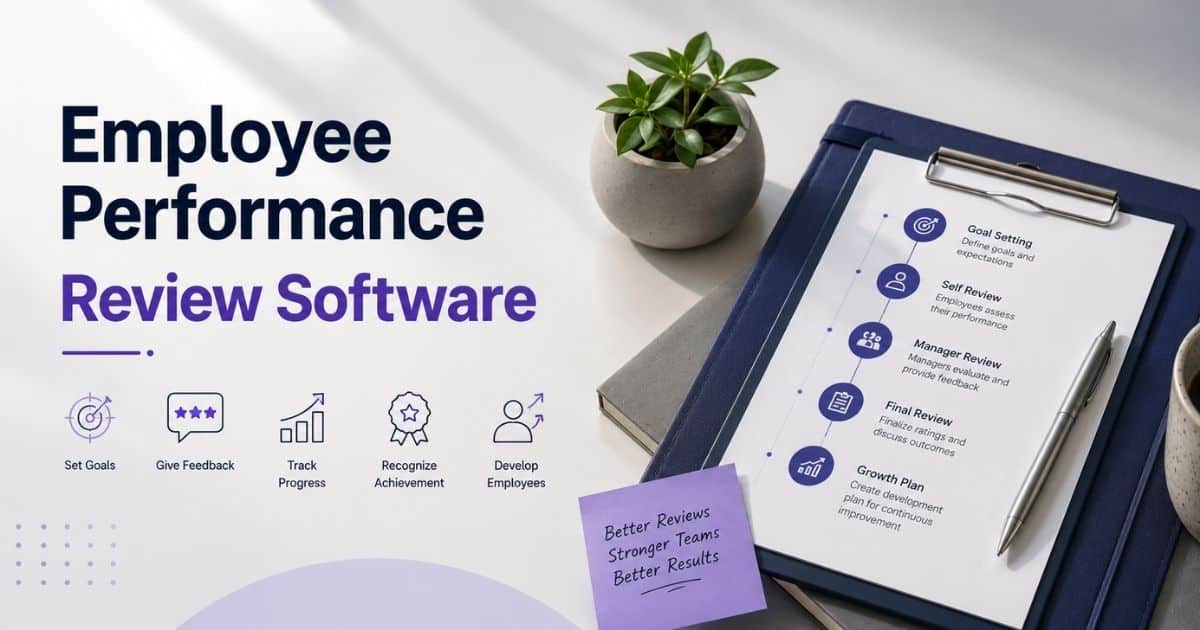
Table of Contents
Most HR teams start looking at employee performance review software the moment spreadsheets and email threads stop working. Performance reviews shouldn't feel like a scramble every quarter, yet without the right system, that's exactly what happens. Deadlines slip, ratings vary manager to manager, and feedback arrives too late to matter.
Choosing between performance review software and full performance management software adds another layer of confusion, since the two get used interchangeably even though they solve different problems.
This guide breaks down what performance review software actually does, how it compares to broader performance management software, and what separates a genuinely useful tool from a box-checking exercise.

What Is Employee Performance Review Software
Employee performance review software is a tool that helps HR teams and managers track employee performance through structured evaluations instead of scattered notes and spreadsheets. It supports employee performance evaluations by centralizing feedback, goals, and ratings in one place.
Unlike broader performance management platforms that run the entire performance management process year-round, this software focuses specifically on the review itself. Many tools also build in continuous feedback and employee development tracking, so reviews reflect real progress rather than last-minute recall.
Key Features Of Employee Performance Review Software

The best review software shares a common feature set that separates it from basic performance management systems. These features mirror what you’d expect from modern employee performance tracking software and shape how well your employee review process runs, from initial goal setting to final feedback delivery and everything in between.
360 Degree Feedback And Peer Input
Relying on a single manager's view often overlooks how someone actually performs day-to-day. 360-degree feedback gathers input from peers, direct reports, and cross-functional collaborators, providing a fuller picture of employee feedback beyond a single perspective.
Team-based roles benefit most, since visibility varies so much by person. Combining multiple viewpoints reduces blind spots and makes performance feedback feel more balanced, reflecting how someone works across the whole organization rather than just one relationship.
Goal Setting And OKR Alignment
Reviews mean little without clear goals to measure against. Built-in goal setting, often structured around OKRs, connects daily work to measurable outcomes and gives both employee and manager a shared reference point heading into any performance evaluation.
Employee growth depends on more than a single review conversation. When goals stay visible year-round instead of buried in a document, progress becomes something people can track and adjust, not just something judged after the fact.
Customizable Review Templates And Forms
No two teams evaluate work the same way, which is why rigid, one-size-fits-all forms frustrate managers. Customizable templates let HR shape the employee review process around actual job requirements instead of forcing every role into identical questions.
Sales teams can weigh output differently than engineering teams, and templates can adjust criteria, rating scales, and even language to match how each department actually works. Good review software supports that flexibility without adding setup complexity.
Automated Reminders And Review Cycles
Manual chasing is where most performance review process breakdowns start. Automated reminders notify employees and managers when reviews are due, and escalate quietly to HR when deadlines slip, keeping cycles moving without constant follow-up.
Fixed yearly cycles often feel disconnected from actual work, which is the common complaint with annual reviews. Automation makes it realistic to run reviews quarterly or even monthly, keeping feedback closer to when it's actually useful.
Performance Analytics And Reporting Dashboards
Once reviews are complete, the real value comes from what the performance data actually shows. Dashboards turn scattered ratings into trends, letting HR spot patterns across teams instead of reading each review in isolation.
Promotions, training decisions, and role changes get stronger when they're grounded in numbers instead of memory or anecdotal impressions. Comparing employee performance data across departments or time periods becomes something you can pull up and explain in minutes.
Integrations With HR And Productivity Tools
Review software works best when it doesn't sit in isolation from everything else HR already uses. Integrations with existing performance management systems, payroll, and communication tools mean data flows automatically instead of being re-entered by hand, especially when you replace disconnected HR tools.
Slack or Microsoft Teams handle reminders, HRIS platforms sync employee records, and admin work during busy review periods drops sharply once everything is centralized instead of scattered across separate logins.
Why Businesses Need Employee Performance Review Software

Manual processes eventually hit a wall, and most HR teams learn this the hard way. As headcount grows, businesses that once managed fine on spreadsheets find it nearly impossible to run performance reviews consistently across departments.
Cuts Manual Review Hours
Chasing down forms, compiling ratings by hand, and reformatting spreadsheets eats up hours that could go toward actual employee reviews. HR teams often spend more time managing the paperwork than the substance of the review itself.
Software removes most of that manual load by automating collection and formatting. What used to take days of back and forth becomes a process that runs largely on its own, freeing HR to focus on the review process rather than the logistics around it.
Scales Reviews Past Startup Size
Small teams can get away with informal check-ins and loose tracking. Once a company grows past a few dozen employees, that same approach falls apart fast, and review cycles start slipping through the cracks entirely.
Dedicated software keeps structure intact regardless of headcount. Whether a manager has three direct reports or thirty, the same system applies consistent criteria and timing, so reviews scale without requiring HR to rebuild the process every time the org chart changes.
Adapts Templates To Each Role
A sales rep and a software engineer succeed in completely different ways, yet many companies still judge both against identical criteria. Generic templates end up measuring the wrong things for half the workforce.
Flexible review cycles paired with customizable templates fix this directly. Each role gets criteria that actually reflect its responsibilities, which makes employee reviews feel fair and relevant instead of like a box-checking exercise applied uniformly across the company.
Enables Continuous Feedback Cycles
Waiting a full year to tell someone how they're doing rarely helps anyone improve in the moment. By the time an annual review rolls around, half the details are forgotten, and the feedback lands too late to matter.
Software built for ongoing feedback changes that rhythm entirely. Shorter, more frequent check-ins keep timely feedback flowing throughout the year, so performance conversations stay current instead of becoming a once-a-year surprise.
Standardizes Ratings Across Managers
One manager might rate generously while another holds a much higher bar, and without shared standards, ratings end up reflecting the reviewer more than the employee. That inconsistency erodes trust in the entire process.
Built-in rating scales and calibration tools close that gap. Standardized criteria across teams make performance insights more reliable, giving leadership a clearer, fairer basis for decisions around raises, promotions, or performance plans.
Speeds Up Review Completion
Long review cycles with unclear deadlines tend to drag on for weeks, with managers finishing forms at the last possible minute. That delay pushes back everything downstream, from calibration to final feedback delivery.
Automated reminders and structured workflows tighten that timeline considerably. Managers get nudged before deadlines slip, and HR spends less time following up, which turns employee reviews into meaningful conversations completed on schedule rather than a rushed formality.
How The Employee Performance Review Process Works

Every effective review follows a rhythm, even when it doesn't feel that way from the manager's side. Understanding each stage makes it easier to see where things typically break down and what actually needs fixing.
Set Goals Before Review Cycle
Nothing derails a review faster than vague expectations set months earlier or not set at all. Clear employee goals, tied to business objectives, give both sides something concrete to reference once the cycle actually begins.
The strongest goals connect individual and team goals directly to company objectives, so progress on one naturally supports the other. Skipping this step turns the entire review into guesswork dressed up as evaluation.
Collect Feedback Throughout Period
Waiting until the review window opens to start gathering input almost guarantees a thin, memory-based assessment. Ongoing input from peers and managers throughout the period builds a far more accurate record.
Platforms like Culture Amp popularized this shift toward continuous collection instead of a single annual snapshot. Spreading feedback out across the cycle also makes it easier to track progress instead of reconstructing months of work from scratch at the last minute.
Draft Evaluations Using Set Criteria
Once feedback is in hand, drafting the actual evaluation should follow criteria set before the cycle started, not whatever feels right in the moment. Consistent review forms keep this stage from turning subjective.
Automated reviews often pull in performance data automatically at this stage, cutting down on manual entry. Sticking to predefined criteria also protects the employee experience, since ratings reflect agreed standards rather than a manager's mood that week.
Calibrate Ratings Across Managers
Left unchecked, one manager's "meets expectations" can look nothing like another's. Calibration sessions bring managers together to compare ratings and catch inconsistencies before performance appraisals go final.
This step matters most in larger organizations, where dozens of managers might otherwise apply wildly different standards. A short calibration meeting can save weeks of disputes later over unfair or inconsistent ratings.
Deliver Feedback During Review Meeting
All the preparation leads to one conversation, and how it's delivered shapes whether the review actually lands. Meaningful feedback needs specifics, not vague praise or criticism that leaves an employee guessing what to change.
The best review meetings feel like a two-way conversation rather than a verdict being read aloud. Employees should leave with a clear sense of where they stand and what's expected going forward.
Document Actions After Review Ends
A review that ends without a written follow-up plan tends to fade from memory within weeks. Documenting agreed actions, whether it's a training plan or a goal adjustment, keeps the conversation from being wasted effort.
This record also becomes useful later, giving both manager and employee something concrete to revisit before the next cycle starts. Tools that support employee timeline tracking make these records even richer, and without them, the same conversations tend to repeat every review with little visible progress.
Performance Appraisal Vs Performance Management

The two terms get used interchangeably, but they describe different things. Understanding the distinction helps HR teams pick the right software instead of buying one when they actually need the other.
Frequency And Timing Differences
Performance appraisal happens at fixed intervals, usually once or twice a year, as a formal checkpoint. It's a snapshot of how someone performed over that specific period, nothing more.
Performance management runs continuously, with check-ins, goal adjustments, and feedback happening throughout the year rather than at scheduled moments. The appraisal becomes one event inside a much longer, ongoing process.
Purpose And Outcomes Differences
Appraisals exist to evaluate and rate past performance, usually feeding into decisions like raises, promotions, or performance improvement plans. The focus stays backward-looking, measuring what already happened.
Performance management aims forward instead, focused on development and future growth. Goals get adjusted in real time, and conversations center on where someone is headed rather than just where they've been.
Scope Of Coverage Differences
Appraisal software covers a narrow slice of the picture: ratings, forms, and a single evaluation event. It does the job well but doesn't extend much beyond that moment in time.
Performance management platforms cover far more ground, including goal tracking, continuous feedback, engagement surveys, and development planning, often as part of broader employee management software for modern HR teams. The appraisal sits inside this broader system as just one component among many.
Software Features Offered
Appraisal-focused tools typically include rating scales, review forms, and basic reporting built around a single cycle. They're built to run one process well, not manage the entire employee lifecycle.
Management platforms add OKR tracking, 360 feedback, real-time check-ins, and engagement analytics on top of the appraisal itself. The tradeoff is more complexity and often a higher price tag for features many smaller teams won't fully use.
Best Use Cases For Each
Situation | Better Fit |
|---|---|
Small team, simple annual review cycle | Performance appraisal software |
Need for structured, one-time evaluation only | Performance appraisal software |
Growing company wanting ongoing feedback | Performance management software |
Need to align goals with company objectives year-round | Performance management software |
Budget-conscious teams with basic HR needs | Performance appraisal software |
Mid-market or larger teams needing full talent development | Performance management software |
Employee Performance Review Checklist For HR Teams

Running reviews without a clear checklist leads to missed steps and inconsistent outcomes. HR teams that follow a structured checklist catch problems early, before they turn into disputes or delays during the actual review cycle.
Goal Alignment Checklist
Before any review starts, confirm that performance goals actually connect to business goals for the period. Misaligned goals make the entire review feel disconnected from what the company actually needed.
Check that individual targets were documented on a centralized platform rather than scattered across emails or personal notes. Fast-moving teams especially benefit from goals that stay visible and easy to revisit throughout the cycle.
Manager Feedback Readiness Checklist
Managers walking into reviews unprepared tend to rely on vague impressions instead of specifics. Confirm that check-ins happened regularly enough to give managers real examples to draw from, not just a general sense of performance.
Automated reminders help here, prompting managers well before deadlines instead of leaving feedback to the last minute. Mobile access also matters for managers who need to log notes between meetings rather than waiting to sit at a desk, and modern attendance and time tracking can provide additional context for these check-ins.
Rating Scale Consistency Checklist
Confirm that everyone is using the same rating scales, with consistent definitions for what each score actually means. Vague or inconsistent scales are one of the fastest ways to undermine trust in the process.
Cross-check ratings against similar roles to catch outliers before they reach employees. This step matters most for identifying top performers fairly, rather than letting one manager's generosity or strictness skew the results.
Self Assessment Checklist
Confirm employees received their self-assessment forms early enough to reflect properly, not the day before it's due. Rushed self assessments tend to be shallow and miss real accomplishments worth noting.
Make sure responses sync automatically into the same centralized platform managers use, avoiding manual follow-up to track down missing submissions. Real-time feedback collected earlier in the cycle should already be visible here, giving employees context for their own reflection.
Calibration Meeting Checklist
Before finalizing ratings, confirm a calibration meeting is scheduled with all relevant managers present. Skipping this step is how inconsistent scores slip through unnoticed until employees start comparing notes.
Bring documented examples for any rating that seems unusually high or low. This is also the point to flag any employee overdue for development planning conversations based on how their review is trending.
Compensation And Promotion Checklist
Confirm that final ratings are locked before compensation or promotion decisions get finalized, since changes after the fact create fairness concerns. This step should never run in parallel with active calibration.
Double-check that sensitive compensation data has proper access controls and data encryption applied, especially if HR teams are sharing figures across a shared platform. Getting this wrong isn't just a process issue; it's a security one.
Employee Performance Review Examples For Different Roles
Generic review language rarely fits every job the same way. Seeing how feedback actually reads for different roles helps managers stay focused on what actually matters for that position, rather than reusing the same phrasing everywhere.
Evaluating Sales Reps On Quota And Pipeline
A strong sales review centers on numbers: quota attainment, pipeline health, and deal velocity over the period. Example feedback might read, "Consistently exceeded monthly targets and kept pipeline coverage steady through regular check-ins with prospects."
Goal setting here should tie directly to revenue figures, not just activity counts. This makes it easier for managers to separate reps who are genuinely closing deals from those who look busy without results.
Assessing Support Agents On Resolution Quality
Support reviews should weigh resolution time alongside customer satisfaction, not just ticket volume. A sample line: "Maintained fast response times while keeping customer satisfaction scores high, even during peak ticket periods."
Time tracking data helps here, showing whether an agent's speed comes at the cost of quality or holds up consistently. This kind of detail helps managers make informed decisions when someone's numbers look strong but complaints are creeping up.
Reviewing Engineers On Code And Delivery
Engineering reviews work best when they cover both code quality and delivery reliability. An example: "Shipped features on schedule with minimal post-release bugs, and gave thoughtful feedback during code reviews."
Regular check-ins throughout a sprint cycle give managers real examples to reference, rather than judging a quarter's work from memory. This approach also helps flag engineers who need support staying on track before deadlines slip.
How To Choose The Right Employee Performance Review Software

Picking software without a clear evaluation process often leads to paying for features an organization never uses. A structured approach helps match the right tool to actual needs instead of chasing whatever looks impressive in a demo.
Match Features To Company Size
A 20-person team and a 500-person organization need very different software. Smaller teams often just need to set goals and track basic feedback in one platform, while larger companies require deeper reporting and multi-department support.
Look closely at whether 360 degree feedback and advanced analytics are actually necessary right now, or if they're features that sound useful but won't get used. Paying for capacity an organization doesn't need yet rarely pays off.
Check Integration With Existing HR Tools
Software that doesn't connect with existing tools creates extra manual work instead of reducing it. Check whether the platform integrates with payroll, HRIS, and communication tools already in place before signing anything, and look for innovative HR features in unified platforms like Payrun that streamline these integrations.
Data should flow between systems automatically, keeping employee records and team goals consistent without duplicate entry. A tool that forces manual syncing across platforms usually costs more time than it saves.
Test Ease Of Manager Adoption
The best software fails if managers find it confusing or tedious to use. Before committing, get a few managers to actually test the interface and provide honest feedback on how intuitive it feels day to day.
Complicated tools discourage regular use, which defeats the purpose of ongoing tracking. Software that's simple enough for busy managers to check in on employees without extra training tends to see far better long-term adoption.
Review Pricing Against Budget Scale
Pricing structures vary widely, and some platforms charge per employee while others use tiered plans based on features. Map out realistic costs at current headcount and projected growth before comparing options side by side, using resources that break down HR software pricing and true costs to avoid surprises.
Watch for modular pricing that seems affordable at first but adds up quickly once additional tools get added. A clear view of total cost helps avoid budget surprises six months into using the software.
Confirm Data Security And Compliance
Employee performance data is sensitive, and software handling it needs proper security standards in place. Confirm the provider offers data encryption, defined access controls, and compliance with relevant regulations for the organization's region, similar to a secure employee record management system for modern HR teams.
This matters even more for organizations handling compensation-related data alongside reviews. A breach or compliance gap here creates real legal and trust issues that outweigh whatever convenience the software offers elsewhere.
Request Demo Before Final Decision
Reading feature lists only goes so far, since most software looks similar on paper. Requesting a live demo shows how the platform actually handles real scenarios, from setting goals to running a full review cycle.
Bring specific questions from earlier steps into the demo rather than sitting through a generic walkthrough. Support responsiveness during this stage often reflects how helpful the vendor will be after the contract is signed.
How Payrun Supports Performance Reviews Within Your HR Platform
Payrun brings the groundwork performance reviews depend on together in one place. As an all-in-one HR platform, the Employee Management module centralizes profiles, role history, and activity tracking, giving managers a reliable record to reference instead of relying on memory alone.
Timeline and Productivity Tracking adds visibility into work patterns and logged hours, providing smarter employee productivity tracking with timeline insights that is useful context when preparing for a conversation about performance. Project Management features also help track task completion and deadlines, which managers can pull into review discussions.
For teams wanting basic performance visibility alongside payroll, leave, and HR data in one platform, Payrun covers that groundwork well. Teams needing dedicated employee management software with advanced review capabilities or more specialized employee performance tracking software should treat this as a starting point rather than a full appraisal system.