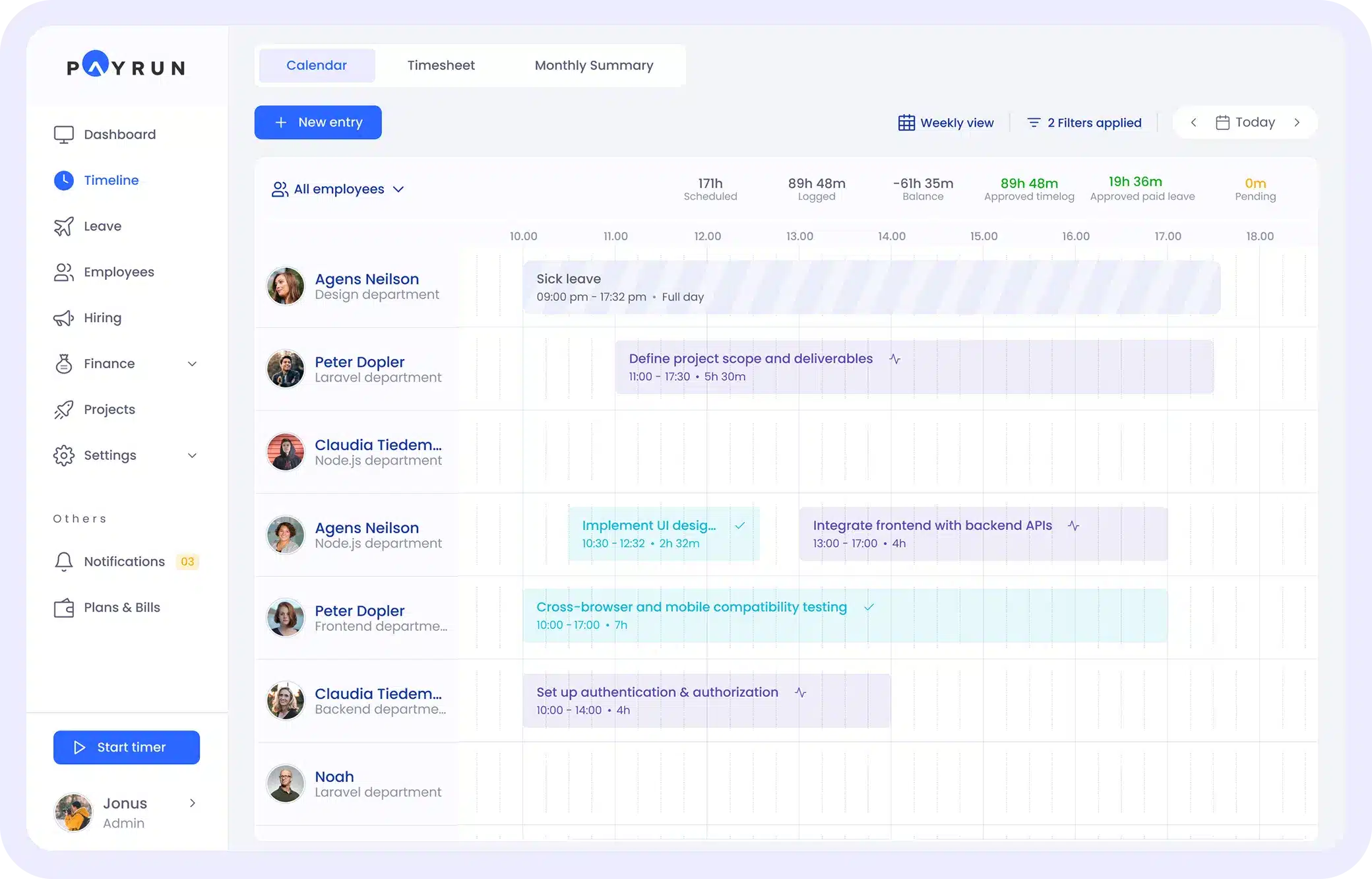
Employee timeline tracking gives teams a clearer and more accurate view of how work happens throughout the day. Instead of relying on guesswork or end-of-day time entries, timeline tracking shows the actual flow of tasks, apps used, focus periods, and transitions between activities. This helps managers understand productivity patterns and gives employees a fairer, more transparent way to reflect their efforts.
In modern workplaces where remote, hybrid, and flexible schedules are common, knowing how time is spent matters more than ever. Timeline tracking brings clarity to complex workflows and reduces the need for manual time updates. With better visibility and real data, companies can plan smarter, reduce inefficiencies, and support teams with tools that match how work truly gets done.
What Employee Timeline Tracking Means
Employee timeline tracking is how modern teams capture and understand daily work activity across projects, tasks, and time periods. Unlike basic attendance systems that only record when someone arrives or leaves, timeline tracking builds a complete picture of what employees actually do during their working hours. It combines clock times with project codes, task categories, and location data to create a chronological record of effort throughout the week. This approach gives managers reliable data for team management decisions while giving employees a clear view of their own productivity patterns. For organizations seeking better workforce management, timeline tracking has become a fundamental component of how work gets measured and valued.
How Timeline Tracking Differs From Timesheets
Traditional timesheets and modern timeline tracking serve similar purposes but work in fundamentally different ways. Understanding these differences helps businesses choose tools that match their specific business needs and support effective workforce management.
Manual Entries vs Automatic Logging
Traditional timesheets rely entirely on employees typing in their hours worked at the end of each day or week. This manual process creates pain points for both team members and administrators. People often forget details or make estimates based on memory rather than actual work patterns. Automatic logging, by contrast, captures activity in the background. Time tracking software records which applications and tasks employees engage with throughout the day. This removes the burden of double entry and produces more accurate data. The difference matters most for billing purposes, where billable hours need to reflect real effort rather than rough approximations.
End-of-Day Estimates vs Real-Time Records
When employees fill out timesheets at day’s end, they reconstruct their schedule from memory. A support agent might remember handling tickets for most of the morning but forget that 45 minute call that interrupted their workflow. Real time visibility changes this dynamic completely. Modern time tracker tools record work as it happens, creating an accurate timeline that employees can review rather than recreate. This shift from estimation to documentation makes reporting more reliable and reduces disputes during payroll processing.
Total Hours vs Detailed Activity Timelines
Basic timesheets typically capture one number: total hours for the day or week. This tells managers almost nothing about how time spent translates into completed tasks or project progress. Detailed activity timelines break work into meaningful segments. A developer’s timeline might show three hours on feature development, two hours in meetings, and one hour on code review. This granularity supports better project management and helps human resources teams understand where resources actually go. For different industries, this level of detail can reveal hidden inefficiencies that simple hour totals would never expose.
Memory-Based Tracking vs Actual Work Patterns
Human memory is unreliable, especially for routine activities. Someone tracking their own time might consistently overestimate focus work and underestimate time lost to context switching. Timeline tracking based on actual system activity reveals true work patterns. Managers see when productivity peaks and when energy drops. This data helps with scheduling and workload distribution without requiring employees to confess to distractions. The shift from subjective recall to objective data creates a more honest picture of how work actually flows.
Simple Logs vs True Workflow Visibility
A filled timesheet is a static document. It answers the question “how many hours?” but not “what happened?” True workflow visibility means understanding the sequence of activities, the transitions between tasks, and the rhythm of each team member’s day. Timeline tracking provides this visibility in a way that simple logs never could. Managers can identify bottlenecks, spot employees struggling with context switching, and make data driven decisions about project assignments. For sales teams, support centers, and development groups alike, this visibility transforms how leaders approach team management.
Why Employee Timeline Tracking So Important?
Employee timeline tracking has become essential because the old ways of measuring work no longer match how modern teams actually operate. Remote and hybrid arrangements have made visibility harder to achieve through casual observation. Projects span time zones. Tasks overlap across multiple systems. Without a reliable way to track time and understand work patterns, organizations struggle with planning, billing, and fair compensation.
Teams Need Accurate Daily Visibility
Support teams handling tickets, development squads shipping features, and sales groups chasing leads all benefit from knowing where effort actually goes each day. Without accurate visibility, managers make decisions based on assumptions rather than data. Timeline tracking solves this by creating a clear record that everyone can reference. When questions arise about project progress or resource allocation, the timeline provides answers grounded in real activity rather than guesswork.
Managers Want Reliable Work Patterns
Understanding when and how employees work helps managers plan better. Some team members do their best work in focused morning blocks. Others hit their stride after lunch. Timeline data reveals these patterns without requiring awkward conversations. Managers can then schedule meetings, assign urgent tasks, and set realistic deadlines based on actual productivity rhythms rather than arbitrary expectations. This leads to better employee satisfaction because work aligns with natural energy cycles.
Employees Prefer Less Manual Time Entry
Nobody enjoys filling out timesheets. The task feels tedious and takes time away from actual work. Timeline tracking reduces this burden by capturing activity automatically or through quick confirmations rather than detailed manual entry. Employees get their free time back at the end of each day. The system handles the documentation while they focus on tasks that actually matter. This reduction in admin work improves employee experience across the board.
Companies Must Avoid Time Misreporting
Inaccurate time data creates problems that ripple through an organization. Payroll gets calculated wrong. Clients receive invoices that do not match actual effort. Compliance reports contain errors that could trigger audits. Timeline tracking addresses these risks by grounding all data in observed activity. The accuracy protects both the company and its workforce from disputes and corrections that waste everyone’s time.
Modern Workflows Require Flexible Tracking
Work happens in different places and at different hours. An employee might answer urgent messages from a mobile device during their commute, join video calls from home, and finish documentation at a coffee shop. Traditional punch clocks cannot accommodate this flexibility. Modern timeline tracking works across desktop apps, mobile apps, and web interfaces. It adapts to how people actually work rather than forcing outdated patterns onto contemporary teams.
Key Problems With Traditional Time Tracking Methods
Before exploring solutions, it helps to understand exactly why older approaches fall short. The problems with traditional methods are not abstract. They show up in missed deadlines, payroll disputes, and frustrated team members.
Time Entries Often Filled Incorrectly
When employees enter their own hours, mistakes happen. Someone might type 8 instead of 9, forget to subtract lunch, or accidentally claim overtime they did not work. These errors create extra work for payroll administrators who must chase down discrepancies. The cumulative impact affects labor costs and financial planning. Time tracking software with automatic validation reduces these errors significantly.
Employees Forget to Log Work
After a busy day, filling out a timesheet feels like one more task on an already long list. Employees postpone it, intending to catch up later. Days pass. By the time someone finally enters their hours worked, they are reconstructing from vague memory. Critical details get lost. Billable hours go unrecorded. The data that reaches managers is incomplete at best and inaccurate at worst.
No Insight Into Hour-by-Hour Activity
Traditional systems capture totals but not details. A timesheet might show eight hours on Tuesday without explaining what actually happened during those hours. Did the employee spend the morning in productive focus or in back to back meetings? Did context switching eat up hours that should have gone to a key project? Without granular data, these questions remain unanswered.
Managers Struggle With Incomplete Data
Making decisions with missing information leads to poor outcomes. A manager planning next quarter’s staffing needs cannot forecast accurately if current time data is spotty and unreliable. Project leads estimating future work must guess when historical records are incomplete. The uncertainty compounds, making planning feel more like gambling than strategic thinking.
Productivity Patterns Stay Hidden
Every team has rhythms. Some groups work best with long focus blocks. Others thrive with frequent check ins throughout the day. Traditional time tracking reveals none of this. Managers cannot optimize scheduling because they lack the data to understand when their team does its best work. Opportunities for improvement remain invisible, buried under piles of summarized but uninformative hour totals.
How Employee Timeline Tracking Works
Modern timeline tracking operates differently from the manual approaches it replaces. The technology captures work activity through observation rather than requiring employees to describe what they did.
Automatic Capture of Apps and Tasks
Timeline tracking systems monitor which applications employees use throughout their workday. When someone opens a design tool, the system notes it. When they switch to email, that transition gets recorded too. This automatic capture eliminates the need for employees to manually log every task. The system builds a picture of the day based on actual behavior rather than self reporting.
Real-Time Recording in the Background
Unlike end of day timesheets that rely on memory, timeline tracking happens continuously. The time tracker runs quietly while employees work, recording activity as it occurs. This real time approach means data is always current. Managers checking on project progress see the latest information, not a snapshot from days ago.
Seamless Logging Without Interruptions
Good timeline tracking stays out of the way. Employees should not need to stop working to document working. The best tools integrate so smoothly that people forget they are running. Work flows naturally while the system handles documentation. This seamless experience encourages adoption because it requires no extra effort from busy team members.
Activity Timeline Created for Each Employee
At the end of each day, the system generates a visual timeline for each person. Employees can review their own timelines to understand how they spent their hours. The format shows blocks of activity across the day, making patterns immediately visible. Someone who thought they spent three hours on a project might discover it was actually closer to two, with frequent interruptions eating into their focus time.
Easy Review of Daily or Weekly Workflows
Timelines aggregate into weekly and monthly views that support regular review. Employees can compare their current week to previous weeks. Managers can monitor trends across their whole team. The data supports conversations about workload, efficiency, and capacity. Rather than arguing about perceptions, everyone can look at the same objective record and discuss what it shows.
Benefits of Employee Timeline Tracking for Managers
Timeline tracking transforms how managers understand and support their teams. The visibility it provides enables better decisions across multiple dimensions of leadership.
Better Visibility Into Team Productivity
Managers gain clear insight into how their team spends time. They can see which projects consume the most hours and which tasks get neglected. This visibility helps with prioritization. When leadership asks for a status update, managers have data to share rather than impressions. The operational efficiency improvements come from understanding reality rather than managing based on assumptions.
Clearer Understanding of Project Effort
Estimating future projects requires knowing how much effort similar work took in the past. Timeline data provides this foundation. A manager planning a new client implementation can review timelines from previous implementations. They see exactly how many hours each phase required. This historical record makes proposals more accurate and prevents underestimating scope.
More Confident Resource Planning
Staffing decisions become easier when you understand current capacity. Timeline tracking reveals which team members have bandwidth and which ones are stretched thin. Managers can redistribute work proactively instead of waiting for burnout or missed deadlines. This confident planning extends to hiring decisions too. Data showing consistent overload justifies requests for additional headcount.
Faster Identification of Workflow Gaps
Problems become visible before they escalate. A workflow gap that causes repeated delays shows up in timeline patterns. Managers spot where work gets stuck and can intervene with solutions. This speed matters in competitive environments where quick iteration creates advantage. The data turns management from reactive firefighting into proactive optimization.
Data-Driven Management Decisions
Gut feelings have limits. Data provides foundation for better choices. Timeline tracking supplies the quantitative basis for decisions about scheduling, assignments, and process changes. Managers can test hypotheses about what works and measure results. This analytical approach improves outcomes over time as teams learn what actually drives productivity versus what just feels productive.
Benefits of Employee Timeline Tracking for Employees
Timeline tracking is not just a management tool. It delivers real benefits to the people doing the work, addressing employee expectations for fairness and reducing administrative burden.
No Need for Constant Time Updates
Automatic tracking means employees can focus on their actual jobs instead of documenting their jobs. The system captures activity without requiring constant input. This frees up mental energy and calendar time for meaningful work. Employees appreciate not having to remember to log hours or fill out forms at the end of exhausting days.
Clear Insight Into Personal Productivity
Timeline data helps employees understand their own work patterns. Someone might discover they lose an hour each day to email that could be batched into focused blocks. Another person might notice their most productive hours happen in the morning. This self awareness enables personal optimization that benefits both the individual and their team.
Fair Evaluation of Workload
When performance reviews arrive, timeline data provides objective evidence of effort. Employees no longer need to argue that they worked hard. The record shows exactly what they did. This transparency protects against bias and ensures contributions get recognized accurately. It also gives employees confidence that their effort is visible to decision makers.
Less Manual Admin Work
Time tracking documentation is a chore nobody enjoys. Reducing this burden improves daily work experience. Employees can close their laptops at the end of the day without one more task hanging over them. The mental load drops. Job satisfaction improves. All because the system handles what used to require tedious manual effort.
More Accurate Reflection of Daily Efforts
Timesheets filled from memory rarely capture the full picture. Timeline tracking does. Every task, every project, every hour shows up in the record. Employees who feel their contributions go unnoticed finally have documentation that proves their value. The accuracy creates confidence that compensation and recognition will match actual effort.
How Timeline Tracking Improves Accuracy and Compliance
Accurate time data matters for more than just internal planning. It supports legal compliance, financial integrity, and organizational trust. Timeline tracking delivers improvements across all these dimensions.
Automatic Logs Reduce Human Error
Manual data entry introduces mistakes. People transpose digits, forget entries, or make calculation errors. Automatic logging eliminates most of these problems at the source. The system records what actually happens rather than what someone remembers happening. This accuracy compounds over time, resulting in clean data that organizations can trust.
Reliable Proof of Hours Worked
Disputes about time worked create friction between employees and employers. Timeline tracking provides objective documentation that resolves disagreements quickly. If someone questions whether overtime was really necessary, the timeline shows exactly what happened. This proof protects both parties and keeps relationships professional even when questions arise.
Better Alignment With Labor Rules
Employment regulations require accurate tracking of hours worked, breaks taken, and overtime earned. Organizations operating across multiple jurisdictions face different types of rules in each location. Timeline tracking software automates monitoring across these different requirements. It can flag potential violations before they become problems and generate documentation that auditors require. This keeps companies fully compliant without requiring HR teams to manually verify every entry.
Transparent Tracking Builds Trust
Employees sometimes worry that tracking means surveillance. Good timeline systems address this concern through transparency. Employees see exactly what data the system collects. They can review their own timelines and correct inaccuracies. This openness builds trust because people understand the tool serves legitimate business needs rather than invasive monitoring. Employee autonomy remains intact while the organization gets the data it needs.
Clean Audit Trails for Reviews
When questions arise months later, organizations need records that document what happened. Timeline tracking creates these audit trails automatically. Every entry includes timestamps and metadata. If a compliance review requires evidence of break times or overtime payments, the data exists in accessible form. This documentation protects organizations during audits and reduces the stress of regulatory inquiries.
How Timeline Tracking Strengthens Project and Payroll Data
The practical value of timeline tracking shows most clearly in how it improves two critical business functions: project management and payroll processing.
Better Project Time Breakdown
Projects succeed or fail based partly on resource allocation. Timeline tracking shows exactly how time flows across different projects. Managers can compare planned versus actual hours for any initiative. This breakdown supports better estimation for future work and highlights projects that consistently require more effort than budgeted. The data turns project planning from art into science.
More Accurate Payroll Calculations
Payroll errors create unhappy employees and administrative headaches. Timeline data flows directly into payroll systems, providing the hours worked, overtime earned, and attendance patterns that calculations require. This integration eliminates manual data transfer between systems. Administrators process payroll faster with fewer corrections. Employees receive accurate paychecks that reflect their actual effort.
Reliable Cost Allocation
Understanding where labor costs go helps organizations make smarter decisions. Timeline tracking enables precise cost allocation to projects, clients, and departments. A consulting firm can see exactly how many hours went to each client engagement. A product company can measure engineering investment across features. This reliable allocation supports pricing decisions, profitability analysis, and strategic planning.
Consistent Reporting Across Teams
Different teams often track time differently, creating reports that cannot be compared. Timeline tracking standardizes the approach across an entire organization. Everyone uses the same categories and classifications. Reports generated for one team use the same format as reports for another. This consistency makes organization-wide analysis possible and eliminates the confusion that comes from incompatible data sources.
Smooth Integration With Payroll Systems
Modern timeline tracking tools offer integration capabilities with existing systems, including payroll platforms. Data flows automatically from time records to pay calculations without manual intervention. This smooth integration eliminates the delays and errors that come from transferring data between disconnected tools. The result is faster payroll cycles and happier employees who get paid correctly and on time.
Features to Look For in Employee Timeline Tracking Tools
Choosing the right time tracking solution requires understanding which features actually matter. Not every tool fits every organization. These capabilities separate effective solutions from inadequate ones.
Automatic Activity Logging
The core feature that distinguishes modern timeline tracking from old fashioned timesheets is automatic capture. Look for tools that record activity without requiring constant manual input. The best solutions track application usage, detect idle time, and build timelines from observed behavior. This automation is a critical capability that determines whether the system will actually get used.
Clear and Editable Timelines
Employees need to see and modify their own records. The interface should present timeline data in a clear visual format that makes sense at a glance. Editing capabilities matter too because automatic capture sometimes miscategorizes activity. People should be able to correct errors easily without jumping through administrative hoops.
Easy App and Task Detection
Good tools recognize common applications and categorize them intelligently. A design tool gets tagged as design work. A communication app gets marked as collaboration. This automatic detection reduces manual classification effort. Look for solutions that learn from corrections and improve their categorization over time using machine learning or similar approaches.
Manager Dashboards With Insights
Managers need more than raw data. They need dashboards that surface insights. The right tool shows team trends, highlights anomalies, and provides context for decision making. These dashboards should support filtering by project, time period, and individual. Highly customizable views accommodate different management styles and organizational structures.
Simple Setup for Teams
Complex implementation requirements discourage adoption. The best timeline tracking tools offer simple setup for teams of any size. Look for solutions that support unlimited users without complicated pricing tiers. Implementation should take hours, not weeks. Training materials should be clear enough that teams can onboard themselves without extensive support.
How Payrun Supports Employee Timeline Tracking
Payrun addresses the connection between timeline tracking and payroll processing that creates headaches for so many organizations. The platform imports approved timelines and maps them directly to pay items, including base hours, overtime, and allowances. Payroll administrators see side-by-side views of each pay period with total hours per employee before confirming runs.
This reduces manual entry and the back and forth corrections that slow down payroll cycles. Payrun applies country-specific rules based on the hour types present in imported timeline data, keeping organizations fully compliant across jurisdictions. Once timelines are locked and payroll runs are complete, Payrun maintains secure records linking payslips to underlying work periods for future reference.
FAQs
How detailed should employee timelines be for effective tracking?
Timelines work best with 15 to 30 minute blocks. This level captures meaningful activity shifts between tasks without overwhelming employees with micro level documentation. Ultra detailed minute by minute logs rarely improve billing accuracy or payroll calculations but often damage trust and feel invasive to team members.
Can timeline tracking work for both salaried and hourly employees?
Yes. Both groups use similar timeline structures but the data serves different purposes. Hourly employee timelines feed directly into pay calculations. Salaried employee timelines focus more on capacity planning, project allocation, and overtime verification. The same system typically supports both with different approval workflows.
How does timeline tracking differ from employee monitoring software?
Timeline tracking focuses on capturing when and what work happens rather than how employees behave. It records task transitions and project time without invasive features like keystroke logging or webcam surveillance. The goal is accurate work documentation, not surveillance. Employees typically review and confirm their own timelines.
What happens if an employee disputes their recorded timeline?
Good systems allow employees to edit and correct their timelines before approval. If disputes arise after approval, audit trails show exactly what was recorded and when changes occurred. This documentation helps resolve disagreements quickly based on objective data rather than conflicting memories.
How long should organizations retain timeline data?
Retention periods should align with local labor and tax laws, typically between 2 and 7 years. Organizations should keep at least the legally required minimum plus one additional year. Detailed task descriptions can be archived after a reasonable period while high level hour totals remain accessible for audits.
Does timeline tracking work for remote and hybrid teams?
Timeline tracking suits remote and hybrid environments particularly well. Cloud based access means employees log work from any location using web interfaces, desktop apps, or mobile apps. Managers see activity across distributed teams regardless of physical location, making it easier to coordinate work across time zones and different work arrangements.