Employee Lifecycle Management Software: What It Covers at Each Stage
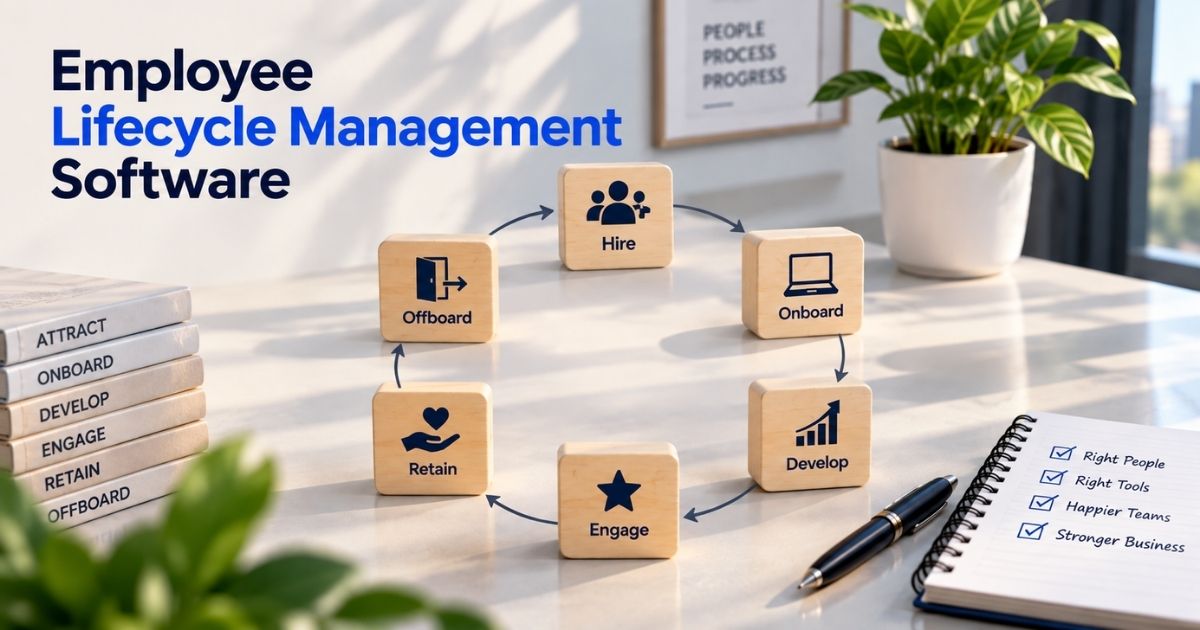
Table of Contents
Employee lifecycle management software is an HR system that tracks each employee from the moment they apply to the day they leave, in one place. Instead of a recruiting tool, an onboarding spreadsheet, a leave calendar and a folder of exit paperwork, each stage reads from and adds to the same employee record.
This guide walks through the six stages, what software actually does at each one, the records each stage leaves behind, and how to choose a tool. Payrun, one of the tools mentioned, is our own product, and we say plainly which stages it doesn't cover.

What is employee lifecycle management?
The employee lifecycle is the path a person takes through your company: being recruited, joining, doing the work and growing, staying engaged, being paid, and eventually leaving. Employee lifecycle management is how HR runs each of those stages and the handovers between them.
Software helps most at the handovers. When a candidate becomes an employee, their details should carry over, not be typed in again. When someone changes role, their access and pay should change with it. When they leave, every system should know.
The 6 stages of the employee lifecycle, and what software does at each
Stage | What HR does | What software handles | Records created | In Payrun? |
|---|---|---|---|---|
1. Attract and recruit | Post jobs, screen and interview candidates, make an offer | Job board and careers page, candidate pipeline, screening | Applications, interview notes, offer | Yes: job listings, career page, candidates; AI resume screening on Pro and Ultimate |
2. Onboard | Collect personal, tax and right-to-work details, set up access, introduce the team | New employee profile, document collection, role and access set-up, onboarding checklists | Employee record, contract, tax forms, right-to-work check | Partly: profile, files, departments, roles. No onboarding checklists or e-signature |
3. Develop | Set goals, review performance, train | Performance reviews, goals, learning | Review history, training records | No |
4. Engage and retain | Check in, gather feedback, manage time off | Surveys, leave and attendance | Survey results, leave and attendance history | Yes: pulse surveys, leave, attendance, timesheets |
5. Pay and administer | Run payroll, handle expenses and equipment, update roles | Payroll, expenses, assets, change history | Pay records, expense claims, asset log, job history | Yes: payroll calculation on Pro and Ultimate (no US tax filing), expenses, assets, employee history |
6. Offboard | Final pay, recover equipment, remove access, keep records | Status change, access removal, asset return, record retention | Termination date, final pay, retained records | Partly: status change, user deactivation, asset tracking. No exit-interview or offboarding checklist tool |
1. Attract and recruit
Recruiting software publishes jobs, collects applications and moves candidates through stages. The lifecycle value comes later: when you hire someone, their name, contact details and offer should become the start of their employee record, not a separate file.
2. Onboard
Onboarding is where most of the legal paperwork happens. In the US, a new hire completes Form I-9 Section 1 by their first day, and the employer completes Section 2 within three business days (USCIS), plus a Form W-4 for federal tax withholding (IRS). In the UK, employers must check right to work before employment starts (GOV.UK) and give a written statement of the main terms on the first day (GOV.UK).
Software helps by creating the employee profile once, storing these documents against it, and setting up the person's role and access on day one.
3. Develop
This stage covers goals, performance reviews and training. Dedicated performance tools handle review cycles and goal tracking. If a lifecycle tool doesn't include this, check whether it connects to one you already use.
4. Engage and retain
Regular, short surveys show how people feel before they resign. Leave and attendance records matter here too. Unused leave, frequent absence or long hours are early signals worth acting on.
5. Pay and administer
Every change during employment (a raise, a new manager, a move to another department) should update the employee record and, where it matters, payroll. A change history answers "who changed what, and when?" later.
6. Offboard
When someone leaves, three things matter most:
- Final pay. The deadline depends on the state, and in some states earned vacation is part of it. See our guide to PTO payout laws by state.
- Access and equipment. Remove system access and get company equipment back.
- Records. Keep them for the required period. In the US, for example, I-9s are kept for three years after hire or one year after employment ends, whichever is later (USCIS). Employers with 20 or more employees usually also owe COBRA notices for health coverage (US DOL).
Software helps by changing the employee's status, disabling their login, listing the assets they hold, and keeping their record available after they've gone.
The employee record ties every stage together
Every stage above reads from or writes to one employee record: personal details, job and department, documents, leave, pay, and the history of changes. If that record lives in one system, the lifecycle runs smoothly. If it's split across tools, HR spends its time copying data between them. For what a good record system needs, see our guide to employee record management systems.
Features to look for
- One employee profile that carries over from hire to exit, with custom employment statuses.
- Document storage for contracts, IDs, tax and right-to-work documents, attached to the profile.
- Roles and permissions, so managers, HR and payroll each see only what they need.
- Change history, showing role, department and pay changes over time.
- Leave, attendance and timesheets that feed payroll.
- Hiring that turns a candidate into an employee without retyping.
- Offboarding support: status change, access removal, asset tracking.
- Integrations with the tools you keep, such as accounting, payroll, Slack or Jira.
- Mobile access for employees to view their details and request leave.
One system or several connected tools?
One lifecycle system | Separate specialist tools | |
|---|---|---|
Data entry | Once | Often repeated or synced |
Cost | Usually lower for small teams | Several subscriptions |
Depth per stage | Broader, sometimes lighter | Deeper in each area (e.g. performance) |
Best for | Small and growing teams | Larger HR teams with specialist needs |
Many small businesses run core HR (records, leave, attendance, hiring) in one system and add a specialist tool only where they need depth, such as performance reviews or US payroll tax filing.
How to choose employee lifecycle management software
- Map your stages. Which of the six do you run today, and where does information get retyped?
- List the records you must keep for your country and headcount.
- Check coverage honestly. For each stage, is it built in, an add-on, or not offered?
- Ask about data carry-over. Does a hired candidate become an employee automatically? Does a role change update permissions?
- Price it at your headcount now and in a year. See our HR software pricing guide.
- Trial it with real data before you commit.
Where Payrun fits
Payrun covers hiring, employee records and documents, roles and permissions, leave, attendance, timesheets, pulse surveys, expenses and assets, with payroll calculation on the Pro and Ultimate plans. It's free for up to 5 users, and paid plans start at $4.95 per user per month billed annually. It doesn't include onboarding checklists, e-signature, performance reviews or learning, and it doesn't file payroll taxes, so teams that need those will pair it with another tool. See Payrun's features and pricing.
Written by the Payrun Team. Legal requirements were checked against official US and UK government sources on 4 November 2026. This is general information, not legal advice.