How Time Tracking Software Reduces Payroll Errors
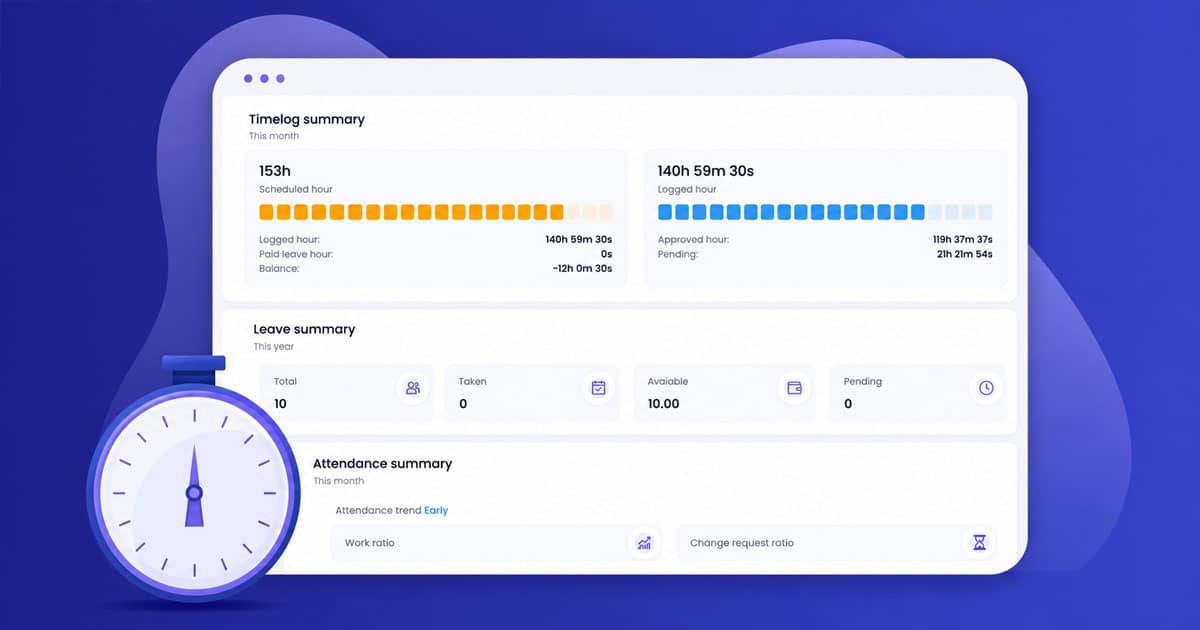
Table of Contents
Payroll errors cost businesses money and damage employee trust. Time tracking software eliminates these mistakes by automating time capture and reducing manual data entry. Employee time tracking keeps teams accountable and transparent in their work. An employee time tracking app can help you measure productivity, monitor remote work, and assess performance. Investing in the right time management software protects your bottom line.
In this article, we will explore how employee time tracking software works and eliminates manual errors. It prevents time theft through features like buddy punching prevention. The software ensures accurate overtime calculations and creates audit trails. We'll also cover how to choose the right time and attendance tracking software for your team.

What Is Time Tracking Software
Time tracking software is a digital tracking software that helps businesses track employee time, work hours, and billable hours with accuracy. Instead of manual time entry or paper time clock systems, modern time tracking tools use automated time tracking and automatic time capture to log time across different tasks and multiple projects. Teams can track time with just a few clicks through a desktop app or mobile app, while managers gain clear insights into employee hours, labor costs, and team capacity.
Employee time tracking software also supports project management features, team management, attendance reports, and advanced reporting tools. Many time tracking apps integrate with popular project management tools and other software to simplify managing projects, billing clients, and tracking expense tracking data. From small businesses to large teams handling numerous projects, the best time tracking software helps track productivity, prevent buddy punching, and turn tracked data into accurate payroll and employee performance insights.
How Employee Time Tracking Software Works
Employee time tracking software connects automated time capture, tracked data, and payroll systems into one smooth workflow. Every time entry moves through structured steps. The system records work hours, syncs updates, routes approvals, and prepares clean data for billing clients and payroll without manual effort.
Automated Time Capture
Automated time tracking records employee time in the background. A time tracker logs time spent on different tasks, various projects, and applications without manual time entry. Employees can also track time manually when needed. Hybrid tracking improves accuracy.
Studies show manual timesheets contain error rates of 1–8%. Automated time tracking reduces payroll leakage by up to 10%. Desktop app and mobile app options allow teams to track employee time across multiple projects. Idle detection and activity tracking protect data quality while preventing buddy punching.
Real Time Data Sync
Immediate synchronization keeps the tracked data consistent. When employees log time or update time logs, the tracking software pushes changes across connected systems within seconds. Payroll, project management tools, and reporting tools reflect accurate total hours.
Research from Ernst & Young shows automation can reduce administrative workload by up to 40%. Automatic time sync removes spreadsheet errors. Managers gain clear insights into employee hours, billable time, and team capacity without chasing updates.
Digital Timesheet Approval
Structured approval workflows replace paper-based time clock systems. After submission, employee time tracking software routes time logs to supervisors. Automated reminders reduce delays. Managers review work hours before payroll management runs.
Organizations with digital approvals report up to 30% faster payroll cycles. Payroll audit process log every change. Locked timesheets protect tracked data integrity. Clean approvals help finance teams calculate labor costs and billable hours with confidence.
Project And Payroll Integration
Integration connects time tracking apps with popular project management tools and payroll platforms. Approved hours convert into payroll data and invoices with just a few clicks. No duplicate data entry is required.
Seamless integration improves billing accuracy for numerous projects. Businesses that automate payroll integration reduce processing errors by nearly 50%, according to Deloitte. Employee time tracking software ensures billable hours align with real work hours across unlimited projects.
Insights And Performance Reports
Advanced reporting transforms raw tracked data into actionable insights. Managers track productivity, employee performance, and attendance reports through dashboards. Reports highlight time spent across multiple projects and different tasks.
Companies using advanced reporting tools improve project estimates by up to 25%. Time tracking software helps small businesses and large teams summarize time, manage team collaboration, and optimize resource allocation. Clear insights support smarter decisions without a steep learning curve.
How To Eliminate Manual Data Entry Errors
Manual data entry creates hidden risks in payroll and project management. Research shows 88% of spreadsheets contain at least one error. Even small mistakes affect employee hours, labor costs, and billing clients. Time tracking software removes this risk by automating data capture, validation, and payroll integration.
Payroll System Integration
Direct integration between employee time tracking software and payroll platforms removes double entry. When employees track time through a time tracker or mobile app, tracked data flows straight into payroll. No copying. No spreadsheet uploads.
API connections sync employee hours, overtime, and paid time off automatically. Deloitte reports automation can reduce payroll errors by up to 80%. Integrated tracking software also connects with popular project management tools. Billable hours and expense tracking data transfer in just a few clicks. Accurate data reaches payroll without manual handling.
Automated Timesheet Creation
Automated time tracking replaces manual time entry. The system captures time spent on different tasks and various projects throughout the workday. Employees do not rely on memory at the end of the week.
Smart reminders reduce missed entries. Research from the American Payroll Association shows manual time reporting can inflate payroll by 2–4%. Automated timesheet creation prevents those gaps. Teams managing projects across unlimited projects gain structured time logs without extra effort. Payroll teams receive complete data faster.
Built-In Validation Checks
Validation rules protect data before it reaches payroll. The system flags overlapping entries, missing breaks, or unusual total hours. Managers review issues before approval.
Auto calculations standardize overtime and billable time rules. Conflict detection reduces HR risk. Companies that use automated time systems report up to 30% faster payroll processing cycles. Clean tracked data supports accurate reporting tools and advanced reporting. Errors get caught early instead of after payments go out.
Accurate Reporting And Audit Trails
Audit trails record every edit and approval. Transparency reduces disputes over employee time or attendance reports. Managers track productivity with confidence because the numbers stay consistent.
Accurate reports improve team capacity planning and employee performance analysis. Integrated time tracking apps also support billing clients based on verified time logs. Finance teams close payroll faster. Clear insights replace guesswork. Reliable data protects both business needs and employee trust.
Accurate Overtime And Break Tracking
Payroll errors often start with overtime mistakes or missed breaks. The U.S. Department of Labor recovers millions each year due to wage violations. Time tracking software reduces that risk. Automated time tracking applies rules instantly, protects employee hours, and keeps compliance on track.
Automatic Overtime Calculation
The Fair Labor Standards Act requires overtime pay at 1.5 times the regular rate after 40 hours per week. Manual time tracking makes this complex, especially across multiple projects or pay rates. Errors increase when teams rely on spreadsheets.
Employee time tracking software applies overtime rules automatically. The system calculates total hours, billable hours, and premium pay without manual edits. Deloitte reports automation can reduce payroll errors by up to 80%. Automated time ensures accurate compensation while reducing disputes. Managers review exceptions through approval workflows inside the tracking software.
Break Rule Enforcement
Break violations carry heavy penalties. In California, employers owe one extra hour of pay for each missed meal or rest break. Penalties can double when both are missed in a single day. Manual logs often fail to prove compliance.
Time tracking apps solve this with automatic alerts and timestamps. The system prompts employees before break deadlines. It flags missed breaks in real time. Tracked data stays visible for audits. Clear reminders reduce risk and protect both employers and employees from costly claims.
Labor Law Record Accuracy
The FLSA requires accurate records of daily and weekly work hours. Employers must document overtime and break periods. Poor documentation leads to fines and back pay claims.
Automated time tracking creates detailed audit trails. Every time entry, edit, and approval stays recorded. Reporting tools generate attendance reports and compliance summaries in seconds. Companies using digital time tracker systems report up to 30% faster payroll cycles. Reliable records build confidence during audits and internal reviews.
Policy-Based Rule Control
Overtime and break rules vary by state and role. Tracking software allows custom rule configuration by department or employee class. Multiple rule layers apply automatically where required.
Managers receive alerts when employee hours approach legal limits. The system blocks unauthorized shifts when policies require it. Advanced reporting gives clear insights into labor costs and team capacity. Accurate automation has benefits, and it removes guesswork. Compliance becomes proactive rather than reactive.
Common Causes Of Payroll Errors In Manual Systems
Manual payroll systems generate errors at an alarming rate. Companies maintain only an 80.15% payroll accuracy rate on average, one survey found. Each timesheet error costs around $291 to fix. These mistakes compound across pay periods and create substantial financial losses and compliance risks.
Timesheet Calculation Mistakes
Manual calculations produce incorrect math and inaccurate payroll results. Construction supervisors who total overtime by eye often miss 15- to 30-minute overlaps between work sites. Payroll then overpays workers while billing deals with inflated expenses.
Rounding inaccuracies emerge when humans add dozens of fragmented time intervals under deadline pressure. Managers excel at judgment calls but struggle with precise arithmetic across multiple employee timesheets. Typing errors further compromise accuracy when transferring paper timesheet data into computers. A 1 and 7 look alike when employees have messy penmanship and lead to hours tracked wrong.
Missing Or Incomplete Time Records
The FLSA requires employers to keep three years of pay records that include hours worked, payment rates, and the date of every payroll. Many states extend requirements beyond three years. Missing records create substantial headaches during audits.
Employees sometimes forget to punch in at shift start or forget to clock out at the end. Timesheets get filled out wrong. Many times, employees forget to submit timesheets altogether. The FLSA and state wage-hour laws require that employees must be paid for all time worked. Employers bear ultimate responsibility to create and maintain accurate time records.
Overtime And Holiday Pay Miscalculations
Overtime laws prove complicated and cause businesses to calculate overtime pay wrong. The FLSA mandates that employers take several factors into account. Non-discretionary bonuses must be included in the regular rate of pay. Shift differentials and varying pay rates require inclusion when calculating overtime.
To cite an instance, see this: if a nurse works one twelve-hour day shift for $10 per hour and two twelve-hour night shifts for $15 per hour, both pay rates must factor into overtime calculations. Employees working multiple jobs at different pay rates need all rates included. An assistant working weekdays for $20 per hour and weekends responding to customer reviews for $15 per hour requires both rates in overtime calculations.
Time Theft And Buddy Punching
Buddy punching happens when colleagues clock in for each other when one runs late or stays absent from the workplace. The American Payroll Association reports that 75% of U.S. businesses experience losses from this practice. Buddy punching costs U.S. employers an estimated $373 million each year.
Time theft amounts to 2.2% of gross payroll for higher-risk companies. Employees getting 4.5 hours worth of unworked wages weekly translates to close to $1,560 per employee each year. Multiple employees using buddy punching could cost payroll upwards of $30,000 each year for small businesses that employ fewer than 20 people.
How To Time Theft With Time Tracking Software
A proactive time tracking strategy prevents both accidental and intentional time theft before it affects labor costs. Modern employee time tracking software builds complete prevention systems where manual oversight falls short.
GPS And Geofencing Features
GPS time tracking captures exact coordinates when employees clock in and clock out. This confirms they're at expected work locations. Construction companies, healthcare providers who travel, and trade workers who move between job sites find this feature valuable.
Geofencing creates virtual boundaries around work sites using GPS or RFID technology. The system triggers alerts when employees cross these boundaries outside expected times. Geofencing detects when employees clock in for a specific job but remain out of bounds from the designated site. Notifications arrive via email and appear on timesheets. Managers can correct problematic clock-ins before they inflate payroll and billing costs.
Photo verification adds another security layer. The system captures employee photos during clock-in events to verify identity and prevent fake hours.
Biometric Authentication Options
Biometric time clocks use fingerprint scans or facial recognition to track employee attendance and working hours. These systems offer high accuracy in preventing buddy punching because only the person's own fingerprint or face works.
Buddy punching affects 75% of U.S. employers. Businesses lose 3-5% of their payroll to this practice each year. Biometric authentication eliminates this practice. Fingerprint readers provide irrefutable proof of presence and make it impossible for employees to punch in or out for each other.
Companies using biometric time clocks report savings ranging from 1.5% to 10% of gross payroll. Payroll prep time drops by as much as 50%.
Automated Clock-In And Clock-Out Systems
Employees can track time easily using desktop software, web browsers, and mobile apps for Android and iOS. Badge readers, RFID devices, NFC scanners, and thermal sensors help managers see who's clocked in and where.
WiFi-based attendance control prevents off-site clock-ins by restricting access to authorized networks using advanced BSSID technology. This will give employees physical presence at work locations when logging hours.
How To Choose The Right Time Tracking Software For Your Team
The right time tracking software should fit your workflow, not force you to adapt. Teams lose up to 20% of productive time due to inefficient HR processes, according to McKinsey. Clear goals help you select tools that truly support your business needs.
Define Your Use Case
Start with clarity. Do you need employee time tracking for payroll accuracy or to track billable hours across multiple projects? Agencies often prioritize client billing. Remote teams focus on track productivity and team capacity.
Small businesses usually need simple time tracking tools. Large teams managing projects across numerous projects require advanced reporting. Your primary goal shapes which tracking software makes sense. Clear priorities prevent overpaying for features you will never use.
Evaluate Key Features
Key features matter more than long feature lists. Automatic time tracking reduces manual time entry errors. Project management features help organize different tasks and various projects.
Timesheet approvals add accountability. Reporting tools deliver clear insights into labor costs and employee performance. A reliable time tracker should also support attendance reports and time logs. Research from the American Payroll Association shows automation can cut payroll errors by up to 80%.
Check Integration Options
Integration saves hours each month. Time tracking apps should connect with payroll, accounting platforms, and popular project management tools. Smooth integration reduces manual data transfer and data duplication.
Connected systems improve accuracy of tracked data. Billable time flows directly into invoicing tools. Payroll sync ensures employee hours remain correct. Businesses that automate integrations report up to 40% lower administrative workload, according to Deloitte.
Consider Scalability
Growth changes requirements. A tool that works for five employees may fail with fifty. Choose time tracking software that supports unlimited users or unlimited projects when needed.
Advanced reporting and team management features become essential as operations expand. Flexible plans, such as a free plan or premium plan, allow gradual upgrades. Scalability protects long-term return on investment.
Prioritize Ease Of Use
Complex systems slow adoption. A user-friendly interface shortens the learning curve. Employees should log time in just a few clicks through a desktop app or mobile application.
Poor usability leads to incomplete time logs. High adoption rates improve data accuracy. Studies show intuitive software can increase usage rates by over 30%. Ease of use supports better employee time tracking and reliable total hours calculation.
Review Support And Pricing
Strong customer support prevents long delays. A responsive support team helps during initial setup and troubleshooting. Reliable assistance reduces downtime.
Compare free version options with paid plan benefits. Premium features may include advanced reporting, GPS time tracking, or expense tracking. Evaluate total cost against reduced labor costs and fewer payroll mistakes. The best time tracking software balances value, functionality, and long-term efficiency.
How Payrun Simplifies Payroll And Time Management
Payrun brings payroll and time tracking software into one unified platform. Teams can track employee time, manage work hours, and approve time logs without switching between other tools. The built-in time tracker captures tracked data accurately and syncs it directly with payroll. That means fewer manual errors and faster salary processing. Managers gain clear insights into employee hours, overtime, and labor costs from one dashboard.
The platform also supports employee time tracking, leave management, and attendance reports in a single workflow. Automated time calculations reduce compliance risks and improve payroll accuracy. Businesses handling multiple projects can track billable hours and manage projects without complexity. With integrated reporting tools and smart automation, Payrun helps teams track productivity and maintain full control over payroll operations. You can enjoy Payrun at a suitable price.
FAQs
Can Time Tracking Software Help Reduce Payroll Disputes In Remote Teams?
Yes, time tracking software creates transparent time logs that both managers and employees can review. Automated time tracking and detailed audit trails reduce confusion around employee hours, overtime, and billable time. Clear tracked data builds trust and minimizes payroll disputes.
Does Employee Time Tracking Software Work For Freelancers And Contractors?
Yes, employee time tracking software works well for freelancers who manage multiple projects. A time tracker helps log time, separate billable hours, and generate accurate invoices. It also supports advanced reporting for better income tracking.
Is Time Tracking Software Suitable For Hourly And Salaried Employees?
Yes, time tracking tools support both hourly and salaried roles. Hourly staff track employee time for payroll accuracy, while salaried teams use time tracking apps to monitor productivity, project management, and team capacity.
Can A Time Tracker Improve Client Billing Accuracy?
Yes, accurate time logs ensure that billable time reflects actual work hours. Integration with popular project management tools and payroll systems reduces manual errors. Businesses can bill clients confidently with verified tracked data.
What Should Small Businesses Look For In A Time And Attendance Tracking Software?
Small businesses should prioritize automated time capture, easy time entry, and simple reporting tools. A user-friendly interface and strong customer support reduce the learning curve. Scalable plans help manage growth without switching other tools later.