Year End Payroll Checklist: Everything To Complete Before January 1st
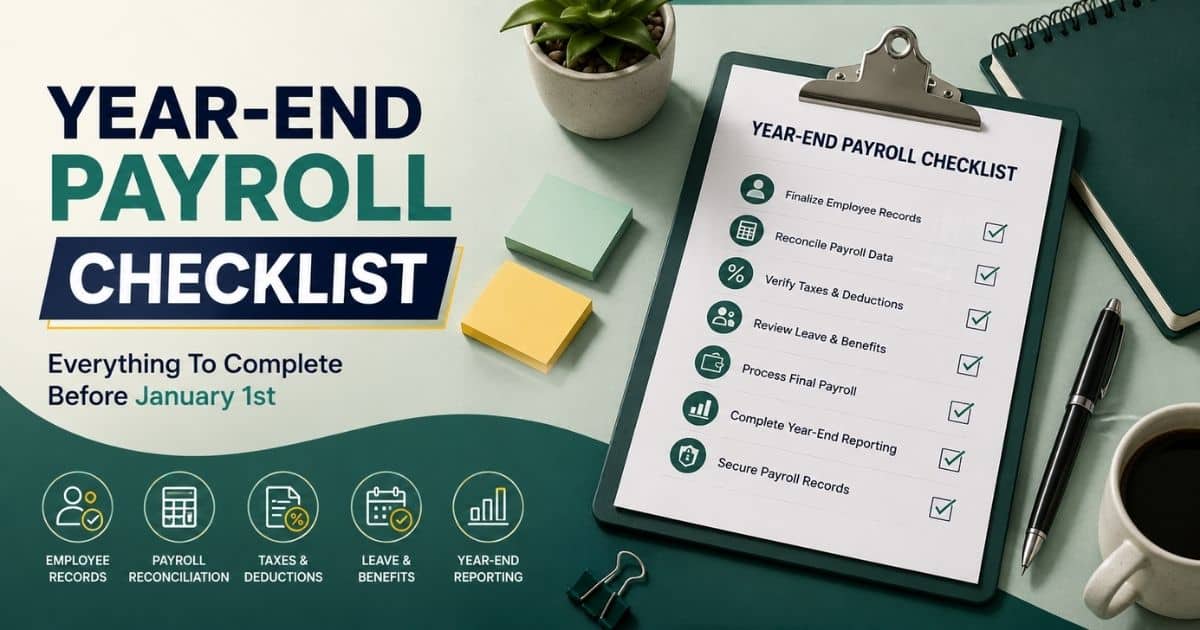
Table of Contents
Every payroll cycle you skip preparing for now becomes a scramble in the first week of January. Between updated tax tables, final bonus runs, and W-2 prep, closing out the year touches nearly every part of your payroll system at once. A missed step here doesn't just create rework; it can trigger real payroll tax penalties or delay your annual business tax return.
This checklist breaks down exactly what needs attention before January 1st, from verifying employee records to reconciling federal income tax withholding against your quarterly filings. If you're running everything through payroll software or still cross-checking spreadsheets by hand, the goal is the same: close out clean, start the new year without corrections waiting on your desk.

What Is A Year End Payroll Checklist?
A year-end payroll checklist is a set of steps businesses complete before their final payroll of the year, ensuring every number lines up before tax season opens. It means verifying employee wages against what's on file, confirming the Social Security wage base hasn't shifted your withholding calculations, and accounting for extras like third-party sick pay that often get missed in the rush. The Social Security Administration and IRS both expect clean, accurate year-end forms, and skipping this review is how errors end up baked into W-2s. Done right, it turns your last payroll of the year into a routine close instead of a scramble.
7 Year End Payroll Checklist To Complete Before Jan 1st

Closing out the year touches every corner of payroll, from records to reporting. This payroll year end checklist walks through the year end process step by step, so nothing slips through before your last payroll of the year.
1. Finalize Employee Records
Before anything else, your records need to reflect reality. Names, addresses, and Social Security numbers should match what's on file with the IRS, since even minor mismatches can cause filings to be rejected later. This is also the moment to confirm classifications are correct.
Misclassifying a worker doesn't just create tax headaches; it opens you up to Fair Labor Standards Act violations if overtime eligibility was calculated incorrectly all year. Cross-check exempt and non-exempt status now, while there's still time to fix it before forms go out, using an employee vs contractor classification guide as a reference if needed.
Don't forget location-based details either. If your team spans multiple states, confirm that current minimum wage rates were applied correctly throughout the year, especially for any employees who moved or shifted roles.
2. Reconcile Payroll Data
Reconciliation means comparing what you paid against what your reports say you paid. Small discrepancies compound across a full calendar year, so this step catches errors before they land on a W-2.
Pull every pay run and match totals against your general ledger. Look specifically for voided checks, off-cycle bonus payments, or manual adjustments that might not have synced properly.
If you're relying on spreadsheets instead of comprehensive payroll solutions, this is where gaps tend to surface. A dedicated payroll management system built for reconciliation flags mismatches automatically, rather than leaving you to hunt for them line by line.
3. Verify Taxes And Deductions
Tax accuracy is the core of year-end payroll, and it starts with confirming what's actually taxable. Review every paycheck for correct treatment of taxable income, since exclusions and additions shift depending on benefits offered, especially for small businesses working to maintain payroll compliance obligations across multiple rules and jurisdictions.
Local taxes deserve a close look, too. Municipal and county withholding rules change more often than federal ones, and they're easy to miss if your team operates across several jurisdictions.
Finally, confirm medicare taxes were withheld at the right rate for every employee, including anyone who crossed the additional Medicare threshold partway through the year. A small percentage error here multiplies fast.
4. Review Leave And Benefits
Benefits reporting trips up more businesses than almost any other year-end task. Start with flexible spending accounts, confirming employee contributions match plan elections and unused balances follow your plan's carryover or forfeiture rules, and consider building this review into broader payroll audit strategies you run throughout the year.
Next, look at taxable fringe benefits like personal vehicle use, gym memberships, or gift cards. These need to be added to wages before your final numbers are locked, not adjusted after the fact.
Group term life insurance also needs attention, since coverage above $50,000 counts as imputed income. If it wasn't taxed correctly throughout the year, this is the last chance to true it up.
5. Process Final Payroll
Your last payroll of the year carries more weight than a typical pay run. Confirm your final pay date well in advance, and account for any bank holidays that might shift your usual schedule.
This run should also capture anything outstanding, bonuses, commissions, or retroactive pay adjustments that haven't been processed yet. Once this payroll closes, correcting missed items becomes far more complicated.
Double-check direct deposit files and paper check batches before submission. A rushed final run is where most costly errors happen, simply because there's no cycle left to catch them, and it's exactly where automated payroll software features that validate totals in real time make a difference.
6. Complete Year-End Reporting
With payroll processed, reporting comes next. Prepare W-2s, 1099s, and any state-specific payroll forms well before their deadlines, giving yourself buffer time for corrections if something looks off.
Tax filing at year-end isn't just about W-2s, either. Reconcile your quarterly filings against annual totals to confirm they match, since discrepancies here are a common audit trigger that dedicated payroll compliance software is specifically designed to flag early.
If you manage contractors, don't overlook their forms in this rush. Missing a 1099-NEC deadline carries penalties just as steep as missing one for an employee.
7. Secure Payroll Records
Once everything's filed, records still need proper handling. Store completed forms, reports, and reconciliation documents securely, since federal retention requirements typically call for several years of access, and follow best practices for employee payroll records management so nothing critical is lost.
This step matters even more if you have active payroll disputes on file. Documentation from the closed year may become relevant evidence, so nothing should be deleted or archived carelessly.
Set a clear retention policy now, covering who can access records and for how long, so you're not scrambling to locate something months after the year has closed.
How To Prepare Your Payroll Before The Final Pay Run

The final pay run of the tax year deserves more prep than a routine cycle. A few overlooked details here turn into corrected tax forms later, so getting ahead of it now saves real time in January.
Set Payroll Deadlines
Start by locking in your internal deadlines well before the actual pay date. Coordinate with your payroll provider to confirm cutoff times for submissions, since year-end processing windows often close earlier than usual.
Build in buffer days for corrections. If something surfaces late, like a missed adjustment to gross wages, you want room to fix it without rushing the final submission.
Collect Missing Information
Gaps in employee data cause more year-end delays than anything else. Chase down missing addresses, updated banking details, or unfiled tax forms before this run, not after.
Former employees need attention too. If someone left mid-year, confirm that their final wages and any outstanding payments are accounted for, since their year-end tax forms still need to go out correctly as part of your broader payroll processing workflow.
Approve Attendance Records
Attendance data feeds directly into gross wages, so unapproved hours or pending time-off requests need resolution before this run. Anything left pending gets processed incorrectly, and correcting it after the fact is far messier.
Cross-check attendance against your records for the full tax year, especially for employees whose schedules changed partway through. Small gaps compound quickly across twelve months, which is why many teams adopt dedicated timesheet apps for employees that sync directly with payroll.
Confirm Payroll Changes
Before processing, verify that raises, bonuses, and benefit adjustments were entered correctly. Outdated tax tables are a common culprit behind under-withholding, which can leave employees owing back taxes they didn't expect, and modern payroll processing software helps keep these calculations current automatically.
This is also the moment to confirm your system reflects current withholding rules. Keeping accurate records here prevents a wave of corrections once W-2s go out.
Notify Employees
Once everything's confirmed, remind employees about the final pay date, any schedule shifts, and what to expect on their upcoming tax forms. Clear communication now cuts down on questions once tax season starts.
Give employees a chance to review their own information too. A quick check of their address or banking details before this run is far easier than issuing a correction afterward.
Payroll Data You Should Audit Before Closing The Year

Before the year closes, a focused audit catches errors that are cheap to fix now and expensive later. For any small business owner, this review protects against surprises once filing deadlines arrive.
Employee Earnings
Start by pulling every employee's full-year earnings and comparing them against individual pay stub records. Totals should match exactly, since even a small gap here flows straight into an incorrect W-2.
Pay close attention to anyone paid through earned wage access during the year. Those early withdrawals still count toward annual earnings, and they need to be reflected accurately in year-end totals rather than treated as separate from regular pay.
Also, check for deceased employees on your roster. Final wages for a deceased employee follow different tax rules than a standard paycheck, and getting this wrong creates complications that are difficult to unwind after filing.
Salary Adjustments
Review every raise, bonus, and off-cycle payment processed throughout the year to confirm each was applied at the correct rate. Adjustments made mid-year are the most common source of year-end discrepancies.
Check how your business structure affects owner compensation too, since sole proprietors, S-corps, and partnerships each handle salary and distributions differently for tax purposes. Confirm this was applied consistently.
Don't overlook timing issues around federal holidays either. A raise or bonus that shifted pay dates due to a holiday schedule can land in the wrong reporting period if it wasn't tracked carefully.
Tax Withholdings
Audit federal income tax, state tax, and medicare withholding line by line for a sample of employees across different pay bands. Errors tend to cluster around specific salary thresholds, and adopting payroll automation software can reduce the manual calculation mistakes that usually surface here.
Confirm medicare withholding stepped up correctly for any employee who crossed the additional threshold during the year. This is one of the more common areas where automated systems and manual tracking diverge.
Cross-reference withholding totals against what actually appears on each final paycheck of the year. Any mismatch needs resolution before forms are generated.
Benefit Contributions
Compare benefit deductions taken from paychecks against what your provider has on record. Retirement contributions, HSA amounts, and insurance premiums should reconcile exactly across every pay period, including any balances tied to your leave management system if time off affects benefit eligibility.
Flag any employee whose contributions changed mid-year due to a life event or open enrollment update, and confirm the new amount was applied from the correct effective date onward.
Payment Reconciliation
Finally, reconcile every payment method used across the year, direct deposit, paper checks, and manual adjustments, against your total payroll expense. This final check confirms nothing was missed before filing deadlines close in.
Compliance Tasks You Cannot Miss Before January 1st

Compliance slips are the costliest mistakes to catch late. For any small business closing out its fiscal year, early December is the right time to work through these five tasks before January 1st arrives.
Review Tax Obligations
Start by confirming your FUTA taxes are calculated correctly against total wages paid, since exemptions and rate changes can shift these numbers year to year. This review should happen before your final quarterly form is submitted, not after.
Also, revisit how fringe benefits were taxed throughout the year. Anything under-reported here becomes a liability that carries directly into January filings, so resolve discrepancies now while records are still fresh.
Validate Employee Classifications
Classification errors are one of the most common compliance failures businesses face. Confirm every worker is correctly categorized, since independent contractors and regular employees follow entirely different tax and reporting rules.
Pay particular attention to owner employees in corporations. Compensation for this group often gets misclassified as distributions rather than regular wages, which creates problems well beyond a simple payroll correction, especially for small teams without dedicated HR staff who rely on HR software for small businesses to keep classifications and payments consistent.
If anyone's role or hours changed mid-year, double-check that their classification still holds. A shift in responsibilities can sometimes affect exempt status without anyone noticing until it's flagged.
Check Statutory Contributions
Confirm all required contributions, unemployment insurance, workers' compensation, and any state-mandated programs were calculated and remitted correctly throughout the year. Missed contributions here often surface only during an audit, long after they're easy to fix.
Cross-check these amounts against your payroll records for the full year, not just the most recent quarter. Statutory obligations tend to get overlooked when attention narrows to year-end wages alone.
Organize Payroll Documents
Gather every payroll record generated over the year, pay stubs, tax deposits, benefit statements, and prior filings into one accessible location. Scattered documentation is the main reason year-end filing takes longer than it should, and it often contributes to recurring payroll mistakes businesses must avoid, which thorough payroll audit strategies are designed to catch early.
This is also the moment to confirm nothing is missing from earlier in the year. A document gap from six months back is far easier to resolve now than during active filing season.
Prepare For Regulatory Filing
With records organized, turn to what's due first. Map out every upcoming filing deadline, including your next quarterly form and any annual filings tied to your business structure.
Give yourself real buffer time here. Rushing regulatory filings in the final week of the year is how avoidable penalties happen, especially for a small business without a dedicated compliance team.
How To Start The New Payroll Year With Confidence

A clean start to the upcoming year depends on decisions made now, not scrambled together in January. These five steps set your payroll up to run smoothly from the very first pay date.
Update Payroll Policies
Begin by reviewing any policy changes taking effect for the new year, overtime rules, expense reimbursements, or paid time accrual rates. Document each update clearly so nothing gets applied inconsistently once payroll resumes, and ensure your chosen payroll software platform is configured to enforce those policies automatically.
If your business structure includes C corporations, confirm that any changes to the owner compensation policy are reflected before the first run. Policy gaps here tend to surface as costly corrections later.
Refresh Tax Settings
Update state withholding tables and confirm state and local rates reflect the latest changes across every local jurisdiction where you have employees. Rates shift more often at this level than most businesses expect.
Also, update the wage base for social security and unemployment taxes, since these figures reset annually and directly affect how much employer share gets calculated on each check moving forward.
Carry Forward Leave Balances
Review your policy on unused paid time and confirm which balances carry forward versus which are reset. Employees will notice discrepancies quickly, so get this right before the first payroll process.
Double-check employee information tied to leave accruals, too, since a mismatch in start dates or accrual rates often traces back to outdated employee records from the prior year.
Create New Payroll Calendar
Build your full calendar for the upcoming year now, mapping pay dates against holidays and processing deadlines. A calendar set early prevents missed deadlines once regular payroll cycles resume.
This is also the time to plan when you'll file electronically for required filings throughout the year, spacing them out so no single month carries an unmanageable compliance load, especially if you're moving from disconnected tools to a unified all-in-one HR and payroll platform.
Plan Your First Payroll
Before running your first payroll of the year, confirm that every employee's form W details, tax elections, and other compensation are current. This first run sets the tone for accuracy through the rest of the year.
Give this run extra review time. Errors in the first payroll of the year are the ones most likely to compound, since they often go unnoticed until several cycles have already passed.
Handle Year-End Payroll More Efficiently With Payrun
Year-end payroll doesn't have to mean chasing spreadsheets and cross-checking numbers by hand. Payrun's all-in-one HR platform keeps employee records, attendance, leave, and payroll data in one place, so reconciling totals before your final pay run means pulling from a single source instead of five. Its innovative HR features, like automated gross-to-net calculations, reduce the manual math errors that usually surface during year-end audits, and self-service access lets employees confirm their own address, tax elections, and banking details before W-2s go out, cutting down on last-minute corrections. For teams managing multiple locations, built-in compliance support helps keep tax calculations consistent across the board. It won't replace your judgment on classifications or filings, but it removes a lot of the manual friction around getting there.

.jpg)