Payroll days should be simple. But for many businesses, manual checks, bank trips, and payroll errors still create unnecessary work. Employees expect to receive pay on time, while employers need a secure and reliable way to manage payroll without extra stress.
That is why payroll software direct deposit has become the preferred payment method for modern businesses. Today, over 93% of workers receive their wages through direct deposit using the ACH network, making payroll faster, safer, and more convenient than paper checks. Funds move directly from a company's bank account to employee bank accounts, reducing delays, lost checks, and administrative work.
Whether you run a small business or a growing company, payroll software for startups and growing teams can simplify payroll management, automate tax calculations, and help your team get paid accurately every payday. In this guide, we will explain how direct deposit works, its costs and benefits, common challenges, and how payroll software can make the entire payroll process easier.
How Direct Deposit Payments Work In Payroll Software
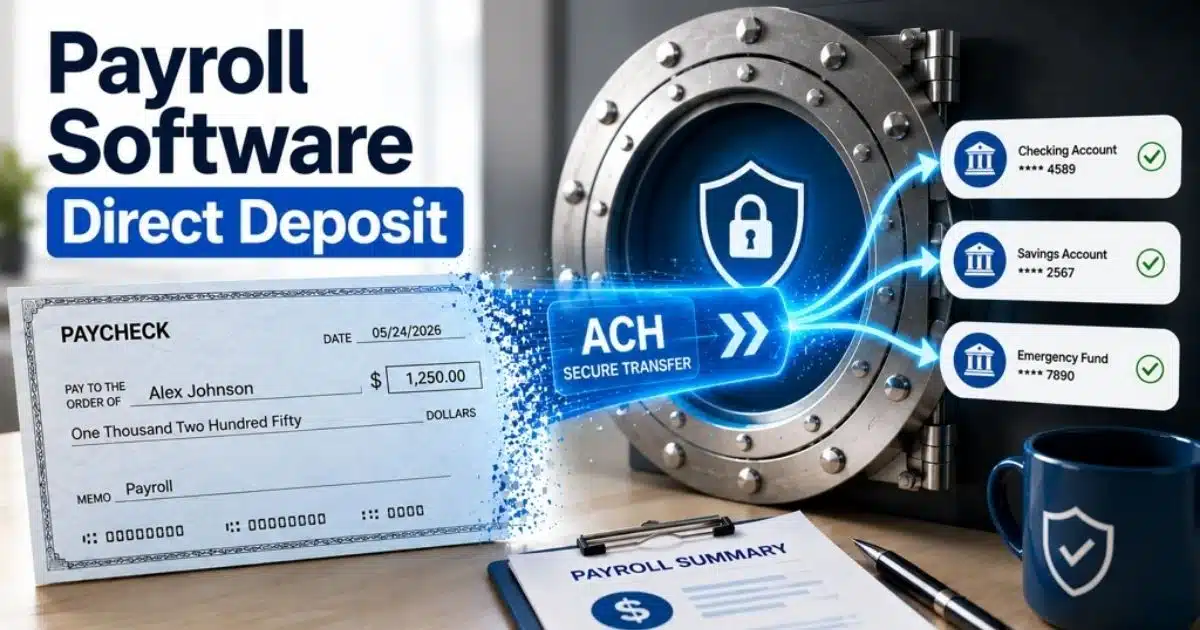
Direct deposit makes payroll faster and easier for both employers and employees. Instead of paper checks, money moves electronically from a company's bank account to employee bank accounts. Most businesses now rely on payroll software to automate this process and reduce errors. In fact, more than 93% of workers receive wages through direct deposit today.
Payroll Starts With Employee Data
Every direct deposit payroll process begins with accurate employee information. Employers collect banking information such as account and routing numbers. Employees also provide tax forms and payroll details.
Payroll software stores employee data in one secure place. Many systems also offer self-service access. Employees can update bank accounts, review pay stubs, and manage payroll information without help from HR. This saves time for the entire team and improves security.
Payroll Software Calculates Pay Automatically
Once the pay period ends, payroll software calculates gross pay, taxes, deductions, and net wages. The payroll system also factors in overtime, sick time, health insurance, and retirement contributions.
Time and attendance tools can send hours directly into payroll. Solutions like real-time attendance tracking software give managers clear visibility into hours worked while feeding accurate data into payroll calculations. This removes manual work and reduces errors. Businesses can process payroll faster while keeping compliance on track. Automated tax filing also helps employers avoid costly mistakes.
ACH Transfers Move Funds Securely
After employers run payroll, the payroll software sends direct deposit payments through the Automated Clearing House, or ACH, network. ACH acts as a secure system that transfers funds between banks. Direct deposit is actually a type of ACH payment.
Funds usually reach employee bank accounts within one to two business days. Some direct deposit providers also support same-day direct deposit for faster access to money. The ACH network processed more than 35 billion payments in 2025, showing how reliable this service has become.
Employees Receive Pay Without Paper Checks
Direct deposit payroll software removes the need for paper checks, cash handling, and bank visits. Employees receive pay even while on vacation or away from the office. Weather delays and lost checks no longer interrupt payday.
Many payroll software platforms support multiple accounts. Employees can split wages between checking and savings accounts automatically. This flexibility gives employees more control over their money and helps them build savings.
Businesses Gain Better Control Over Payroll
Direct deposit payroll services do more than send payments. They create audit trails, generate payroll summaries, and produce tax liability reports. Employers can manage payroll with less time and lower administrative expenses.
Small businesses especially benefit from payroll software direct deposit. Many providers of simple payroll software for small businesses include free direct deposit or low direct deposit cost within their plans. As a result, businesses spend less on printing checks and gain a more reliable payroll process. Direct deposit also helps prevent lost paychecks and improves payroll management across the company.
Direct Deposit As The Standard For Modern Payroll Systems
Direct deposit has changed the way businesses handle payroll. Employees expect fast and secure payments, while employers want fewer manual tasks. As payroll software evolves, direct deposit has become the standard for companies of all sizes.
More Employees Prefer Direct Deposit
Most workers no longer want paper paychecks. They expect wages to arrive on time and without extra steps. According to PayrollOrg surveys, more than 93% of employees receive pay through direct deposit today.
Direct deposit payroll gives employees quick access to money on payday. Funds arrive in bank accounts automatically. Employees do not need to visit a bank, cash checks, or worry about delays. This convenience has made direct deposit the preferred payment method.
Businesses Save Time And Reduce Costs
Paper checks take time and money. Employers must print checks, distribute them, and fix errors when checks get lost. Direct deposit payroll software removes those extra steps.
Payroll software direct deposit helps businesses process payroll faster and with fewer administrative expenses. Many payroll providers include free direct deposit or low-cost options in their plans. Businesses can spend less time on payroll management and focus more on growth.
Payments Stay Reliable In Any Situation
Bad weather, mail delays, and remote work can disrupt paper paychecks. Direct deposit services solve this problem by sending funds electronically through the ACH network.
Employees receive pay even when they are on vacation or taking sick time. Electronic payments also reduce the risk of lost checks or stolen paychecks. A reliable payroll system ensures employees receive wages on time every pay period.
Payroll Software Improves Accuracy
Manual payroll is time-consuming and increases the chance of errors. Payroll software calculates taxes, deductions, and net pay automatically. This helps employers maintain compliance and reduce payroll mistakes.
Modern payroll systems also store employee data securely and create audit trails for tax reporting. Businesses can run payroll with confidence because payroll information stays accurate and easy to access. Automated payroll process tools simplify work for every team.
Employees Gain More Control Over Pay
Direct deposit options have become more flexible than ever. Many direct deposit providers allow employees to split wages across multiple accounts. This makes it easier to build savings or manage household expenses.
Employee self-service portals add even more convenience. Workers can update banking information, view pay stubs, and access payroll records securely. Whether for small businesses or large companies, direct deposit payroll services create a better experience for both employers and employees.
How Payroll Software Automates Direct Deposit Without Manual Work
Modern payroll software does much more than send payments. It automates payroll tasks, reduces manual work, and helps businesses pay employees accurately. With direct deposit payroll software, employers can save time, improve compliance, and run payroll with fewer errors.
Payroll Data Flows Automatically
Payroll starts with employee data. Employers add employee information, banking information, pay rates, and tax details into the payroll system. After setup, most updates happen automatically.
Time and attendance tools can connect directly to payroll software. Implementing a modern attendance management system ensures employee hours flow into the system without manual entry. This helps businesses process payroll faster and reduces errors. Teams spend less time on payroll management and more time on important work.
Pay Calculations Happen Instantly
Payroll software calculates gross pay, taxes, deductions, and net wages in seconds. The system also handles health insurance premiums, retirement plans, and other benefits automatically.
Manual payroll can be time-consuming and costly. Modern payroll automation software replaces paper calculations and printing checks. Automated tax filing also improves compliance and reduces the risk of expensive mistakes for employers.
Direct Deposits Run On Schedule
Once employers run payroll, the software sends direct deposit payments through the ACH network. Funds move from the company's bank account to employee bank accounts securely. According to Nacha, the ACH network processed more than 33 billion payments worth over $86 trillion in 2024.
Most employees receive funds within one to two business days. Some direct deposit providers also offer same-day direct deposit. This gives employees faster access to money and ensures a reliable payday every pay period.
Employees Manage Their Own Details
Modern payroll software often includes employee self-service portals. Employees can update banking information, change direct deposit options, and access pay stubs anytime.
Many payroll platforms also support multiple accounts. Employees can split wages between checking and savings accounts automatically. This convenience reduces HR work and gives employees greater control over their finances without extra paperwork.
Businesses Gain Better Payroll Control
Direct deposit payroll services create accurate records for every payment. Electronic audit trails make tax reporting easier and help employers maintain compliance. Payroll software can also generate payroll summaries and tax liability reports.
Small businesses especially benefit from automation. Dedicated automated payroll software solutions often include free direct deposit in their plans, though some may charge additional fees. Businesses save money by reducing paper checks, lost checks, and manual work. As a result, payroll becomes more secure, efficient, and easy to manage.
Setting Up Payroll Software Direct Deposit - A Step-By-Step Breakdown
Setting up payroll software direct deposit is easier than many businesses think. With the right payroll system, employers can automate payments, reduce paperwork, and pay employees on time. A few simple steps can turn a manual payroll process into a faster and more reliable one.
Step 1: Open A Business Bank Account
Direct deposit starts with a company's bank account. Employers need a commercial bank account that supports ACH transfers. This account becomes the source of payroll funds for employees and contractors.
Many banks and payroll providers support direct deposit services today. Some charge small transaction fees, while others include free direct deposit in their payroll software plans. Choosing the right account early helps businesses avoid extra direct deposit cost and keeps payroll management simple. Direct deposit now powers pay for more than 93% of U.S. workers.
Step 2: Collect Employee Banking Details
Employees must provide banking information before receiving direct deposit payments. This usually includes account numbers, routing numbers, and account type. Employers may also require a signed authorization form.
Accurate employee data is essential. Even small mistakes can delay payday or send funds to the wrong bank account. Modern payroll software lets employees self-manage their information through secure portals. This improves security and reduces HR work. Many systems also allow employees to split wages across multiple accounts for savings goals.
Step 3: Set Up Payroll Software
The next step is configuring the payroll software. Employers enter employee information, tax settings, deductions, benefits, and pay schedules. The payroll system then prepares direct deposit payroll automatically.
Many payroll platforms integrate with time tracking tools. Employee hours flow directly into payroll without manual entry. This helps businesses process payroll faster and reduce errors. Payroll software also calculates taxes and creates accurate payroll information for every pay period, making compliance much easier.
Step 4: Run A Test Payroll
A test payroll helps verify that everything works correctly. Employers can confirm bank accounts, deductions, and payment amounts before sending real wages. This step prevents costly mistakes later.
Most direct deposit providers recommend testing before the first payroll run. A successful test builds confidence that funds will reach employees on time. Electronic payroll also creates an audit trail that helps with tax reporting and compliance. Businesses spend less time fixing payroll errors and more time focusing on growth.
Step 5: Launch Direct Deposit Payroll
After testing, employers can run payroll and send direct deposit payments through the ACH network. Funds typically reach employee bank accounts within one to two business days, though timing may vary by bank and provider.
Direct deposit payroll software eliminates paper checks, printing costs, and lost paychecks. Employees receive pay even during sick time, travel, or bad weather. Businesses save time, improve reliability, and create a more secure payroll process. That is why direct deposit has become the standard way companies manage payroll today.
Common Direct Deposit Problems And How To Avoid Them
Direct deposit is fast and reliable, but problems can still happen. Incorrect employee data, bank issues, and payroll mistakes may delay payments. The good news is that most problems are easy to prevent with the right payroll software and process.
Incorrect Banking Details
Wrong banking information is one of the most common direct deposit problems. A missing digit in an account number or routing number can send funds to the wrong bank account or delay paychecks.
Payroll software helps reduce these errors through employee self-service portals and data validation. Employees can review and update their own information securely. A quick check before every pay period can prevent lost time and payroll headaches for employers.
Missed Payroll Deadlines
Direct deposit follows ACH processing schedules. If employers run payroll too late, employees may not receive pay on payday. Most payroll providers require payroll submission one to two business days before payment.
A payroll system with automated reminders helps businesses stay on schedule. Understanding common payroll mistakes businesses must avoid also encourages teams to plan ahead. Some direct deposit payroll services also offer same-day direct deposit for urgent situations. Planning ahead keeps payments reliable and prevents unnecessary worry across the team.
Insufficient Account Funds
Direct deposit payments fail when a company's bank account does not have enough money to cover wages, taxes, and deductions. This can create compliance issues and hurt employee trust.
Businesses should review payroll expenses before every payroll run. Payroll software can generate payroll summaries and tax liability reports to show upcoming costs. Better visibility helps employers manage cash flow and avoid failed deposits.
Security And Fraud Risks
Payroll contains sensitive employee data and banking information. Without strong security measures, businesses risk fraud, data theft, and unauthorized access.
Modern payroll software protects information through encryption, access controls, and audit trails. Electronic records also make payroll management more secure than paper checks. As digital payments grow, security remains a top priority for every employer and payroll service provider.
Manual Errors In Payroll
Manual payroll is time-consuming and increases the chance of mistakes. Incorrect hours, missed deductions, or tax errors can affect employee pay and create compliance problems.
Time and attendance integration helps process payroll accurately. Automated payroll software calculates wages, taxes, and benefits without manual work. This reduces errors, saves time, and simplifies payroll management for small businesses and growing companies alike. Electronic payroll also eliminates lost checks and reduces dependence on paper paychecks.
Security Measures For Safe Employee Banking Information
Employee payroll data contains sensitive details such as bank accounts, wages, and tax records. A security issue can lead to fraud, compliance problems, and lost trust. Strong payroll software uses multiple layers of protection to keep payroll information safe.
Encryption Protects Sensitive Data
Encryption converts payroll information into unreadable code. Even if someone accesses the data without permission, they cannot use it without a security key. Modern payroll software protects both stored data and transferred funds with encryption. Secure platforms often use advanced standards such as TLS for data in transit.
Employee data moves between the payroll system, bank, and direct deposit services every pay period. Encryption keeps banking information secure during each step. This protection helps employers maintain compliance and build trust with employees who rely on direct deposit payroll.
Access Controls Limit Data Exposure
Not every team member needs access to payroll. Payroll software allows employers to control who can view or edit employee information. Role-based permissions reduce mistakes and lower security risks. Experts warn that weak access controls remain a major payroll risk for businesses.
Small businesses can self-manage permissions with ease. HR teams may access payroll reports, while finance teams process payroll and taxes. Limiting access keeps sensitive data secure and helps employers avoid unauthorized changes to wages, deductions, or bank accounts.
Multi-Factor Authentication Adds Security
Passwords alone are no longer enough. Multi-factor authentication, or MFA, requires an extra verification step before access is granted. This may include a code, app notification, or biometric check. Security experts now consider MFA essential for payroll systems.
Cyber threats continue to grow. A recent phishing campaign targeted payroll users and affected more than 500,000 victims. Strong authentication helps prevent fraud and protects employee accounts from unauthorized access.
Audit Trails Track Every Action
Good payroll software records every update and transaction. Audit trails show who changed employee data, when changes occurred, and what information was modified. This creates transparency and supports compliance requirements.
Electronic records also simplify tax reporting and payroll management. If an error occurs, employers can quickly identify the cause. Audit trails reduce worry, improve accuracy, and provide a reliable history of direct deposit payments and payroll process activities.
Regular Updates Prevent New Threats
Cybercriminals constantly look for new ways to attack payroll systems. Software updates close security gaps and strengthen protection against new threats. Businesses that delay updates face greater risks from malware and data breaches. Experts report that around 20% of companies experience payroll security breaches each year.
Modern payroll software applies security patches automatically. Purpose-built payroll compliance software also stays current with tax and regulatory changes in the background. This saves time and keeps payroll operations secure without extra manual work. Regular updates help businesses protect employee banking information, maintain compliance, and keep direct deposit services reliable.
Payroll Compliance Rules For Direct Deposit
Direct deposit makes payroll easier, but employers must still follow important rules. Payroll compliance covers employee consent, tax reporting, data security, and payment timing. Following these rules helps businesses avoid penalties, maintain trust, and run payroll smoothly.
Employee Authorization Matters
Many states require employers to get employee consent before setting up direct deposit. Employees may need to sign an authorization form and provide banking information. In some areas, workers must also have the freedom to choose their own bank accounts.
Good payroll software stores these records securely for future reference. Keeping signed forms helps employers prove compliance if questions arise later. A clear process also reduces errors and creates a better experience for employees and independent contractors.
ACH Rules Guide Payments
Direct deposit payroll runs through the ACH network. Employers and payroll providers must follow rules set by Nacha, the organization that governs ACH transactions in the United States. These rules cover file formats, payment timing, and transaction security.
Businesses should submit payroll before ACH deadlines to avoid delayed paychecks. The ACH network processes billions of transactions every year, making it one of the most reliable payment systems available. Following ACH standards helps ensure funds reach employee bank accounts on time.
Tax Compliance Cannot Be Ignored
Payroll taxes are a major part of compliance. Employers must calculate, withhold, and file taxes correctly every pay period. Missing deadlines or filing incorrect amounts can lead to penalties and extra expenses.
Modern payroll software automates tax calculations and filings. A dedicated payroll compliance guide for small businesses can help employers understand their obligations while the system tracks deductions for health insurance, retirement plans, and other benefits. Automated reports also simplify payroll management and help businesses maintain accurate payroll information throughout the year.
Data Security Protects Employee Information
Payroll contains sensitive employee data such as wages, bank accounts, and tax records. Businesses must protect this information from unauthorized access and fraud. Many privacy laws require companies to secure employee information properly.
Secure payroll software uses encryption, audit trails, and access controls to protect data. Employee self-service portals also provide safe access to pay stubs and banking information. Strong security measures reduce worry and help employers maintain compliance.
Payment Records Must Stay Accurate
Employers should keep payroll records for tax reporting and audits. Electronic records create a reliable history of direct deposit payments, deductions, and employee wages. This audit trail helps businesses resolve disputes and meet legal requirements.
Payroll software can generate payroll summaries and tax liability reports automatically. A robust payroll management system ensures accurate records save time and simplify payroll process reviews. A strong recordkeeping system also helps businesses manage growth while staying compliant with changing regulations.
Direct Deposit Vs Paper Checks Vs Pay Cards: Which Payment Method Works Best?
Businesses have several ways to pay employees, but each method comes with different costs, convenience, and security levels. The right choice depends on your payroll process, workforce needs, and compliance requirements. For most companies, direct deposit payroll offers the best mix of speed, reliability, and efficiency.
Feature | Direct Deposit | Paper Checks | Pay Cards |
|---|---|---|---|
Payment Method | Electronic transfer through the ACH network | Physical paper check | Prepaid debit card |
Payroll Speed | Funds usually arrive within 1–2 business days | Employees must deposit or cash checks | Funds become available on payday |
Convenience For Employees | High | Low | Medium |
Need For Bank Account | Yes, in most cases | No | No |
Risk Of Lost Payments | Very low | High risk of lost or stolen checks | Low |
Payroll Processing Time | Fast and automated | Time-consuming and manual | Faster than checks |
Printing Costs | None | Requires printing checks | None |
Payroll Errors | Lower with payroll software | Higher due to manual work | Moderate |
Support For Multiple Accounts | Yes | No | Limited |
Employee Access To Funds | Available from bank accounts anywhere | Requires bank visits or mobile deposit | Access through card network |
Remote Employee Support | Excellent | Limited | Good |
Tax Reporting And Audit Trail | Automatic and digital | Manual recordkeeping | Digital records available |
Best For | Most businesses and employees | Very small teams with limited payroll needs | Unbanked employees |
Compliance And Security | Strong with payroll software | Higher fraud risk | Depends on provider |
Overall Cost | Often included in payroll software plans | Higher due to materials and labor | May include additional fees |
Direct deposit payroll software has become the preferred choice because it helps businesses save time, reduce expenses, and improve payroll management. More than 93% of employees in the U.S. receive wages through direct deposit today, showing how widely trusted this payment method has become.
Paper checks still work for some companies, but they require more manual effort and create risks such as lost checks and delayed pay. Pay cards can help employees without bank accounts, but they may include service fees depending on the provider. For most businesses, direct deposit remains the most secure, reliable, and convenient payroll solution.
Advanced Direct Deposit Features In A Payroll Software
Modern payroll software does more than send wages to employee bank accounts. Advanced features help businesses save time, improve compliance, and simplify payroll management. The right payroll system can automate tasks, reduce errors, and create a better payroll experience for everyone.
Same-Day Direct Deposit
Traditional direct deposit payments often take one to two business days through the ACH network. Today, many payroll providers offer same-day direct deposit for faster access to funds. This feature is especially useful when employers need to process urgent payroll changes. Recent payroll platforms now support faster payment options through Same Day ACH services.
Employees appreciate quick access to money on payday. Businesses also avoid worry when payroll deadlines are tight. Faster payments improve employee satisfaction and make direct deposit payroll services even more reliable.
Employee Self-Service Portals
Employee self-service portals reduce HR work and give workers more control. Employees can access pay stubs, tax forms, and payroll information anytime. They can also update banking information without contacting HR. Modern payroll systems increasingly include self-service features to improve employee experience.
This feature helps businesses self-manage payroll tasks more efficiently. Employee data stays accurate because workers update their own records. Fewer manual updates also mean fewer payroll errors and stronger security.
Multi-Account Deposit Options
Many employees prefer to divide wages between checking and savings accounts. Advanced direct deposit options make this possible. Workers can automatically send a portion of their pay to multiple accounts for budgeting or savings.
This feature gives employees more flexibility with their money. It also supports long-term financial goals without extra effort. Several direct deposit providers now include multi-account deposits as a standard feature because employees increasingly expect more control over their pay.
Automatic Tax And Benefit Deductions
Payroll software automatically calculates taxes, deductions, and benefits during every pay period. Health insurance premiums, retirement contributions, and garnishments are processed without manual work. This helps employers maintain compliance and reduce mistakes. Advanced payroll software now automates tax filings and payroll calculations for businesses of all sizes.
Automation saves less time on paperwork and more time on business growth. Employers avoid costly tax errors while employees receive accurate paychecks. A smooth payroll process benefits the entire team.
Time Tracking And Integrations
Payroll becomes easier when systems work together. Many payroll software platforms integrate with time and attendance tools, accounting software, and HR systems. Employee hours flow directly into payroll without manual entry. Some platforms even connect with tools like QuickBooks to simplify financial management.
Integrated systems help businesses process payroll faster and reduce errors. Adopting dedicated payroll processing software means payroll reports, tax liability summaries, and audit trails are generated automatically. This creates a secure and efficient payroll management system that grows with the company.
How To Choose Payroll Software With Direct Deposit For Long-Term Growth
Choosing payroll software is a long-term decision. The right platform should save time today and support your business as it grows. Features like direct deposit, automation, compliance tools, and integrations can make payroll easier for years to come.
Look For Reliable Direct Deposit
Direct deposit should be fast, secure, and easy to manage. Good payroll software direct deposit tools send funds through the ACH network and support accurate payroll processing. More than 93% of U.S. workers now receive wages via direct deposit, making it the standard payment method.
Check whether the provider offers same day direct deposit, multiple accounts, and free direct deposit options. Some providers charge additional fees, while others include direct deposit services in their plans. A reliable service ensures employees receive pay on every payday.
Choose Software That Grows With Your Business
Your payroll needs today may look very different next year. Small businesses often start with basic payroll features, but growth brings more employees, contractors, and compliance requirements.
A scalable payroll system can support larger teams, independent contractors, and changing pay structures. Resources that compare the best payroll software for small businesses can help you choose tools that handle more employee data without slowing down. Flexible payroll management helps businesses adapt while avoiding costly system changes later.
Check Automation And Tax Features
Manual payroll is time-consuming and increases the risk of errors. Good payroll software should automate taxes, deductions, and direct deposit payments. Automation reduces administrative work and improves accuracy.
The best payroll systems can process payroll, file taxes, and generate payroll summaries automatically. All-in-one tools like Payrun’s HR and payroll platform also centralize employee data alongside these workflows. Electronic records also simplify audits and reporting. Businesses save time and reduce worry when payroll tasks run automatically in the background.
Review Integrations And Employee Access
Payroll software works best when it connects with other tools. Time tracking systems, HR platforms, and accounting software such as QuickBooks can share payroll information automatically. This reduces duplicate work and improves accuracy.
Employee self-service features are equally important. Employees should be able to access pay stubs, update banking information, and review tax forms securely. Platforms that discover Payrun's innovative HR features show how easy access improves convenience while reducing the workload for HR teams.
Compare Costs And Support Options
Price matters, but value matters more. Direct deposit cost varies across providers. Some payroll platforms include free direct deposit, while others charge fees for extra features or transactions.
Review customer support, training resources, and onboarding services before making a decision. A payroll provider should help your company manage payroll with confidence. The right software reduces expenses, simplifies the payroll process, and supports long-term business growth.
How Payrun Makes Payroll Software Direct Deposit Simple And Reliable
Payrun makes payroll software direct deposit simple for businesses of all sizes. As one of the best HR software options for small businesses, it supports teams from employee onboarding to payday and helps employers manage payroll without manual work. Businesses can run payroll, automate direct deposit payments, and maintain compliance from a single system.
With Payrun, employee data, banking information, taxes, and deductions stay organized in one place. Designed as HR and payroll software for SaaS and software businesses, it scales with growing teams. Employees can securely access pay stubs and update their details through self-service tools. Direct deposit payroll runs through secure workflows, helping reduce errors and improve reliability.
Payrun also integrates time and attendance data into the payroll process. As outlined in its about Payrun HR management overview, this integration means fewer spreadsheets and less time spent on administrative tasks. Whether you manage a growing team or a large workforce, Payrun helps simplify payroll management, save time, and ensure employees receive accurate pay on every payday.
FAQs
Can Small Businesses Afford Direct Deposit Payroll Software?
Yes. Many payroll software providers offer affordable plans, and some even include free direct deposit. Small businesses often save money by reducing printing checks, paper paychecks, and administrative work. Lower payroll expenses can make direct deposit cost-effective in the long run.
Do Employees Need A Bank Account For Direct Deposit?
Yes. Employees usually need bank accounts to receive direct deposit payments. However, some employers also provide pay cards as an alternative for workers who do not have access to traditional banking services.
Can Direct Deposit Be Used For Independent Contractors?
Yes. Many businesses use direct deposit payroll services to pay independent contractors securely and on time. A payroll system can store contractor information, automate payments, and maintain accurate records for taxes and compliance.
How Long Should Employers Keep Payroll Records?
Employers should keep payroll information, tax records, and employee data for several years based on local laws. Electronic payroll software creates an audit trail that makes records easy to access and manage when needed.
What Happens If An Employee Changes Banking Information?
Employees can update banking information through self-service portals in many payroll software platforms. Employers should verify changes before the next pay period to ensure funds reach the correct account and avoid payroll errors.