Features Of A Payroll Software For Startups And Growing Teams
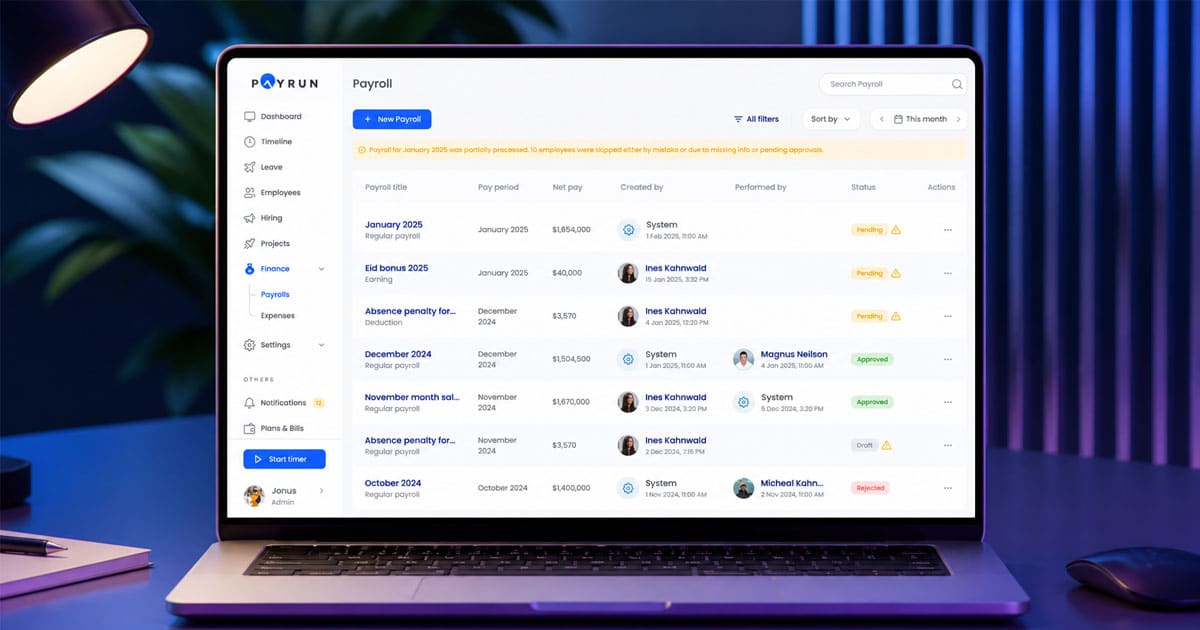
Table of Contents
Startups and growing teams need payroll systems that keep salary processing accurate, organized, and easy to manage. Manual payroll methods often create errors, compliance issues, and unnecessary administrative work as teams expand. A reliable payroll platform helps businesses handle employee payments, tax calculations, and workforce records from one centralized system.
Modern payroll software also supports automation, which reduces repetitive payroll tasks and improves overall operational efficiency. Startups especially benefit from tools that can scale with team growth while maintaining accurate financial records. Research from Deloitte shows that companies using automated payroll systems can reduce payroll processing time by up to 60 percent while improving data accuracy.

What Is Payroll Software
Payroll software is a digital solution that automates the entire process of paying employees and managing related tax obligations. It handles everything from calculating gross-to-net pay to managing deductions, processing direct deposit payments, and generating tax documents for regulatory compliance.
For startups and small businesses, payroll software replaces time-consuming spreadsheets and manual calculations with streamlined, accurate HR software for payroll management. According to a 2026 Gusto survey, 78% of small businesses report that payroll errors cost an average of $845 per incident. Meanwhile, Paychex data shows that manual payroll processing consumes 15 to 20 hours weekly for HR teams in companies with fewer than 50 employees.
The evolution of payroll tools has been significant. What started as mainframe systems in the 1980s transformed into cloud-based platforms after 2010. Since 2020, AI-driven automation has become standard, enabling businesses to handle multi-state payroll taxes and international payments with ease.
Modern payroll software for startups does more than just cut checks. It integrates with accounting software like QuickBooks Payroll, syncs employee hours from time tracking systems, manages contractor payments alongside regular payroll, and ensures compliance with federal and state laws, reflecting the complete guide to payroll software features and automation. For growing teams, this means fewer headaches, fewer penalties, and more time to focus on business growth.
Features Of A Payroll Software For Startups And Growing Teams
The key features of a payroll system determine how effectively it can serve your growing business. A 2026 Seedtable report found that 65% of startups cite payroll as their top administrative bottleneck, making feature selection critical for operational success.
Automated Salary Processing
Automated salary processing forms the foundation of any startup payroll software worth considering. This feature calculates gross-to-net pay in real time, factoring in bonuses, overtime pay, commissions, and various deductions without requiring manual data entry.
The impact is measurable. Paycor reports that automated systems cut processing time by 70% compared to manual methods. For startups with shift-based roles or hourly employees, this automation becomes even more valuable since research indicates miscalculations occur in 12% of manual payroll setups.
Good automated payroll software handles the entire payment processing cycle from syncing time tracking data to executing direct deposit payments. Some advanced payroll platforms even support multiple payment rails, accommodating different preferences across your team. When you run payroll with automation, you reduce the risk of human error while ensuring salaried employees and hourly employees alike receive accurate, timely payments.
Tax Calculation And Compliance
Tax calculation and compliance automation might be the most valuable feature for startup teams. The system automatically handles federal, state, and local withholdings while filing required tax forms like quarterly 941 reports and annual W-2 documents.
The stakes are high. IRS data shows that non-compliance penalties average $400 per employee, and late filing fines average $845. For startups navigating their first tax year, these costs add up quickly. Modern payroll software handles state tax registration automatically as your team expands into new locations. This matters because 40% of startups now hire remotely across multiple states, according to Clear Peak Accounting research.
The best payroll software uses AI to identify jurisdiction-specific requirements and file payroll taxes automatically. This eliminates the guesswork around tax laws and keeps your business compliant without requiring in-house tax expertise. Your payroll providers should handle these complexities so you can focus on building your product.
Employee Data Management
Centralized employee data management keeps all worker information in one secure location. This includes bank details, tax documents, benefits elections, and personal information through a modern employee record management system. Paycor research shows that consolidated platforms reduce duplicate data entry by 50%.
For startups, this centralization solves a common problem. When employee records exist across multiple spreadsheets, email threads, and paper files, errors multiply. A single source of truth for payroll data means updates flow automatically to all connected systems. Change an employee’s address, and the system triggers appropriate compliance checks. Add health benefits, and deductions update in the next pay period.
This feature scales smoothly whether you have 10 employees or 500. The simplify payroll approach means HR teams spend less time hunting for information and more time on strategic work.
Leave And Attendance Integration
Leave and attendance integration pulls timesheet data, PTO balances, and absence records directly into your payroll processes. The system automatically deducts unpaid leave or accrues sick time based on your company policies.
Manual tracking creates real problems. UKG Pro user feedback indicates that 25% of small firms experience pay errors from overtime mislogs when processing payroll manually. Integrated systems eliminate this gap by syncing attendance data directly to payroll calculations.
For startups with flexible work arrangements or multiple pay schedules, this integration ensures that employee hours translate accurately into compensation. Whether someone works standard hours or variable shifts, the system captures and calculates correctly.
Payroll Reports And Insights
Payroll reports and insights give startup leaders visibility into labor costs, turnover trends, and overtime spending patterns. Customizable dashboards let you export data to accounting software like QuickBooks or Xero for seamless financial management.
This reporting capability matters because payroll typically consumes 60 to 70% of early-stage startup budgets. Understanding where that money goes helps founders make smarter decisions about hiring, compensation structures, and cash flow forecasting.
Look for payroll software tools that offer traceable changes for audit-ready outputs. When investors conduct due diligence or accountants prepare year-end reports, clean payroll data makes the process smoother.
Secure Payroll Data Storage
Secure payroll data storage protects sensitive employee information using encryption, access controls, and compliance certifications. As outlined in practical guides to employee data protection in HR systems, the Verizon Data Breach Investigations Report noted a 22% increase in HR system breaches last year, making security non-negotiable.
Strong payroll features include AES-256 encryption, SOC 2 compliance, role-based access permissions, and multi-factor authentication. For startups handling personal and financial data, these safeguards protect both your employees and your business reputation.
Regulatory compliance extends to GDPR and HIPAA requirements depending on your workforce and location. Your payroll system should automatically maintain these standards without requiring manual oversight.
Employee Self Service Portal
Employee self service portals let workers view pay stubs, update personal information, request time off, and manage benefits administration through web or mobile interfaces. Dedicated employee self service portal platforms for modern HR show that these portals boost employee satisfaction scores by 30%.
For startups, self service capabilities free HR from routine queries. Instead of answering questions about deduction amounts or remaining PTO balances, team members find answers themselves. This scales particularly well for distributed teams who need 24/7 access regardless of time zone.
The best payroll services include mobile-friendly portals so employees can handle administrative tasks from anywhere. This stress free payroll experience benefits everyone involved.
Why Startups Need Payroll Automation
Startups face unique challenges that make automated payroll essential rather than optional. With average team growth of 150% in the first three years according to Startup Genome, manual processes simply cannot keep pace.
Reduce Payroll Processing Errors
Manual payroll entry causes significant financial damage across the industry. SHRM estimates that 1 in 5 paychecks processed manually contains errors of $100 or more, costing businesses $1.2 billion annually industry-wide.
Automated validation catches anomalies before they become problems. Duplicate payment attempts, incorrect tax withholdings, and data entry mistakes get flagged immediately. As detailed in resources on benefits of payroll automation software, Gusto data shows that 92% of users report fewer compliance issues after adopting payroll automation.
Save HR Administrative Time
Processing payroll manually consumes hours that founders and HR teams cannot spare. Paychex analysis finds that automation delivers 12 to 15 hours weekly back to startup leaders.
Those recovered hours translate directly into productivity elsewhere. Instead of wrestling with spreadsheets and chasing down missing information, your team can focus on product development, customer support, and business tools that drive growth. This time savings alone often justifies the investment in best payroll software.
Improve Payroll Accuracy
Built-in rules engines in modern payroll software achieve 99.9% accuracy compared to 88% for manual processing according to Paycor research. This improvement means employees receive correct payments consistently, building trust and retention.
Accurate payroll also prevents downstream problems. Incorrect withholdings create tax complications. Miscalculated overtime pay invites compliance scrutiny. When your payroll software handles calculations correctly from the start, these issues never arise.
Support Growing Team Operations
Startup payroll software scales to accommodate rapid hiring without proportional increases in administrative staff. Whether you bring on 5 new employees this month or 50, the system handles onboarding and processing efficiently.
For businesses expanding into international payroll or working with international contractors, scalable payroll capabilities become even more important. Automated KYC and compliance checks streamline the process of bringing remote team members on board regardless of location.
How Payroll Software Improves HR Efficiency
Payroll software transforms HR operations by unifying fragmented tasks into streamlined workflows. Guides on HR workflow automation for modern teams echo Deloitte HR Tech findings that centralized systems cut overall admin costs by 40 to 50% for startups under 100 employees.
Centralized Employee Records
Centralized employee records aggregate profiles, documents, and employment history in a single database accessible to authorized users through HR software for small and medium businesses. This eliminates the scattered Excel files and email attachments that create errors and waste time.
Paycor notes a 60% reduction in administrative workload when companies move to consolidated systems. Finding information becomes instant rather than a scavenger hunt, and updates propagate automatically across all connected processes.
Faster Payroll Processing
Modern payroll features compress pay runs from days to minutes. Where manual processing might take a full day or more, full service payroll automation handles the same workload in a fraction of the time.
Same day direct deposit capabilities ensure employees receive funds quickly. Research shows 98% on-time payment rates with automated systems compared to delays of 2 to 3 days when processing manually. This reliability matters for employee satisfaction and retention.
Better Payroll Compliance
Payroll software automatically updates for tax law changes, new filing requirements, and jurisdiction-specific rules. This prevents the outdated calculation errors that contribute to 25% of small business audit failures.
As regulations shift, your payroll system adapts without requiring manual intervention. State tax registration, filing deadlines, and rate adjustments happen automatically. This compliance automation protects your business from penalties while reducing the expertise required from your internal team.
Clear Payroll Reporting
Real-time analytics on cost per hire, benefits management, and labor trends support strategic decision-making. Detailed reports help finance teams forecast cash flow and plan for future hiring needs.
For startups approaching investor due diligence or preparing financial statements, clean payroll reporting simplifies the process significantly. Every transaction is documented, every change is traceable, and every question has an answer in the system.
Improved HR Workflow Management
Integrated payroll orchestrates approvals, sends reminders, and connects with hr tools across your technology stack. This end-to-end workflow management reduces dropped tasks and inconsistent processes.
From the moment someone joins your team through every pay period they work, the system maintains continuity. Onboarding flows into payroll setup, approval workflow automation in HR structures decision-making, time tracking feeds into calculations, and payments trigger appropriate record-keeping automatically.
Key Considerations When Choosing Payroll Software
Selecting the right payroll software requires matching capabilities to your specific situation. Reviewing a complete guide to payroll processing for growing businesses can clarify needs, and Capterra research indicates that 55% of startups abandon complex tools within six months, making fit more important than feature count.
Scalability For Growing Teams
Your payroll system must grow with your business without creating pricing surprises or capability gaps. Average startup headcount doubles yearly, so the platform you choose today needs to work equally well at twice your current size.
Look for unlimited payroll runs and transparent per-employee pricing that does not spike at certain thresholds. Some platforms start affordably but become expensive as team size increases. Understanding the total cost at various growth stages prevents painful migrations later.
Payroll Automation Capabilities
Full automation covers the complete cycle from onboarding through payment processing. This includes capturing employee information, calculating compensation, managing deductions, executing payments, and filing required reports.
The best payroll services minimize touches required at each step. Setup should take hours rather than weeks. Running each pay period should happen in just a few clicks rather than requiring extensive manual review.
Integration With HR Systems
Seamless connections to your existing business tools prevent data silos and manual reconciliation work. Replacing disconnected tools with an all-in-one HR and payroll platform and looking for native integrations or well-documented APIs that connect to accounting software, hr services, applicant tracking systems, and time tracking platforms is critical.
Research suggests that proper integration prevents 80% of sync errors that plague disconnected systems. When payroll data flows automatically into your books, month-end close becomes faster and more accurate.
Data Security And Compliance
Security requirements have intensified as threats targeting HR systems multiply. Current standards include SOC 2 Type II certification, AES-256 encryption, and AI-powered anomaly detection to identify unusual access patterns.
Your payroll providers should offer clear documentation of their security practices and compliance certifications. Breach warranties, incident response plans, and regular security audits demonstrate commitment to protecting your data.
User-Friendly Interface
Intuitive design matters especially for startups without dedicated payroll specialists. The people managing payroll may be founders, office managers, or finance leads handling multiple responsibilities, so an all-in-one HR management system for growing teams should be easy to navigate.
Mobile-first design enables management from anywhere, which suits the flexibility that startup teams need. Customer support availability also factors into usability since questions will arise regardless of interface quality.
Reporting And Analytics Features
Beyond basic payroll reports, look for predictive analytics and KPI dashboards that inform business decisions. Adopting HR software features for small businesses helps you understand trends in labor costs, overtime patterns, and benefits utilization to optimize spending.
Cash-strapped startups benefit from tools that forecast tax liabilities and highlight opportunities for efficiency. These insights transform payroll from a cost center into a source of business intelligence.
Comparing Specific Payroll Software Options
Knowing what to look for is one step. Seeing how actual platforms stack up against each other is the next one, and that comparison works better as a dedicated resource than a quick summary here.
For a full side-by-side breakdown of pricing, features, and ease of use across ten leading platforms, see our guide to the best payroll software for small businesses. It includes a pricing comparison table and a business-type matching framework to help narrow the list down to the two or three options worth demoing.
Whichever shortlist you land on, weigh it against the criteria above first. A well-reviewed platform that's overbuilt for a 10-person team creates the same problem as an underpowered one: paying for complexity you don't need yet.
How Payrun Supports Startup Payroll Management
Payrun delivers tailored automation for lean startup teams who need simplicity without sacrificing capability. As your trustworthy partner in HR management, the platform at payrun.app processes payroll in under 10 minutes for teams up to 500, integrating core hr management without unnecessary complexity.
Automated Payroll Processing
Payrun handles salary runs, deductions, and deposits through streamlined one-click approvals. The system supports variable pay structures including equity grants, bonuses, and commission payments common in startup compensation packages.
Time data syncs automatically from connected tracking systems, reducing calculation errors to near-zero. Whether you pay contractors weekly or salaried employees bi-monthly, the platform adapts to your pay schedules without requiring complex configuration.
Centralized Employee Data
All employee profiles, tax forms, and benefits information live in a single secure hub within Payrun. Automatic updates ensure that address changes, banking details, and benefits management elections stay current across all connected processes.
This centralization supports compliance checks when information changes. Rather than chasing down updated tax documents or verifying direct deposit details manually, the system prompts and captures what it needs.
Flexible Payroll Workflows
Payrun accommodates custom pay schedules, off-cycle bonus payments, and multi-currency transactions for remote team members. Whether you need to pay employees on different schedules or handle international payments for distributed teams, the platform scales to meet your requirements.
This flexibility extends to performance management workflows and approval chains. Leveraging Payrun's innovative HR management features, you can define the processes that work for your organization and let the system enforce consistency.
Real-Time Payroll Insights
Dashboards within Payrun display burn rates, headcount costs, and compliance status in real time. These insights enable proactive cash management rather than reactive scrambling at month-end.
For startups watching every dollar, understanding payroll trends helps with forecasting and planning. With HR software tailored for small businesses, you can see where money goes, identify patterns, and make informed decisions about hiring and compensation structures.
.jpg)