HRIS Migration Checklist for Small Businesses In 2026
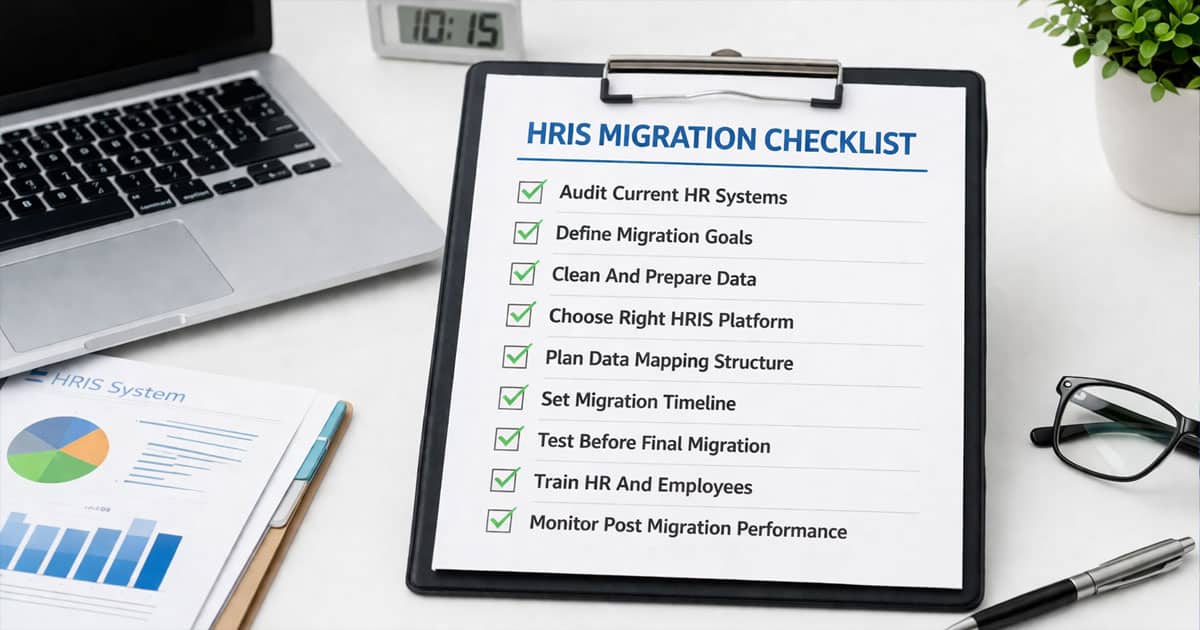
Table of Contents
HRIS migration checklist for small businesses requires a structured approach to ensure smooth data migration and system transitions. Many organizations move from an old system to one HR system to improve efficiency and reduce manual processes. Identifying transferable data early helps the HR department avoid data loss and maintain consistency during the migration process.
Using data transformation tools improves data accuracy and simplifies complex data transfer tasks. A dual maintenance period allows businesses to run both systems simultaneously and validate migrated data for future reference. Dual maintenance also reduces risks by ensuring business continuity. With the right checklist, small businesses can manage HRIS migration efficiently and support long term growth.

What Is HRIS Migration For Small Businesses
HRIS migration for small businesses refers to the structured process of moving HR data from a current system or legacy system to a new HR system. A well-defined HRIS migration checklist ensures that HR data migration covers all critical data, including employee records, payroll data, and operational details. This migration process reduces errors and improves data accuracy during system transitions.
The HR data migration process involves planning, data validation, and secure data transfer. A proper HRIS data migration ensures data quality and consistency across the new system. Businesses that follow an essential HR data migration guide experience fewer disruptions and faster adoption. With an optimized data migration process, small businesses can manage HR data more effectively and support long-term operational efficiency.
HRIS Migration Checklist For Small Businesses
HRIS migration checklist for small businesses ensures a structured data migration process that protects HR data, improves data quality, and reduces errors. A clear checklist helps HR teams manage system transitions efficiently while maintaining compliance and operational continuity.
Audit Current HR Systems
Start by reviewing your current system and HR system landscape across HR software and tools. Many businesses rely on multiple systems, which creates fragmented HR data and increases migration risks. Identify all data sources, including employee data, payroll data, and operational records, before starting the migration process.
This step ensures that HR teams and HR team members understand where data resides and how it flows across systems. It also helps HR managers detect gaps in data quality and prepare for a smoother data migration process. A complete audit supports better planning and reduces issues during data transfer into the new system.
Define Migration Goals
Define clear goals for your HRIS migration plan based on business needs and system limitations. Goals may include improving data access, consolidating HR software, or enhancing reporting through a new system. Without defined goals, the entire process lacks direction.
HR managers and HR team members should align objectives with operational priorities. Clear goals help HR teams focus on outcomes such as better efficiency and reduced manual work. This alignment ensures the migration process delivers measurable value and supports long term improvements.
Clean And Prepare Data
Data cleaning and data preparation are essential for maintaining data quality during data migration. Remove duplicate employee data, validate formats, and standardize records before data upload. Poor data quality leads to errors in the new system.
Preparing HR data ensures accuracy and consistency during data transfer. Clean data improves system performance and reduces issues during data migration tools execution. This step also ensures that only relevant and accurate employee data moves into the new system.
Choose Right HRIS Platform
Selecting the right HR software and HRIS vendor determines long term success. The new system should support HR teams, integrate with existing workflows, and meet compliance requirements. Evaluate features such as data access, reporting, scalability, and whether the platform functions as an all-in-one HR management system.
A strong HR system replaces multiple systems and improves efficiency. HR teams benefit from centralized data and streamlined workflows. Choosing the right platform ensures better data management and supports business growth.
Plan Data Mapping Structure
Data mapping ensures that HR data moves correctly from the current system to the new system. Map employee data, payroll data, and other critical fields carefully to avoid inconsistencies. This step is essential for maintaining data quality.
Proper mapping supports smooth data transfer and ensures migrated data aligns with the new system structure. It also improves data access and reporting accuracy. HR teams rely on accurate mapping to ensure the migration process works without disruption.
Set Migration Timeline
A clear migration process requires a structured timeline. Define phases such as data preparation, data transfer, and multiple test migrations. This ensures the entire process remains organized and predictable.
HR managers should plan resources and coordinate HR teams effectively. A realistic timeline reduces disruptions and ensures smooth transition to the new system. It also helps manage workload and maintain productivity during migration.
Test Before Final Migration
Running multiple test migrations helps validate data migration tools and identify issues before the final migration. Testing ensures data transfer accuracy and confirms system readiness.
User acceptance testing allows HR team members to verify workflows and data access in the new system. Testing also ensures that migrated data is accurate and usable. This step reduces risks and improves confidence in the migration process.
Train HR And Employees
Training HR teams and HR team members ensures successful adoption of the new system. Provide training resources and guidance on using HR software for small businesses and managing data access effectively.
Well trained users improve data quality and reduce errors. Training also helps employees adapt to new workflows and tools. This step ensures smooth transition and maximizes system efficiency.
Monitor Post Migration Performance
After migration, monitor data quality, system performance, and user feedback. Review migrated data to ensure accuracy and consistency across the new system.
Post migration support helps HR teams identify issues early and improve processes. Continuous monitoring ensures the entire process remains stable and supports long-term efficiency.
Key Challenges In HRIS Migration And How To Solve Them
HRIS migration introduces several risks that can affect data accuracy, compliance, and system performance. A structured approach helps HR professionals manage challenges, protect data, and ensure a smooth transition with minimal disruption to daily operations.
Data Accuracy Issues
Data accuracy remains one of the biggest risks during HRIS migration. Inconsistent employee records, missing fields, and outdated information can lead to errors in the new system. Poor data quality often results from fragmented data stored in the current system and multiple sources.
To solve this, validate all employee records before migration and run data migration checklist reviews. Use audit logs to track changes and ensure data consistency, ideally within a modern employee record management system. Regular validation of migrated data improves accuracy and reduces long term issues.
Integration Compatibility Gaps
Integration issues occur when the new HR system fails to connect with existing tools or workflows. Many HR systems rely on integrations with payroll, performance, and other platforms, which are often at the heart of broader HR challenges and modern solutions. Without compatibility, data flow becomes disrupted.
To address this, review integration requirements early in the migration plan. Test connections between the new system and existing tools during test migrations. Proper planning ensures seamless data exchange and reduces disruptions across HR processes.
User Adoption Resistance
User resistance is a common challenge during system transitions. Employees and HR team members may struggle to adapt to new workflows and interfaces. Lack of familiarity reduces productivity and increases errors.
Provide training resources and involve HR professionals in the migration process. Collect user feedback during user acceptance testing and promote use of an employee self-service portal to improve usability. Strong support and clear communication increase adoption and ensure smoother transition.
Compliance And Security Risks
HRIS migration involves handling sensitive employee data, which increases risks related to data security and compliance requirements. Using an all-in-one HR platform like Payrun can help standardize controls, as failure to follow data protection regulations can result in legal and financial consequences.
To reduce risks, implement access controls and encrypt data during data transfer. Ensure compliance with employee data protection regulations and monitor audit logs regularly. Strong data security practices protect sensitive information and ensure safe migration.
Migration Downtime Risks
Downtime during migration can disrupt payroll cycles and daily HR operations. Delays in system transitions affect productivity and create operational challenges for HR teams.
Plan migration during low activity periods and use multiple test migrations to minimize risks. A phased approach ensures continuity while moving data. Proper planning and monitoring reduce downtime and support a successful migration.
Data Preparation Steps Before HRIS Migration
Data preparation ensures a smooth HRIS migration by improving data quality and reducing errors during the data migration process. Proper preparation helps HR teams handle existing data efficiently while protecting sensitive information and ensuring accurate transfer to the new system.
Employee Data Cleanup
Employee data cleanup focuses on improving data quality before migration. Many organizations store employee data with inconsistencies due to manual updates and multiple systems. Data cleaning helps remove outdated information and ensures accuracy across records.
HR teams should review existing data carefully and validate all employee data fields. Clean data improves system performance and reduces errors during data migration. This step also ensures that only relevant and accurate information moves into the new system.
Duplicate Record Removal
Duplicate records are common in HR data due to multiple systems and manual data entry. These duplicates affect data quality and create confusion during the migration process. Removing duplicate entries is essential for maintaining consistency.
Use data cleaning methods to identify duplicate records and merge them correctly. Eliminating duplicates ensures accurate employee records and prevents errors in payroll records and reporting. This step improves overall data integrity in the new system.
Standardizing Data Formats
Standardizing data formats ensures consistency across all HR data fields. Differences in address formats, alphanumeric data, and naming conventions can cause issues during data transfer. Consistent formatting improves accuracy and usability.
HR teams should define standard formats for all data fields before migration. This step ensures smooth data upload and better compatibility with the new system. Standardized data also supports better reporting and analysis after migration.
Document Verification Process
Verifying documents ensures that employee records and critical data are accurate and complete. Missing or incorrect documents can lead to compliance issues and errors in the new system. A structured verification process reduces risks.
HR professionals should review all records and confirm accuracy before migration. This step ensures compliance requirements are met and improves data reliability. Verified data supports smoother system transitions and reduces post migration corrections.
Data Backup And Security
Data backup and data security are critical during HRIS migration. Data loss or breaches can have serious consequences for businesses. Protecting data ensures safe transfer and compliance with regulations.
Create secure backups of existing data before migration. Use encryption and access controls to protect sensitive information during data transfer, and consider HR workflow automation best practices to minimize manual handling. Strong data security practices ensure safe migration and support long-term system reliability.
How To Choose The Right HRIS For Your Business
Choosing the right HRIS determines how effectively HR teams manage HR processes, data access, and long-term growth. A structured selection approach helps businesses align technology with operational needs and ensure a smooth HRIS migration.
Business Needs Alignment
Start by aligning the HRIS with your business requirements and HR processes. Every organization has different needs based on size, industry, and complexity. A system that works for one company may not suit another.
HR leaders and HR teams should define priorities such as automation, reporting, and employee management. The right system should support human resources operations and help manage HR data efficiently. Aligning the system with business needs ensures better adoption and supports long-term success.
Feature And Module Fit
Evaluate features and modules based on your operational requirements. The new HR system should include tools for managing employee data, payroll records, and performance reviews. Missing features can limit system usability.
A good system combines essential features with flexibility. Modules should support daily HR processes and allow customization when needed; for small companies, reviewing an HR software feature list for small businesses can clarify priorities. Choosing the right feature set ensures better efficiency and reduces dependency on external tools.
Integration Capabilities
Integration plays a key role in ensuring smooth data flow between systems. The new HR system should connect with existing tools and support data transfer across platforms. Poor integration leads to data silos and inefficiencies.
Evaluate how the system integrates with payroll, reporting, and other tools. A well-integrated system supports seamless data access and improves productivity. Strong integration capabilities also simplify system transitions and reduce manual work.
Scalability And Flexibility
A scalable HRIS supports business growth and changing requirements. As the company expands, the system should handle increasing HR data and additional users without performance issues, which is especially critical when you set up HR tools for startups that need to grow quickly.
Flexibility allows businesses to adapt the system to new workflows and policies. A scalable solution ensures long term usability and reduces the need for frequent system changes. This supports future growth and improves overall efficiency.
Pricing And ROI
Pricing should align with the budget and expected return on investment. Evaluate total costs, including implementation, training, and ongoing support. Low-cost options may lack essential features or scalability.
A strong HRIS delivers value by improving efficiency and reducing manual work. HR teams should assess how the HR software supports SMB business outcomes and long-term savings. Choosing a system with clear ROI ensures better financial decisions and sustainable growth.
Common HRIS Migration Mistakes To Avoid
HRIS migration mistakes can delay system transitions, reduce data quality, and increase operational risks. A structured migration plan helps HR teams avoid common errors and ensures a successful migration with minimal disruption to HR processes and business continuity.
Skipping Data Cleanup
Skipping data cleaning is one of the most common mistakes during HRIS migration. Many organizations move existing data directly from a legacy system without validating accuracy. This results in poor data quality, duplicate entries, and inconsistent records in the new HR system.
Data cleaning ensures that only accurate and relevant data is transferred. HR teams should review employee records, payroll records, and other critical data before moving data. Clean data improves system performance and reduces errors during the migration process.
Rushing Migration Timeline
A rushed migration plan increases the risk of failure. Organizations that skip proper planning often face issues during system transitions, including incomplete data transfer and system downtime. Without a realistic project timeline, the entire process becomes difficult to manage.
HR leaders should define a structured migration plan with clear phases. Allow enough time for data preparation, test migrations, and final migration. A well planned timeline ensures smooth system transitions and supports a successful migration.
Ignoring Employee Training
Ignoring training leads to poor adoption of the new HR system. Employees and HR teams may struggle to use new tools, which reduces efficiency and increases errors. Lack of training also affects user confidence and system usability.
Providing ongoing training and training resources helps HR professionals adapt quickly. Training ensures that HR processes continue smoothly after migration. Well-trained users improve data accuracy and support long-term system success.
Poor Vendor Communication
Poor communication with the HRIS vendor can create misunderstandings and delays. Lack of coordination affects data migration, system configuration, and issue resolution. Clear communication is essential throughout the migration process.
HR teams should maintain regular updates with the vendor and involve core team members in discussions so they understand the provider’s HR management partnership approach. Strong communication improves collaboration and ensures that the entire process stays aligned with business goals.
Lack Of Testing
Skipping test migrations is a major risk during HRIS migration. Without proper testing, errors in data transfer, system integration, and workflows remain undetected until after final migration. This can disrupt HR processes and affect system performance.
Running multiple test migrations and conducting user acceptance testing ensures system readiness. Testing validates migrated data and confirms system functionality. A strong testing approach reduces risks and ensures a smooth and successful migration.
Post Migration Best Practices For HR Teams
Post migration best practices ensure a stable HRIS migration outcome and support long term efficiency across human resources. After system transitions, HR teams must monitor performance, maintain data quality, and refine processes to achieve a successful migration and support future growth.
Monitor System Performance
After final migration, HR teams must track how the new system performs during daily operations. Monitor system weeks and new system weeks closely to identify issues early. Performance tracking helps ensure payroll cycles, HR processes, and data access work without disruption.
HR leaders should review system logs, audit logs, and usage patterns regularly. Monitoring helps detect issues related to system transitions and ensures stability. A well-monitored system supports a successful migration and improves overall efficiency.
Collect Employee Feedback
User feedback is critical after HRIS migration. Employees and HR team members interact with the new system daily, making their input valuable for identifying issues. Feedback helps improve usability and optimize workflows.
HR teams should collect feedback through surveys and direct communication. This input helps refine HR processes and improve system performance. Listening to users ensures better adoption and long-term system success.
Optimize Workflows Continuously
Post-migration is not the end of the migration process. HR teams should continuously improve workflows to align with business needs. Many organizations move from semi-automated processes to fully integrated systems after migration.
Optimizing workflows helps reduce manual tasks and improve productivity. HR teams should analyze performance and adjust processes based on real usage, taking advantage of innovative HR software features. Continuous improvement ensures the new system supports business operations effectively.
Ensure Data Accuracy
Maintaining data quality after migration is essential. HR teams should regularly review migrated data, including employee records, payroll records, and historical records. Errors in data can affect reporting and decision-making.
Regular audits and validation ensure data accuracy. HR teams should use audit logs and verification processes to maintain consistency. Accurate data supports compliance requirements and improves trust in the system.
Plan Future Upgrades
Planning future upgrades ensures the new HR system supports long-term growth. Businesses evolve, and the system should adapt to changing needs. Planning upgrades helps maintain system relevance and performance.
HR leaders should develop a migration plan for future enhancements and consider system transitions when needed. Ongoing planning ensures scalability and supports future growth. A forward-looking approach helps organizations maximize the value of their HR system.
How Payrun Simplifies HRIS Migration For Small Businesses
Payrun simplifies HRIS migration for small businesses by providing a structured migration process that ensures accurate HR data migration and strong data quality through its all-in-one HR management system. Small businesses often struggle with data migration, system transitions, and compliance requirements, but Payrun reduces these challenges with guided workflows and centralized HR tools.
The platform supports data preparation, secure data transfer, and validation of employee data, payroll records, and other critical data. With built-in data migration tools, audit logs, and access controls, Payrun ensures data security and accuracy throughout the entire process, while modules like its leave management system for HR teams, streamlined payroll processing tools, and recruitment automation features are ready to use once migration is complete. HR teams benefit from faster implementation, reduced errors, and improved data access, enabling a smooth transition to a new HR system that supports long term growth.
FAQs
How Long HRIS Migration Take?
HRIS migration timelines typically range from 4 to 12 weeks, depending on data volume, system complexity, and migration plan. Small businesses with fewer employee records and simpler HR processes often complete the migration process faster. Time also depends on data preparation, test migrations, and user acceptance testing. Proper planning reduces delays and ensures a smooth transition to the new HR system.
What Data Should Be Migrated?
Businesses should migrate all critical data required for HR operations. This includes employee data, payroll records, performance reviews, and compliance-related information. HR teams should review data sources and decide which historical records are necessary. Migrating only relevant data improves data quality and system performance.
How To Avoid Data Loss During Migration?
Avoiding data loss requires strong data protection and validation processes. Businesses should create backups, use data migration tools, and run multiple test migrations before the final migration. Using audit logs, access controls, and encryption ensures secure data transfer. These steps protect HR data and ensure accuracy in the new system.
Can Small Teams Handle HRIS Migration?
Small HR teams can handle HRIS migration with proper planning and tools. A structured HRIS migration checklist helps manage tasks and ensures each step is completed correctly. Using HR software and automation reduces workload and improves efficiency; comparing options like Payrun vs other HR tools helps teams choose the right fit. Support from vendors also helps teams manage the entire process effectively.
What Costs Are Involved In Migration?
HRIS migration costs vary based on system complexity, data volume, and vendor support. Costs include implementation, data migration, training resources, and ongoing maintenance. Investing in proper planning reduces hidden costs from errors and delays. A well-managed migration process ensures better return on investment and long-term system efficiency.