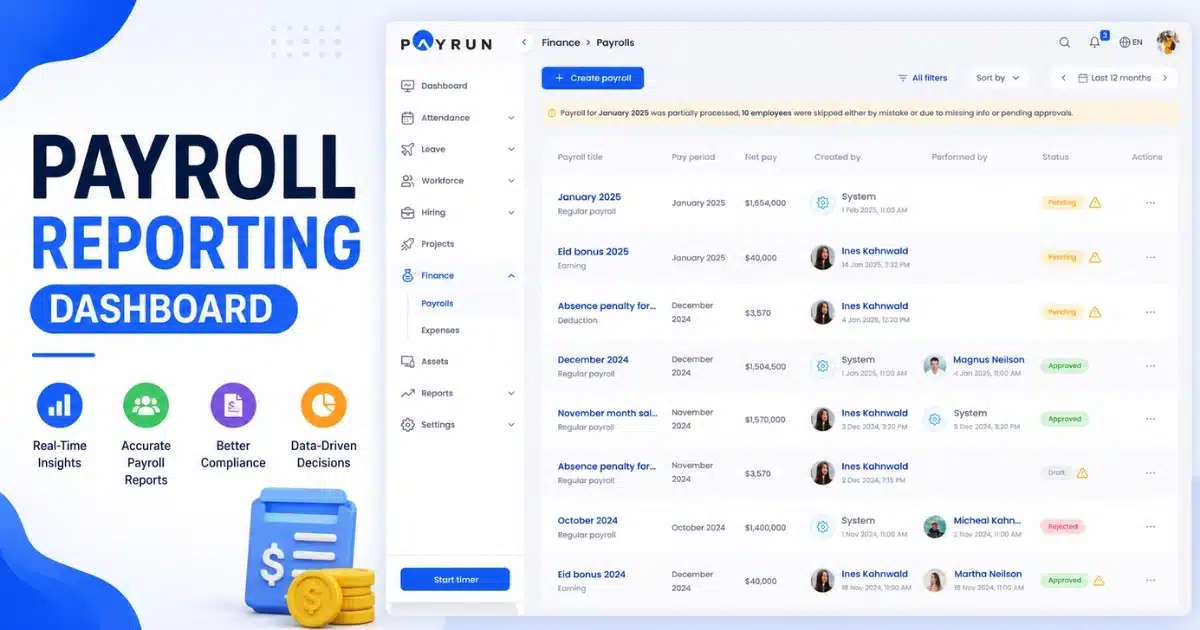
Managing payroll manually often leads to delays, compliance risks, and operational stress for growing businesses. Manual payroll processes require constant data verification, complex wage calculation, and careful handling of tax withholding, which can easily lead to costly errors. An automated payroll system simplifies these challenges by enabling automatic payroll processing, accurate payroll calculations, and better control over sensitive payroll workflows.
Modern solutions also integrate with time tracking tools and support multi state payroll requirements, helping organizations adapt to changing labor laws while maintaining accuracy. Instead of struggling to run their own payroll across disconnected systems, businesses can ensure compliance and maintain consistent payroll operations through automation. By reducing manual effort and improving accuracy, automated payroll software helps organizations streamline payroll management and focus more on strategic workforce planning.
How Automated Payroll Software Works Day To Day
The typical workflow begins with capturing hours and salaries from your team. Modern automated systems pull this data from time tracking integrations or manual inputs, then apply your pay rules automatically.
From there, the software handles calculating employee wages, PAYE, National Insurance, PRSI, pensions, and any other deductions you have configured. Once calculations are complete, payments go out via direct deposit and digital payslips land in employee inboxes or self-service portals.
Concrete touchpoints make this real. You might import timesheets every Friday, run payroll on the same day each month, and file returns to HMRC or Revenue online without logging into separate government portals. The payroll system handles the submission automatically.
Modern automated payroll software continuously updates tax codes, thresholds, and statutory rates in the background. When tax laws change, you do not have to track every update manually. The system applies new rules before your next pay run.
Most actions become repeatable templates. Your finance lead only reviews exceptions before approving each pay run, saving valuable time compared to rebuilding calculations from scratch every period.
Audit trails record who changed what and when. This becomes vital during financial reviews, due diligence processes, or when answering questions from auditors about payroll transactions.
Core Features Of Automated Payroll Software
This section covers the key capabilities that make automated payroll systems valuable for growing businesses. Each feature addresses a specific pain point in managing payroll.
Smart Wage And Salary Calculations
Automated payroll software handles hourly, salaried, and blended pay structures without manual formulas. The system applies overtime rates, bank holiday rates, and shift differentials based on the rules you configure once. Consider overtime at 1.5 times the regular rate after 40 hours per week. With a manual payroll approach, you would need to calculate this for each employee individually. An automated system does this instantly across your entire workforce.
Pro-rata pay becomes straightforward when someone joins mid-month or changes role on a specific date. The software calculates the correct amounts based on start dates and salary changes. Recurring allowances and deductions, such as car allowances, health insurance contributions, or student loan repayments, are stored against each employee profile. These apply automatically every pay run without manual data entry.
Built In Tax And Compliance Management
The software keeps tax bands, National Insurance, PRSI, and statutory payments like SSP and SMP up to date for your relevant country. You do not need to monitor government announcements or update tax settings manually. Tax calculations happen automatically. The system calculates pay as you earn, employer contributions, and generates the correct submissions for HMRC or Revenue on each period end. This supports your efforts to maintain compliance without specialist knowledge.
Year-end processes become simpler. The system automatically creates forms and files needed for year-end, such as P60s for UK employees or Irish year-end statements. No more scrambling to produce documents before deadlines. Built-in alerts warn you when something looks unusual. A missing tax code, a large variance from the previous pay run, or an employee approaching a threshold triggers a notification so you can investigate before approving payroll.
Direct Deposit And Seamless Payment Processing
Payroll connects to business bank accounts, initiates Bacs or SEPA payments, and pays employees on the chosen date without writing cheques or manually processing banking transactions. For example, approving payroll on a Wednesday ensures funds land in employees’ accounts on Friday morning. This predictability builds trust and reduces payday queries.
The same pay run can also include payments to tax authorities and pension providers. Instead of multiple systems and separate banking tasks, everything processes together. On-time pay is not just convenient. It directly impacts employee satisfaction and retention. When staff know exactly when they will be paid, financial planning becomes easier for everyone.
Employee Self Service And Digital Payslips
Employees can log into a secure portal or app to download pay stubs, view historical pay, and update personal details. This reduces the administrative burden on HR and payroll teams. Digital P60s, P45s, and other statutory documents can be delivered through the same portal. No more printing, posting, or chasing employees for addresses.
This self service approach reduces the volume of small payroll queries sent to HR or finance. Questions like “Can you resend my payslip for March 2024?” become unnecessary when employees can access their own employee records anytime. Two-factor authentication and role-based permissions keep sensitive payroll data protected. Only authorized users access the information they need, supporting data security requirements.
Time Tracking, Leave Management, And Integrations
Connections to time and attendance tools mean approved hours flow straight into payroll without rekeying. This eliminates the costly errors that come from transcribing data between multiple systems.
Syncing rota changes and approved holidays weekly ensures overtime and leave pay are correct. Workforce management becomes simpler when your existing systems talk to each other.
Integrations with accounting platforms let you post journals automatically to nominal codes after each pay run. Your accounting software stays updated without manual exports and imports.
APIs and webhooks allow payroll data to move between HR and payroll systems and finance tools. This creates one consistent source of truth for employee data and payroll records.
Reporting, Forecasting, And Analytics
Automated payroll software offers dashboards showing total payroll cost by month, department, or location. At a glance, you see where labor costs are growing or shrinking. Useful reports include overtime trends over the last 12 months, employer tax costs by team, and headcount changes over time. These insights support better financial planning and budgeting.
Exporting data to spreadsheets or BI tools helps founders plan hiring and model cash-flow for the next two quarters. Understanding payroll as a percentage of revenue guides strategic decisions. Storing detailed payroll history from previous years simplifies due diligence if the business raises funding or sells. Investors and acquirers look favorably on clean, well-documented payroll transactions.
Business Advantages Of Automated Payroll In 2026 And Beyond
The benefits of payroll automation extend beyond cost savings. You gain peace of mind, better data, and more time for strategic work. This section speaks directly to owners, finance leads, and HR professionals who want to understand the real impact.
Significant Time Savings For Small Finance Teams
A typical manual process takes one to two days each month. An automated process can be reviewed and approved in under an hour. That is time back in your week. Businesses running weekly payroll for retail or hospitality save several hours every week. Multiply that across 52 weeks and the impact is substantial.
Consider a 20-person agency that reclaimed a full working day per month after switching from spreadsheets. That time now goes into forecasting, scenario planning, and improving employee benefits management. When payroll processing time drops dramatically, your team can focus on growth rather than data entry. HR and finance teams become strategic partners instead of administrative processors.
Improved Accuracy And Fewer Costly Errors
Keystroke mistakes, wrong formulas, or missed overtime lines create underpayments or overpayments. Both have reputational and financial impact. Payroll errors often cost hundreds of pounds per incident once corrections, off cycle payments, and penalties are included. Manual calculations increase this risk with every pay run.
Automated systems apply validations and checks that catch errors before they happen. When something does need to change, corrections are straightforward and documented. Consistency over many pay periods builds trust with staff and stakeholders. People notice when payroll just works.
Stronger Compliance And Lower Risk
Smaller businesses rarely have an in-house payroll specialist. Yet they still face complex requirements around minimum wage, holiday pay, tax filings, and statutory reporting. Automation supports compliance by applying up-to-date payroll rules and keeping clear records of decisions and approvals. You do not need to track every tax law change yourself.
Missing filing deadlines or paying the wrong amount to authorities can lead to fines or interest. Automated systems reduce this chance by handling submissions and calculations accurately. Data protection matters too. Modern platforms use encryption, regional hosting, and strict access controls to protect employee data from breaches.
Better Financial Visibility And Planning
Payroll is often one of the largest expenses. Seeing it clearly each month is essential for budgeting and managing cash flow. Real-time payroll data lets leaders see how a new hire or pay review will affect monthly and annual labor costs. No more surprises at the end of the month.
You can forecast payroll for the next six months based on scheduled increments and expected new joiners. This supports conversations with investors, banks, and advisors who want to see a proven track record of financial management. Clean payroll data also simplifies loan applications and funding rounds. Lenders look favorably on businesses that can demonstrate accurate, well-organized payroll operations.
Improved Employee Experience And Trust
Consistent, on-time payment and clear payslips reduce stress for employees. Nobody wants to chase HR about missing pay or confusing deductions. Features like self service portals, clear breakdowns of tax and pension contributions, and predictable pay dates drive trust. Employees know what to expect and where to find answers.
Fewer errors and faster resolution of any issues supports morale and retention. In competitive job markets, this matters more than ever. A modern payroll experience reflects well on your employer brand during hiring processes. Candidates notice when onboarding is smooth and payslips arrive digitally on day one.
Manual Payroll Versus Automated Payroll Software
Understanding where you stand today helps you see what would change with automation. This comparison highlights the key differences between manual systems and automated payroll software.
Aspect | Manual Payroll | Automated Payroll |
|---|---|---|
Processing time | 1-2 days per month | Under 1 hour |
Error rate | Higher due to manual entry | Reduced through validations |
Tax compliance | Requires manual tracking | Automatic updates |
Audit trail | Limited or scattered | Complete and timestamped |
Scalability | Difficult beyond 15 employees | Handles growth easily |
Staff dependency | Relies on one or two people | Repeatable by any trained user |
Manual payroll is spreadsheet-based, reliant on one or two people, and vulnerable to error or absence. If your payroll person is sick on payday, you have a problem. Automated payroll is rules-based, repeatable, and auditable even when staff members change. The knowledge lives in the system, not just in someone’s head.
The tipping point often comes when headcount passes around 10 to 15 people or when payroll spans multiple locations. At that stage, manual processes simply cannot keep up without risking employee dissatisfaction and compliance failures.
Steps To Implement Automated Payroll Software Smoothly
Switching to automated payroll does not have to disrupt payroll operations. This roadmap helps businesses make the transition with confidence.
Assess Your Current Payroll Process
Start by mapping your current process from collecting hours to filing taxes. Note where delays happen, where errors are frequent, and where manual rework slows things down. List the current tools you use. Spreadsheets, email chains, banking portals, and paper forms all create friction. Identify where data often goes out of date or gets duplicated.
Understanding your pay schedules, headcount, and employee types will shape how you configure the new payroll system. Different contract types and payment frequencies need different setups. Set clear goals for the switch. You might aim to cut processing time in half, eliminate off-cycle correction runs, or reduce the number of payroll queries reaching your HR professionals each month.
Choose The Right Automated Payroll Platform
Match software to your business size, growth plans, and geography rather than choosing purely on price. A tool that works for a 500-person company might be overkill for a 20-person team. Evaluation factors include ease of setup, support quality, integration with existing accounting software, and local tax compliance coverage. If you operate in both UK and Ireland, you need a platform that handles both jurisdictions.
Transparent pricing matters. Avoid platforms that charge extra for essentials like year-end tax forms or compliance support. These costs add up and disrupt payroll budgets. Test the system with a demo or pilot run using real but anonymised data. See how it handles your specific payroll tasks before committing.
Prepare Data And Plan The Cutover
Gather employee records, historical pay data for the current tax year, and information about benefits and deductions. Data migration is often the most time-consuming part of implementation. Cleanse your data before import. Resolve duplicates, confirm bank details, and verify tax codes. Starting with clean data prevents problems in your first live pay run.
Run at least one parallel pay run where manual and automated calculations are compared line by line. This confirms the new system produces correct results before you rely on it fully. Choose a quieter month or pay period to make the switch. Avoiding peak times reduces pressure and gives you space to resolve any issues.
Train Your Team And Communicate With Employees
Even intuitive software benefits from short, focused training sessions for finance, HR, and managers. Comprehensive training ensures everyone knows their role in the new process. Communicate clearly with staff about what will change. A new payslip layout, a self-service portal, or different payment timing all deserve advance notice. Reassure them that pay amounts and dates remain consistent.
Set up a simple feedback channel for the first few pay runs after go-live. Early feedback helps you catch issues and build confidence in the new system. Document checklists so payroll can be covered during holidays or sickness. The goal is to remove single points of failure from your payroll operations.
Best Practices To Get The Most From Automated Payroll
These practices help businesses that already use automated systems to tighten controls and unlock more value from their investment.
Keep Payroll Rules And Employee Data Up To Date
Review tax codes, pension settings, and allowance rules regularly. Tax year changes and budget announcements often bring updates that need configuration changes. Build a simple process for updating salaries, promotions, and contract changes. These should reflect in the system before the next pay run to avoid corrections.
Accurate start and end dates prevent overpaying leavers or missing payments for new joiners. A few days of incorrect data can create significant cleanup work. Check periodically that integrations with HR and time systems still work correctly. Data flows break sometimes, and catching problems early prevents payroll disruptions.
Use Validation, Approvals, And Audits
Even with automation, review steps matter. Variance checks against last month help catch unusual items before payments go out. Role-based approvals work well for larger teams. One person prepares payroll and another signs off. This separation of duties reduces risk and supports compliance.
Schedule quarterly or bi-annual internal audits of pay calculations, tax filings, and access permissions. These reviews catch drift and ensure your processes stay tight. Clear logs make external audits and funding rounds smoother. When investors or auditors ask questions, you can show exactly what happened and when.
Leverage Reporting For Better Decisions
Review payroll reports alongside revenue and margin each month. Understanding labor costs in context helps you make better business decisions. Track metrics like payroll as a percentage of revenue, overtime as a share of total hours, and employer payroll taxes by team. These numbers tell a story about efficiency and growth.
Use historical payroll data from previous years to plan hiring, adjust staffing levels, or redesign shift patterns. Past patterns inform future decisions. These insights guide conversations about flexible working, overtime policies, and reward structures. Payroll data becomes a strategic asset, not just an administrative output.
How Payrun Helps Businesses Automate Payroll With Confidence
Payrun is a modern, cloud-based payroll platform designed for UK and Irish businesses that want reliable, compliant automation without complex overhead. It handles the routine work so your team can focus on growth.
In concrete terms, Payrun manages pay calculations, PAYE, PRSI, pensions, and digital payslips while keeping legislation up to date in the background. You do not need to monitor government announcements or manually update tax settings when rates change.
Key strengths include easy setup, clear workflows, and responsive support that understands local payroll rules and real small business constraints. The platform was built for businesses that want to process payroll without becoming payroll experts.
Payrun integrates with commonly used accounting tools and time tracking systems. Data moves automatically between platforms, eliminating double-entry and reducing the risk of errors between your HR and payroll systems.
Specific benefits include quicker onboarding of new employees, reduced month-end stress, and clean reports for investors, banks, or advisors. When you need to show a proven track record of accurate payroll management, the data is ready.
If you manage payroll yourself or with a small team, explore how Payrun can take over routine payroll tasks so you can focus on what matters most. Growing businesses deserve payroll that grows with them.
FAQs
Is Automated Payroll Software Suitable For Very Small Teams?
Even businesses with three to five employees benefit from automated payroll. Accurate tax, pensions, and tax filings are required regardless of headcount. Using software early prevents bad habits with spreadsheets and makes scaling much easier. Lighter plans keep costs low while still delivering compliance support.
How Secure Is Cloud Based Payroll Compared With Spreadsheets?
Reputable payroll platforms use encryption, strong authentication, and role-based permissions. This contrasts sharply with emailed spreadsheets that can be forwarded or stored on unprotected devices. Regular backups and controlled data centres reduce the risk of losing payroll data due to hardware failure.
How Long Does It Take To Switch To Automated Payroll?
Most small businesses complete the switch in one to three weeks, depending on data quality and pay complexity. The majority of time goes into gathering employee data and running a parallel test payroll. With guided onboarding, the first live run often happens by the next pay cycle.
Can Automated Payroll Handle Different Contract Types And Pay Schedules?
Modern systems support salaried staff, hourly workers, temporary staff, and casual workers in the same company. Mixed schedules work too, with monthly pay for office staff and weekly pay for frontline teams. Each group has its own templates while feeding into unified reports.
What Happens If Payroll Rules Change After I Set Everything Up?
Payroll platforms regularly update statutory rules like tax bands, minimum wage rates, and statutory pay amounts. When internal policies change, admins can adjust tax settings without rebuilding the whole system. Good vendors communicate changes clearly so you understand what has updated and when.