A strong mobile HR app now stands at the center of modern workforce management because employees expect instant access to HR tools directly from their mobile devices. A mobile-first approach allows your company to streamline HR operations, improve employee self-service, and keep every part of your workforce connected, no matter where they work.
Teams gain faster visibility, smoother communication, and a better employee experience because critical HR processes stay accessible inside one simple app. From updating profiles to checking payslips or completing approvals, a mobile HR app removes friction and helps human resources teams operate with greater speed and clarity. As work becomes more flexible, mobile HR becomes essential for organizations that want to stay aligned and efficient.
Why Businesses Need A Mobile HR App
A mobile HR app helps hr teams and employees stay connected, improves communication, and supports a stronger company culture. It keeps the workforce informed and makes essential HR tasks easier for everyone.
Better Team Communication
A mobile platform gives hr teams and employees a direct communication channel. Updates, alerts, and company news reach everyone instantly, reducing delays and misunderstandings. This strengthens collaboration across remote, hybrid, and on-site teams. Employees receive clear information at the right time, helping them stay aligned with organizational priorities. HR departments also benefit from faster feedback cycles, allowing them to respond to employee needs with greater accuracy. Continuous communication keeps teams informed and builds trust across the organization.
Higher Employee Engagement
A mobile hr experience gives employees the ability to manage tasks on their own, which boosts engagement. When employees can access information, request leave, check documents, and review updates without waiting for HR support, they feel more empowered and involved. This active participation increases satisfaction and reduces frustration. Engagement improves job commitment, productivity, and overall morale. For hr professionals, having an engaged workforce means fewer repeated inquiries and more streamlined daily operations.
Workforce Alignment
Mobile access ensures employees stay informed about key updates, policy changes, and internal requirements. Push notifications help deliver information quickly, ensuring the workforce remains aligned with ongoing hr processes and organizational goals. Employees stay aware of performance schedules, reviews, training sessions, and compliance reminders. This ongoing visibility reinforces clarity across departments. When employees understand what is expected and what is happening within the company, productivity improves naturally.
Stronger Company Culture
A strong culture forms when communication is open and employees feel included. A mobile hr app gives hr departments an easy way to share recognition, welcome new hires, and highlight achievements. This strengthens connections and reinforces shared values. The app becomes a central place where employees participate in company updates, events, and community activities. By staying connected daily, employees build a deeper sense of belonging and commitment to the organization.
Competitive Advantage
Adopting a modern mobile solution helps companies stay ahead in a fast-changing market. Faster decision-making, streamlined approvals, and flexible access help hr professionals operate more efficiently. This agility gives companies an advantage in responding to workforce needs, managing distributed teams, and supporting real-time operations. Businesses that embrace mobile tools can move quickly, reduce administrative barriers, and maintain consistent performance. This adaptability helps both hr departments and managers maintain operational strength in dynamic environments.
Suitable For All Business Sizes
Both small businesses and large businesses benefit from a mobile hr system. Smaller companies gain efficiency and reduce manual tasks, allowing teams to save time and operate more effectively. Larger organizations manage complex processes, multiple locations, and high employee volumes more easily with mobile access. The app allows every employee, regardless of location or job level, to stay informed and connected. This universal accessibility improves employee experience, enhances internal communication, and ensures hr functions remain consistent across the company.
Key Features Of A Mobile HR App
A modern mobile HR app gives employees and managers easy access to essential HR functions and helps organizations streamline daily tasks. It supports faster decisions, better visibility, and a stronger employee experience.
Automated Workflows
Automated workflows remove manual steps and reduce repetitive tasks for HR teams. Requests move through clear approval paths, ensuring consistency across departments. Employees submit time off requests, update information, or complete forms without delays. Managers review and approve tasks directly from their devices, improving overall responsiveness. Automation also reduces the risk of errors, helps teams follow internal policies, and creates a smoother operational rhythm. A well-built system ensures tasks reach the right person at the right time, keeping processes efficient.
Push Notifications
Push notifications help employees stay informed without relying on email or office visits. HR teams use them to share urgent alerts, policy updates, reminders, and new approvals. Employees receive real-time messages about time off requests, benefits updates, performance cycles, and other HR tasks that require attention. This immediate visibility keeps the workforce aligned. Managers also benefit from faster notifications for approvals and deadlines. Clear, timely communication strengthens the connection between employees and the organization.
Attendance Tracking
Attendance tracking helps HR teams maintain accurate records for work hours, shifts, and daily presence. Employees check in and check out from their phones, which reduces manual paperwork and improves accuracy. HR teams verify attendance patterns, identify irregularities, and ensure compliance with company policies. Attendance data directly supports payroll accuracy, overtime calculations, and performance insights. A mobile system gives managers quick access to team attendance summaries, making oversight simpler and more transparent.
Time Tracking
Time tracking allows employees to record work hours, project time, or task completion with easy access. This feature simplifies reporting for employees while giving HR teams clearer visibility into productivity trends. Accurate time logs help managers understand workloads, spot capacity issues, and plan resources more effectively. Companies benefit from better cost control and improved transparency. Mobile time tracking also supports remote and field teams who need instant access outside traditional office environments.
Benefits Administration
Benefits administration becomes simpler when employees access benefits information from their mobile devices. They review eligibility, explore available plans, and handle benefits enrollment through a centralized app. This reduces confusion and support requests while helping HR teams manage benefits more efficiently. Clear visibility into health, insurance, retirement, and other benefit options improves employee satisfaction. HR teams also use mobile tools to communicate updates, enrollment deadlines, and policy changes.
Performance Management
Performance management tools inside a mobile HR app help employees and managers stay aligned with goals, reviews, and development tasks. Employees access goals, track progress, and view evaluation cycles easily. Managers complete reviews, give feedback, and acknowledge achievements without waiting for desktop access. This supports continuous performance improvement and encourages employee recognition. Clear communication around goals and milestones strengthens accountability and helps teams stay productive throughout the year.
Hr Self-Service On Mobile
Employee self service on a mobile device gives employees immediate access to essential HR functions without depending on HR managers for every small request. It simplifies hr processes, reduces delays, and ensures employees always have critical information available when they need it.
Profile And Personal Information Updates
Mobile employee self service lets employees update personal information directly from their phones. Changes to contact details, emergency numbers, or bank information no longer require forms or manual submissions. This reduces HR workload and ensures employee records remain accurate. New hires also gain faster access to onboarding details, helping them settle in quickly. With everything available on a mobile device, updates become simple and immediate.
Access To Employee Documents
Employees can view salary slips, tax forms, contracts, and other employee documents anytime. They no longer wait for HR teams to share files manually, which improves overall efficiency. Having critical information readily available supports transparency and reduces repeated questions. For hr managers, digital document access eliminates the hassle of storing and retrieving paper files. It also ensures all documents stay organized, secure, and accessible in one place.
Quick Access To Employee Records
Employee records stay updated and accessible through a mobile interface. Employees review their job details, shift schedules, benefits information, and performance history without visiting HR. This helps individuals stay informed and reduces dependency on hr departments. HR teams also benefit from improved accuracy, as employees can directly verify and confirm their own information.
Faster Leave And Request Submissions
Mobile self-service allows employees to submit leave applications, reimbursement requests, or general inquiries with just a few taps. This creates a smoother flow for hr processes and allows managers to approve or decline requests quickly. Immediate access speeds up the entire cycle, reducing confusion and ensuring everyone stays aligned. Employees appreciate the convenience, and managers gain better visibility into team schedules.
Real-Time Access To Critical Information
Having immediate access to critical information improves decision-making for employees and keeps them informed about policies, announcements, and internal updates. Whether it is reviewing attendance logs, checking approval status, or accessing company guidelines, mobile access removes delays. Employees stay updated even when away from the workplace, supporting a more connected and self-sufficient workforce.
Support For New Hires
New hires benefit from a mobile-first onboarding experience. They can review onboarding documents, complete required steps, and access company policies immediately. This reduces the time HR teams spend on manual onboarding and helps newcomers adapt quickly. With everything available in one app, new hires experience less confusion and more confidence as they begin their role.
Reduced HR Workload And Better Efficiency
With mobile employee self-service, HR managers spend less time responding to routine questions. Employees complete everyday tasks independently, freeing HR teams to focus on complex initiatives. This shift increases productivity, improves accuracy, and supports more strategic HR functions. Mobile access enhances collaboration between employees and HR, making processes smoother, faster, and more transparent across the organization.
How To Manage Leave And Payslips On Mobile
A mobile app gives employees easy access to leave options, paid time details, and payroll information. It simplifies time off requests, approvals, and payslip reviews, helping organizations operate with better accuracy and speed.
Submit And Track Time Off Requests
A mobile app allows employees to manage leave quickly by submitting time off requests from anywhere. They review balances, select dates, add notes, and send requests without visiting HR. This removes paperwork and reduces delays, especially for teams working remotely or in the field. Employees also track request status instantly, ensuring full clarity. Managers gain better visibility into team schedules and can monitor patterns or upcoming absences, which helps maintain smooth operations. Mobile tools make the entire leave cycle more efficient and transparent for everyone.
Approve Time Off From Any Location
Managers can approve time directly through their mobile device. Real-time notifications alert them when a request arrives, allowing quick decisions without logging into a desktop system. This improves response time and reduces bottlenecks in HR processes. Faster approvals also help employees plan their paid time confidently. Managers review team availability, upcoming workloads, and overlapping requests before confirming. This makes the approval process more accurate and ensures teams maintain proper staffing levels.
Access Payslips With Easy Visibility
Employees use the mobile app to view monthly payslips with easy access. They check salary breakdowns, allowances, deductions, tax calculations, and payment dates in seconds. This reduces the need for HR support and gives employees full clarity over their earnings. Having payslips available on mobile also ensures important payroll information stays secure and organized. Employees can revisit previous payslips whenever needed for personal records, loan applications, or financial planning.
Review Payroll And Tax Documents
Mobile access helps employees handle payroll-related information beyond just payslips. They can review tax documents, download statements, and check year-end summaries directly from their phones. This eliminates the need to request documents repeatedly from HR. Clear visibility into payroll and tax information builds trust and ensures employees remain informed. For HR teams, mobile access reduces administrative workload and improves record accuracy.
Manage Payroll Communication More Efficiently
Mobile payroll visibility improves communication between HR and employees. HR teams share updates, explain payroll changes, or notify employees about document availability faster. Employees stay informed without needing meetings or long email threads. Better access to payroll information enhances transparency and strengthens overall employee satisfaction.
Mobile Access To Employee Data And Records
Mobile access to employee data and employee records allows hr professionals and hr teams to work more efficiently by keeping essential information available at any time. A mobile hr app or hr platform gives immediate access to the system, helping employees and managers review details without delays and ensuring smoother daily operations.
With mobile access, employees can view their personal profiles, job details, department information, and reporting structure quickly. This reduces dependency on HR and helps maintain accurate employee data. Employees verify and update their own information when needed, improving data quality across the organization. For HR teams, this accuracy supports better planning and decision-making.
Managers benefit from immediate access to team records, including work history, performance summaries, and key employment data. This helps them make informed decisions during evaluations, promotions, or shift planning. Instead of searching through files or requesting documents, everything stays organized in one mobile system.
HR professionals can review employee records when resolving issues, answering questions, or supporting compliance audits. Mobile access allows them to respond faster, even when away from the office. This level of accessibility strengthens operational efficiency and reduces delays in routine HR tasks.
A mobile hr app also centralizes documents such as contracts, ID proofs, certifications, and policy files. Employees and managers retrieve what they need instantly, eliminating manual file handling. With everything available in one secure platform, mobile access improves visibility, enhances transparency, and ensures every team member has the information required to work effectively.
Mobile Workflow Approvals For Managers
Mobile workflow approvals allow hr managers and team leaders to review and respond to requests quickly, keeping hr processes smooth and reducing delays. With automated workflows and clear visibility, managers handle approvals from anywhere, ensuring teams stay productive and aligned.
Faster Review Of Employee Requests
A mobile system helps managers stay on top of requests without waiting to reach a desk. Whether it involves time off requests, shift changes, or document acknowledgments, managers can review details immediately. This level of responsiveness reduces bottlenecks and keeps hr processes moving efficiently. Employees also benefit from quicker decisions, which helps them plan their schedules with confidence. The ability to manage these requests on the go improves communication and supports a more organized team environment.
Approve Time Off With Better Visibility
Time off approvals become simpler when managers can access calendars, team schedules, and workload information from their mobile device. Before they approve time, managers check overlapping requests and ensure there are no staffing gaps. This minimizes scheduling conflicts and maintains operational stability. Real-time updates allow managers to respond quickly, which reduces uncertainty for employees. By improving clarity and decision speed, mobile approvals contribute to better team coordination.
Manage Performance Reviews More Efficiently
Performance reviews often require managers to provide feedback, track progress, and complete evaluation steps. Mobile access allows managers to manage tasks related to performance reviews even when away from the office. They can review employee progress, add notes, and complete sections of the review within the app. This flexibility helps managers maintain consistency in the review process and reduces last-minute rushes. It also supports employees by ensuring evaluations remain timely and well-documented.
Handle Daily Tasks With Automated Workflows
Automated workflows simplify the approval process by sending requests directly to the right managers. Instead of sorting through emails or paperwork, tasks appear clearly in the app with all the required information. Managers complete approvals quickly, reducing administrative workload. Automated routing also ensures hr processes follow defined rules, supporting accuracy and compliance. Managers gain more control over day-to-day tasks, while HR teams benefit from fewer manual interventions.
Improve HR Decision-Making
Mobile workflow approvals give managers the context they need to make informed decisions. They view employee records, request history, and performance details instantly, which improves accuracy in every approval. This visibility supports consistent decision-making and strengthens hr processes across the organization. With fast access to information, managers operate more efficiently and help keep the entire team running smoothly.
Payrun Mobile HR App Overview
The Payrun mobile hr app presents a clear, structured layout that helps employees manage work activities directly from their phone. Unlike many hr apps, Payrun focuses on simple navigation, easy access, and a clean visual flow that supports everyday tasks such as time tracking, attendance review, leave management, and profile updates. The interface feels familiar to users who have experienced other hr mobile apps on Google Play or popular tools like the Zoho People app, but with a more streamlined design.
Home Dashboard Overview
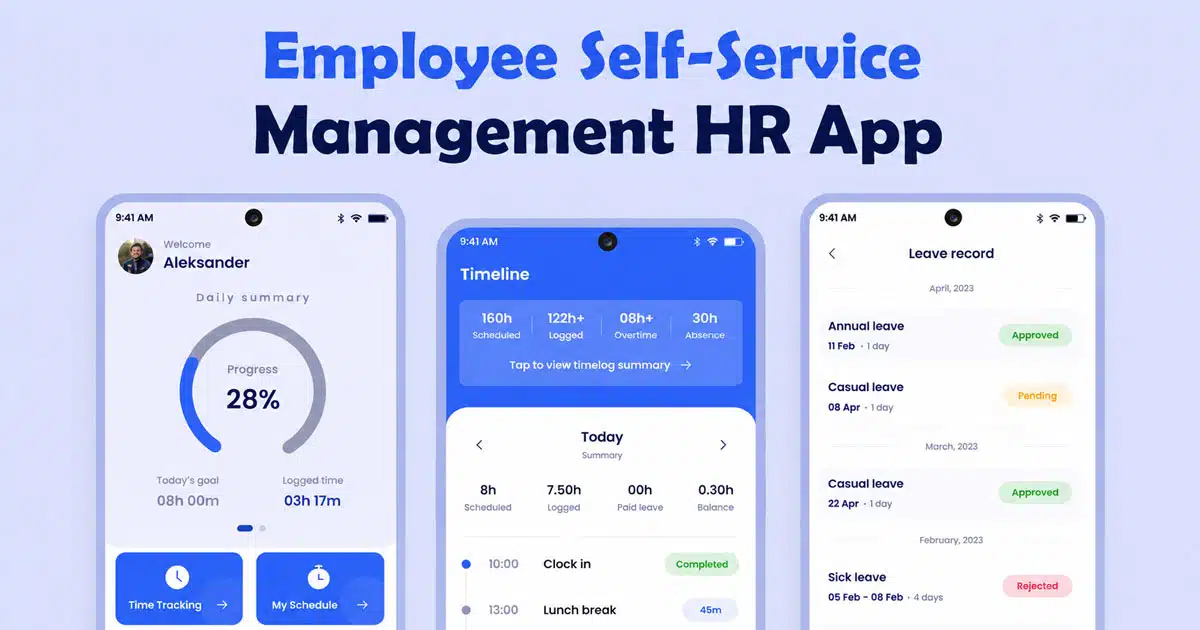
The home screen welcomes the employee by name and displays a Daily Summary section. It shows a progress circle with the day’s goal and logged time, making it easy to understand work completion at a glance. Below the summary, two primary options appear: “Add time entry” and a running timer block. These options allow employees to start logging time instantly without navigating through deeper menus. The Attendance Summary section is presented clearly, with a button leading directly to the detailed breakdown.
Timeline And Work Hours Visibility
The Timeline tab shows detailed work hour information, including scheduled hours, logged time, paid leave, and balance for the selected period. Employees can switch between a calendar view and a timesheet view. Each date displays scheduled hours, actual logged time, leave taken, and the resulting balance. The design helps employees track progress, identify shortages, and manage their hours accurately. The timeline also highlights past entries, making historical data easy to review.
Leave Overview And Availability
The Leave tab summarizes total leave, approved leave, taken leave, and available balance. The top section shows leave totals in a structured layout, while the lower section provides a calendar where employees can view upcoming days, leave usage, and availability. A large add button allows employees to apply for leave without searching for options. This layout gives employees a clear understanding of their remaining leave and past leave patterns.
Notifications Center
The Notifications screen organizes updates into “New” and “Seen” categories. When no notifications are available, the screen shows a simple illustration and a message indicating that updates will appear when available. This clean design helps employees stay aware of important alerts, approvals, changes, or HR communications without clutter.
Employee Profile Details
The Profile screen displays essential employee information, including name, designation, employment status, leave balance, monthly goal, and total logged hours. Additional fields such as email, phone, emergency contact, date of birth, and address are listed for employees to review or update. A section for department details also appears. Everything is organized clearly, making profile management simple and accessible.
Security Measures In A Mobile HR App
A mobile HR app must protect data, maintain compliance, and keep hr operations safe. Strong security ensures employee documents, employee records, and all information inside the hr platform remain protected across the entire system.
Data Protection Standards
A secure mobile HR app uses encryption to protect employee documents and employee records at every stage. Data stays safe during storage and transfer, reducing risks across hr operations. The system applies strict controls and ensures sensitive information is accessible only to authorized users. This protects identities, payroll details, attendance logs, and other confidential records. A strong data protection approach helps companies maintain trust and avoid unnecessary exposure. Encryption and secure protocols also create a safer environment for all HR activities handled through the app.
Access Control Policies
Clear access control rules ensure only verified users can enter the hr platform. Role-based access keeps information organized by responsibility level. HR managers and HR teams can view broader records, while employees access only their own data. The system prevents unauthorized entry through verification steps, helping companies maintain a secure structure. Strong access control is essential for protecting sensitive employee documents and ensuring compliance with organizational policies. It also adds transparency by tracking who accesses or updates specific data.
Compliance With Labor Laws
A secure mobile HR app supports compliance with local labor laws by maintaining accurate data and proper documentation. Attendance, leave records, payroll details, and work hours remain consistent across the system. This helps hr operations align with legal requirements. When all information is stored securely and organized correctly, companies can respond quickly during audits or regulatory checks. Reliable compliance tools inside the app reduce operational risks and ensure compliance becomes part of everyday processes.
Secure Document Management
Employee documents, certificates, IDs, and policies remain safe within the hr platform. A secure storage structure prevents unauthorized downloads or edits. Employees and HR teams access files only through approved channels. This eliminates the risk of lost paperwork or unprotected document sharing. All changes are recorded, giving companies complete visibility over document activity. A secure document system protects important information and supports long-term accuracy and compliance.
Safe Mobile Authentication
A strong mobile HR app uses authentication steps to verify user identity on every login. Multi-factor authentication, secure passwords, and biometric options help prevent unauthorized access. This adds a protective layer across all hr operations. Secure authentication ensures employee records stay protected even if a device is misplaced. The app maintains strict identity rules to keep the entire system safe.
Continuous Monitoring And Updates
A reliable hr platform uses ongoing monitoring, updates, and security patches to defend against risks. Regular improvements keep the system aligned with modern security standards. Quick updates help the app stay resilient against new threats. Monitoring tools track unusual activity, ensuring immediate action if something seems unsafe. Continuous enhancement strengthens compliance, protects employee data, and supports stable hr operations across the organization.
Best Mobile HR Apps In The Market
Choosing the right mobile HR app helps HR teams stay ahead, save time, and improve workforce engagement by integrating essential hr tools directly on employees’ phones. Below is a careful overview of the top 7 mobile HR apps available today, including well-known platforms like Zoho People and modern solutions like Payrun.
1. Zoho People
Zoho People is a widely used hr app known for its strong mobile experience. The Zoho People app allows employees to mark attendance, submit leave requests, access directories, and view shift details directly from their phones. HR managers use the app to review requests, approve tasks, track performance data, and manage distributed teams. Its GPS-based check-ins and flexible attendance settings make it suitable for companies with hybrid or field employees. Zoho People is recognized for offering a balanced combination of time tracking, leave management, and self-service features through an easy-to-use interface.
2. Payrun
Payrun stands out among modern hr mobile apps for its simplicity, clarity, and strong focus on workforce management. Employees use the Payrun mobile hr app to track time, view their daily goals, log hours, and access attendance summaries with minimal effort. The app’s design gives employees easy access to leave information, time entries, and profile details directly from the home dashboard. HR teams benefit from accurate data flow, smooth approvals, and faster visibility across hr tools. Payrun reduces manual work and helps employees and managers save time while maintaining a clean, intuitive experience that supports everyday operations.
3. ADP Mobile Solutions
ADP Mobile Solutions is widely trusted for payroll accuracy and compliance. The mobile app allows employees to view pay statements, access tax documents, check schedules, and submit time-off requests. For HR teams, it supports benefits communication, pay updates, and direct access to payroll information. ADP is especially strong for organizations prioritizing payroll compliance, documentation accuracy, and large-scale workforce management. Its reliability makes it a go-to option for companies of various sizes.
4. Gusto
Gusto provides HR, payroll, and benefits tools tailored for small and medium-sized businesses. While its primary platform is web-based, employees can access essential mobile features to view pay information, request time off, and manage basic HR tasks. Gusto is often recognized for its simple design and people-centric approach to payroll and benefits administration. It is a suitable choice for businesses seeking a straightforward mobile experience for core HR functions.
5. Rippling
Rippling delivers a unified platform that covers HR, IT, and finance. Its mobile app supports time tracking, onboarding, payroll access, benefits updates, and digital document management. Managers handle requests and approvals through automated workflows, and employees complete tasks such as PTO submissions or profile updates from their phones. Rippling is a strong fit for companies wanting a single, integrated system to manage both HR operations and broader organizational functions.
6. BambooHR
BambooHR is known for its user-friendly HR platform, offering solutions for employee records, onboarding, performance management, and engagement. Its mobile app gives employees access to time-off balances, personal information, and company directories. Managers can review requests, track performance details, and monitor team updates. While the mobile app is somewhat lighter in features compared to the desktop version, it remains effective for quick HR tasks and employee self-service.
7. Darwinbox
Darwinbox is a cloud-based HR management system used by growing companies and large enterprises. Its mobile hr app includes attendance, payroll integration, performance tracking, and self-service features. Employees can update profiles, log attendance, and access company documents through the app. HR teams rely on Darwinbox for scalable workforce management and detailed analytics. It is well-suited for organizations needing comprehensive HR tools with mobile support.
How Payrun Helps As Your Mobile HR App
Payrun works as a complete mobile hr app that gives employees and hr teams instant access to essential HR functions. Employees use employee self service tools to manage profiles, track time, view attendance, check leave balances, and submit requests without delays.
HR managers gain faster visibility across teams, allowing them to review approvals, manage schedules, and support daily hr operations more efficiently. Payrun also helps companies handle payroll with greater accuracy while maintaining strong compliance across processes. Its mobile design improves communication, supports benefits visibility, and enhances the overall employee experience.
By keeping everything accessible in one place, Payrun helps organizations operate smoothly and stay organized at every stage of the HR workflow.
FAQs
What Can A Mobile HR App Do For Everyday Employees?
A mobile hr app allows employees to manage essential tasks such as viewing payslips, checking attendance, updating personal details, reviewing leave balances, and submitting requests without contacting HR directly. Employees gain greater independence and instant access to important information, reducing delays and improving overall satisfaction.
How Does A Mobile HR App Help HR Teams Work More Efficiently?
HR teams use a mobile hr app to streamline tasks, reduce manual work, and respond to employee needs faster. They can approve requests, review records, manage attendance summaries, and track ongoing activities even when away from their desks.
How Does A Mobile HR App Improve Manager Oversight?
Managers use a mobile hr app to monitor team attendance, review time entries, check schedules, and approve leave without accessing a desktop system. Real-time visibility helps them make timely decisions, manage staffing needs, and maintain continuity.
Is A Mobile HR App Secure For Sensitive Information?
A mobile hr app uses strong security features such as encrypted data, role-based access controls, and secure authentication to protect employee information. These protections help ensure that employee records, payroll details, and confidential documents remain safe. Reliable apps also support compliance standards that keep company data protected.
Can A Mobile HR App Help With Payroll-Related Tasks?
While payroll systems vary, many mobile hr apps offer basic payroll visibility. Employees may view payslips, check tax details, and verify payment history. HR teams may use mobile tools to review payroll-related updates, confirm attendance inputs, and ensure accuracy before final payroll runs.
How Does A Mobile HR App Support Remote Or Hybrid Teams?
A mobile hr app supports remote and hybrid teams by giving instant access to HR tools from any location. Employees can log work hours, submit requests, and receive updates regardless of where they work. HR teams maintain consistent communication, track attendance accurately, and handle approvals without depending on office-based systems.
Why Should Small Businesses Consider A Mobile HR App?
Small businesses benefit from a mobile hr app because it reduces administrative workload, eliminates manual paperwork, and keeps HR processes organized. Employees and managers can handle tasks quickly, which saves time and improves efficiency. A mobile solution also helps small teams maintain structure and professionalism as they grow.