How to track employee compensation in payroll: salaries, bonuses and changes
Table of Contents
A raise gets agreed in a March one-to-one. Nobody updates payroll, so the next two pay runs use the old salary. In May someone notices, and now you owe back pay and can't say who approved the change or when it was meant to start.
Small teams rarely need compensation software to fix this. They need one record of every pay element, a dated log of every change, and a quick check before each pay run.
Quick overview
Employee compensation tracking means recording every part of an employee's pay (base salary, allowances, bonuses and deductions) and every change to it, with the date it takes effect and who approved it. For a small team that's one salary record per person, one change log and a check before each pay run. Payrun HR software (payrun.app) keeps salary structures and a dated salary history for each employee on its Pro and Ultimate plans.
Record-keeping rules last checked against the US Department of Labor and GOV.UK on 5 November 2026.
Key takeaways
- Track six things per person: base pay, recurring earnings, one-off payments, deductions, overtime rules and the date each one took effect.
- Log every change as a new entry with the old value, the new value, the effective date and the approver. Never overwrite.
- The effective date matters more than the date you typed the change in. Payroll uses the effective date.
- Pay one-off bonuses in their own run instead of raising base salary for a month.
- Check every logged change against the payroll before you approve it, not after payslips go out.
- US employers keep payroll records for at least 3 years under the FLSA. UK employers keep payroll records for 3 years from the end of the tax year.
This guide covers what to track, how to set up a change log (with a template you can copy), how to handle salaries, bonuses and allowances in payroll, and the check to run before every pay run.

What is employee compensation tracking?
Employee compensation tracking is keeping an accurate, dated record of what each person is paid and how that has changed over time. It answers two questions at any moment: what should this person be paid in this pay period, and when and why did that change?
It's different from compensation management. Compensation management is the strategy work: pay bands, salary benchmarking, merit cycles and pay equity reviews. Tracking is the record-keeping that sits underneath it. A 20-person agency might never run a formal merit cycle, but it still has to pay everyone the right amount every month.
When tracking breaks, you get three kinds of problems: people paid on an old rate, bonuses paid twice or not at all, and no answer when someone asks "when did my pay change?"
What should you track for each employee?
Track every element that changes what lands in someone's payslip, plus the facts that explain each change. This table covers it for most small teams.
What to track | Examples | When it usually changes |
|---|---|---|
Base pay and pay basis | $4,000 per month, $25 per hour, £42,000 per year | Hiring, promotion, annual review |
Recurring earnings and allowances | House rent, medical allowance, travel allowance | Role change, policy change |
One-off payments | Bonus, commission, back pay, referral reward | The period they're earned in |
Deductions | Salary advances, unpaid leave, benefit contributions | Each pay period, or when agreed |
Overtime rules | 1.5x hourly rate, or a fixed hourly amount | Contract or policy change |
Effective date | 1 April 2026 | Every change |
Approver and reason | Approved by the founder: annual review | Every change |
For each earning, also record whether it's pro-rated. A pro-rated allowance shrinks when someone works part of a period, and a fixed one doesn't. Say a new hire's house rent allowance is 40% of a $4,000 base, so $1,600 a month. They join with 10 of 20 working days left in the month. Pro-rated, the allowance for that month is $800. Fixed, it's the full $1,600. Decide which you mean before the first pay run, not during it.
How do you set up a compensation change log?
A compensation change log is a list with one row per pay change. Old values stay where they are, and each change gets its own new row. That one rule is what lets you answer "what was this person paid in March?" a year later.
Copy this template into a spreadsheet, or use it as the checklist for what your payroll software should record.
Employee | Change type | Old value | New value | Effective date | Approved by | Date approved | Reason | First pay run |
|---|---|---|---|---|---|---|---|---|
Employee 014 | Base salary | $4,000 / month | $4,400 / month | 1 April 2026 | Founder | 18 March 2026 | Annual review | April 2026 |
Employee 022 | One-off bonus | None | $750 | 30 June 2026 | Head of ops | 24 June 2026 | Q2 project delivery | June 2026 bonus run |
Three rules keep the log trustworthy:
- Never edit an old row. If a change was wrong, add a correction row that explains why.
- Keep the effective date and the approval date separate. A raise approved on 18 March that starts on 1 April belongs in the April pay run.
- Record who approved it. "HR said so" won't hold up when someone disputes a payslip.
What a payroll change form should include
When a manager asks for a change, collect the same fields before anyone touches payroll: the employee, what's changing, the current and new amount, the effective date, the reason, and the approver's name and date. A short form, or a message template in Slack or Teams with those six fields, is enough for most teams under 50 people.
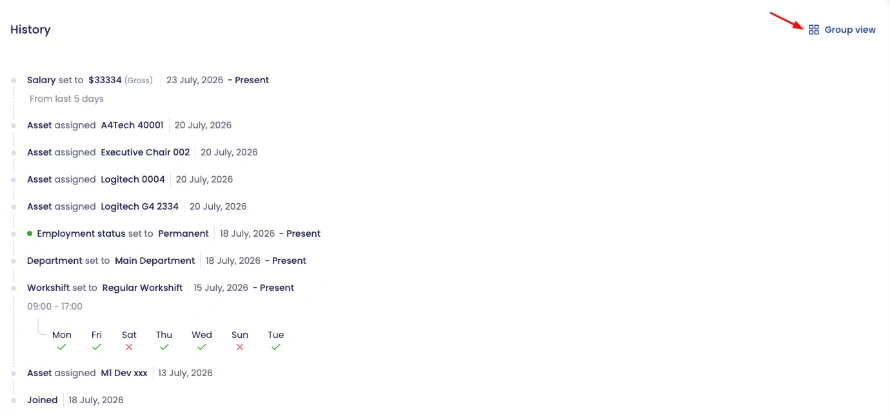
In Payrun, salary changes become part of each employee's profile history. The History page lists every salary change with the amount and the date it took effect, next to department, employment status and workshift changes, so the log builds itself as you update profiles.
How do you track salaries, bonuses and allowances in payroll?
Set the pay rules once, attach them to each employee with a start date, and record every later change against that employee. In practice it takes six steps.
- Create the earnings and deductions you use, each as a percentage of base salary or a fixed monthly amount, and decide whether each one is pro-rated.
- Build the salary structure: how base pay is calculated (per hour, day, month or year), whether overtime applies, and which of those earnings and deductions it includes.
- Assign a structure and a base salary to each employee, with the date it takes effect.
- Record raises and allowance changes as dated changes on the employee, not as edits to last month's payroll.
- Pay one-off bonuses in a separate bonus run, so base salary stays clean and the bonus shows up as its own line.
- Review each employee's salary breakdown after a change to confirm the gross figure is what you agreed.
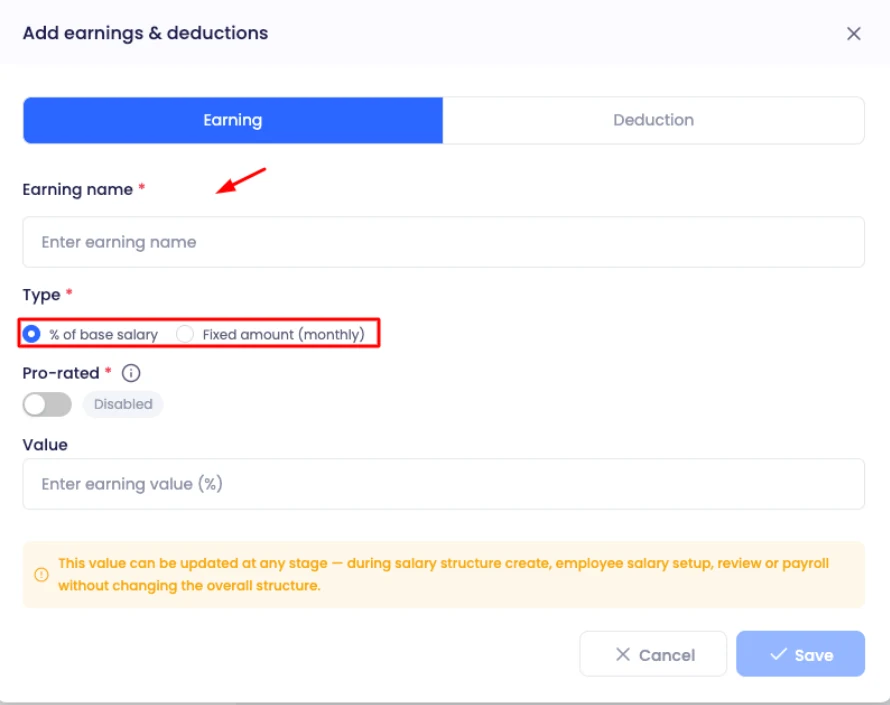
In Payrun this lives under Settings, then Payroll. Start in Earnings & deductions: add earnings such as a bonus, house rent or medical allowance, and your deductions, as either a percentage of base or a fixed monthly amount, with a pro-rated toggle. Then create the salary structure and pick those earnings from the "Earning name" dropdown in its Earning policy. You can set or update an earning's value during salary setup, a salary review or payroll processing. Payroll, including salary structures and payslips, is on the Pro and Ultimate plans.
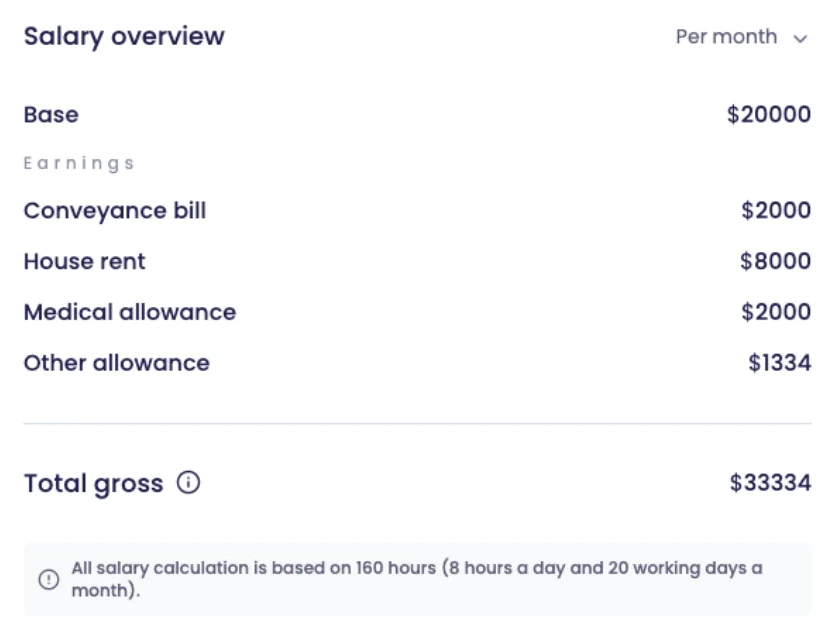
Employees can see their own numbers too. The Salary page in their profile shows the base salary, each earning, the total gross and the date the current salary became effective, as a read-only view. That cuts the "can you check my pay?" messages, because people can check it themselves.
How do you check compensation before every pay run?
Run a five-point check between creating the payroll and approving it. It takes 10 minutes for a small team and catches most errors before anyone gets paid.
- Changes since the last run. Open the change log and list every row with an effective date in this period.
- Dates that fall mid-period. A raise from the 15th means part of the month at the old rate, if your policy pro-rates.
- Joiners and leavers. Confirm their start or end dates and that their pay is pro-rated where it should be.
- Time and leave. Approve pending timesheets and leave first. Both change hourly and pro-rated pay.
- One-off items. Check that this period's bonuses, commissions and deductions are in, and last period's aren't repeated.
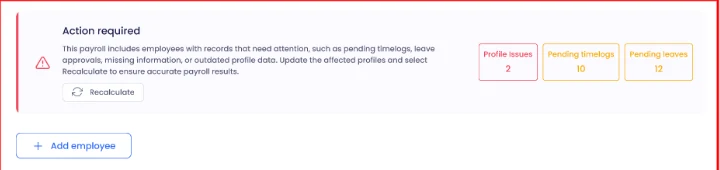
Payrun does part of this for you when you create a payroll. Before calculating, it flags employees with profile issues such as a missing salary structure or outdated salary information, plus pending timelogs and pending leaves. You fix them, recalculate, then review gross pay, overtime, deductions and net pay for each person. Do the check before approving: once a payroll is approved, its payslips are final and it can't be edited.
One scope note: Payrun calculates pay, runs approvals and produces payslips. Tax filing stays with your accountant, payroll provider or Xero. For the full run, see our guide to payroll process steps.
How long should you keep compensation records?
Keep payroll records for at least 3 years in both the US and the UK, and longer where another rule applies. The details differ.
Record | United States (FLSA) | United Kingdom |
|---|---|---|
Payroll records | At least 3 years | 3 years from the end of the tax year they relate to |
Records wages are calculated from | 2 years: time cards, wage rate tables, work schedules, and records of additions to or deductions from wages | Included in payroll records: what you pay and the deductions you make |
Holiday and holiday pay | Set by state rules and your policy | 6 years, from 6 April 2026 |
What the record must show | For non-exempt workers: the basis of pay, regular hourly rate, overtime earnings, and all additions to or deductions from wages | What you pay, deductions, reports and payments to HMRC, and taxable expenses or benefits |
Sources: US Department of Labor, Fact Sheet #21, GOV.UK, PAYE keeping records and GOV.UK, Holiday pay, checked 5 November 2026. In the UK, HMRC can charge a penalty of up to £3,000 if you don't keep full records. This is a summary, not legal advice. State and contract rules can add to it. Our guides to employee payroll records and payroll audits go deeper.
Spreadsheet or payroll software: what works for compensation tracking?
A spreadsheet works while one person runs payroll for a handful of people and nobody else edits it. Once two people update pay, or you pass about 10 employees, the gaps start to cost money.
Need | Spreadsheet | Payroll software |
|---|---|---|
Pay history | Only if nobody overwrites a cell | Each change kept with its date |
Effective dates | You apply them by hand | Used when the pay run is calculated |
Who sees what | Everyone with the file sees everyone | Employees see only their own salary |
Errors before payday | Caught if someone looks | Missing or outdated salary data flagged |
Cost | Free | Paid per user, usually monthly |
If you're comparing tools, our payroll management system guide covers what to look for, and the Payrun payroll feature page shows how it works end to end.
5 compensation tracking mistakes small teams make
- Changing the salary without keeping the old value, so the history disappears.
- Using the date someone typed the change in, not the date it takes effect.
- Adding a one-off bonus to base salary and forgetting to take it out next month.
- Forgetting to pro-rate pay and allowances for joiners and leavers.
- Approving payroll first and checking the changes afterwards, when payslips are already final.
Most of these also show up as deduction errors, so check both together.
How to start tracking employee compensation in 5 steps
- List every pay element your team uses: base pay, each allowance, bonuses, deductions and overtime rules.
- Write down each employee's current values, with the date each one took effect.
- Start a change log from today. One row per change, never overwrite.
- Agree one route for change requests, with the six payroll change form fields.
- Add the five-point check to your payroll calendar, before every approval.
If you'd rather keep this in one system, Payrun's Pro plan includes payroll, salary structures, earnings and deductions, salary history and payslips for $9.95 per user per month billed annually ($16.58 billed monthly). The 14-day free trial covers up to 10 users with no card and no contract, and afterwards the account can switch to the Free plan (up to 5 employees, without payroll). See all plans on the pricing page.