Payroll errors are rarely small when employees are waiting for accurate pay. A wrong deduction, missed overtime entry, or delayed approval can affect employee trust, compliance, and cash flow in the same pay cycle. Payroll workflow automation gives payroll teams a more reliable way to manage payroll without depending on fragmented spreadsheets, email threads, or repeated data entry.
Payroll automation is the use of software to calculate wages, apply tax rules, track deductions, and run payroll with minimal manual work, significantly reducing the time spent on data entry and lowering the risk of errors. It streamlines and manages payroll tasks in a fraction of the time manual processes require, making it a critical part of modern workforce management.
The need is growing. In the Workday Strategic Ascent Of Global Payroll Report, 87% of respondents say evolving payroll complexity is a big challenge. This guide explains practical payroll workflow automation best practices that help HR and finance teams build a cleaner, safer, and more scalable payroll operation.
What Is Payroll Workflow Automation?
Payroll workflow automation is the use of payroll software, connected employee data, approval rules, and payroll calculations to move each payroll cycle from input collection to employee payments with fewer manual steps. Automated payroll systems handle the entire workflow, from importing hours to processing payments and generating payroll reports, allowing HR and finance teams to focus on higher-value work.
Automated payroll systems typically include automated wage and tax calculations, direct deposits, time-tracking integrations, employee self service tools, and secure digital recordkeeping. These automated payroll software solutions simplify complex calculations by automatically applying tax brackets, overtime pay, and benefits allocations, helping teams follow current tax laws and the latest regulations.
Why Payroll Workflow Automation Matters For Modern Businesses
Payroll complexity increases as businesses grow, making manual processes harder to manage accurately and efficiently. Payroll workflow automation helps organizations reduce errors, accelerate payroll processing, strengthen compliance, and improve visibility across payroll operations while supporting workforce expansion and changing business requirements.
Reduce Manual Payroll Tasks
Payroll automation reduces manual data entry, spreadsheet reconciliation, and repeated copying across payroll operations. When employee data, approved hours, leave, expenses, and pay rules flow into one payroll platform, payroll practitioners spend less time fixing avoidable issues and more time reviewing exceptions. For small business owners, HR software for small businesses can also mean less dependence on one person who knows every manual workaround.
Improve Payroll Accuracy
Automated payroll systems can reduce payroll errors because automated systems apply rules consistently and run validations before payroll is approved, minimizing the risk of costly mistakes. The benefits of payroll automation software are visible in real results: Land O’Lakes reported over 99.9% payroll accuracy and 50% fewer off-cycle payments after moving to cloud payroll and employee self-service, according to this case study.
Strengthen Compliance Management
The automation of payroll processes improves efficiency and accuracy while also enhancing compliance by automatically applying current tax tables and retaining required records for audits. This aligns closely with the principles outlined in a small business payroll compliance guide. Payroll automation enhances compliance by automatically applying current tax tables and statutory rules, which helps organizations avoid penalties associated with late filings or incorrect deductions. This matters for payroll taxes, tax filing, tax payments, local taxes, and federal state and local obligations.
Accelerate Payroll Processing
Automated payroll systems can reduce processing time significantly, allowing payroll tasks that once took hours to be completed in minutes. A large manufacturer reported a 70% reduction in payroll processing time after HRMS automation, based on a Presear case study. Faster payroll processing gives payroll teams more time for review before the pay cycle closes.
Support Workforce Growth
As organizations add locations, remote workers, contractors, or international payroll needs, payroll complexity increases quickly. Global payroll and multi-location payroll administration require consistent rules, clean records, and strong visibility. Payroll software for startups and growing teams helps HR and finance teams manage growth by centralizing payroll data and making detailed payroll reports available for budgeting, forecasting, and workforce planning.
Common Payroll Challenges That Automation Solves
Payroll teams often face operational challenges that affect accuracy, efficiency, and compliance. Payroll workflow automation addresses many of these issues by standardizing processes, reducing manual intervention, and improving visibility across payroll activities. Below are some of the most common payroll challenges automation helps solve.
Data Entry Errors
Manual data entry creates risk at every handoff. A payroll manager may receive updated employee information by email, enter it in payroll software, then send separate notes to finance teams. That workflow increases the chance of duplicate data entry, outdated employee records, and incorrect employee payments. Payroll automation work is strongest when data is captured once, validated, and reused across connected systems.
Delayed Payroll Approvals
Delayed approvals can stop teams from being able to process payroll on schedule. Automated approval workflows route timesheets, expenses, leave, and pay changes to the right manager before payroll closes. This helps payroll teams avoid late adjustments, rushed reviews, and unnecessary off-cycle runs.
Inconsistent Time And Attendance Records
Time and attendance data is one of the most important inputs in payroll calculations. When employees work across sites, shifts, or remote schedules, inconsistent records can create incorrect overtime, missed leave, or inaccurate employee wages. Integrated attendance tracking software with real-time timeline views gives payroll teams a clearer view of hours worked before they run payroll.
Compliance Risks And Penalties
Payroll compliance can fail when a business uses outdated tax tables, applies the wrong overtime rule, or misses a filing deadline. Multi-state and remote work can also create nexus and withholding questions, as explained in this multi-state payroll compliance guide. Payroll compliance software, automated tax calculations, compliance calendars, and audit trails reduce the chance of errors, but teams still need human review for unusual cases.
Limited Visibility Across Payroll Operations
Manual processes often leave leaders without real-time insight into payroll cost, tax payments, overtime, or exceptions. Automated payroll systems and employee time log reports provide real-time financial insights, allowing organizations to access detailed analytics on labor costs and spending trends, which supports better budgeting and forecasting decisions. Detailed payroll reports also help HR leaders answer employee questions faster and give finance teams cleaner data for planning.
Payroll Workflow Automation Best Practices
Payroll workflow automation best practices work best when they are designed around accuracy, accountability, and visibility. The following practices apply whether a business uses a payroll management system, an external payroll provider, automated payroll software, or a hybrid model.
Standardize Payroll Processes
Start by documenting the current payroll process, including cut-off dates, approval steps, pay cycle rules, tax deductions, benefits deductions, and payment timelines. Standardization prevents every department from using its own version of the process. It also helps payroll teams identify where manual processes still create risk.
A standardized payroll cycle should define who submits data, who reviews it, who approves it, and who can make changes. Clear ownership keeps payroll administration predictable and reduces confusion when teams need to execute payroll under tight deadlines.
Automate Time Tracking And Data Collection
Accurate payroll processing depends on accurate time, leave, and expense inputs. Time tracking and attendance tracking should connect directly with payroll wherever possible, so approved hours, holidays, overtime, and reimbursable expenses do not need to be rekeyed.
Payroll automation features include employee self service portals that allow employees to access pay stubs, update personal information, and track tax filings without HR involvement, enhancing transparency and reducing administrative workload. Automated payroll systems include self-service portals that allow employees to access pay stubs, update their personal information, and track tax filings independently, which enhances their experience and reduces the administrative burden on HR staff.
Create Approval Workflows And Controls
Automation should not remove accountability. It should make accountability clearer. Approval workflows should cover timesheets, leave, expenses, salary changes, bonus payments, and final payroll review. Role-based controls should separate the person who enters data from the person who approves it.
This is especially important because automated payroll systems often rely on cloud-based platforms, which can introduce cybersecurity risks, including data breaches and unauthorized access to sensitive employee information. Strong permissions, audit trails, and access reviews help protect sensitive payroll data.
Integrate Payroll With HR And Accounting Systems
Payroll should not operate in isolation. Integrating hr and payroll data with accounting, leave, expenses, and timesheet tools reduces rework and helps prevent mismatches between systems. However, integration errors during the implementation of a payroll management system can lead to miscalculations, payment delays, or compliance issues.
Before go-live, test how systems handle complex scenarios such as new hires, terminations, mid-cycle salary changes, expense reimbursements, and leave adjustments. Good integration design helps HR and finance maintain one clear view of payroll operations.
Monitor Compliance Requirements Continuously
Tax laws, wage rules, contribution limits, and tax forms change over time. Payroll teams should review settings regularly and confirm that payroll taxes, deductions, and employee payroll records and statutory reports are aligned with current requirements. Automated payroll systems maintain detailed audit trails for every payroll run, simplifying compliance and making it easier to prepare for audits by retaining required records.
Compliance monitoring should include payroll reports, tax filing dates, tax payments, employee classification, and local taxes. Automation supports this work, but payroll practitioners still need to review alerts, exceptions, and unusual payroll records.
Review Payroll Reports And Audit Trails Regularly
After each payroll cycle, review payroll reports for anomalies such as sudden overtime spikes, negative net pay, missing deductions, or unusual changes in employee payments. Monitoring the payroll process after automation is essential to safeguard against errors and inefficiencies, which includes regularly reviewing payroll reports and ensuring compliance with regulations.
A short post-payroll review can reveal issues before they repeat. Teams should compare gross pay, net pay, tax deductions, benefits, retirement plans, and department cost totals against previous runs. This discipline turns automated payroll from a faster process into a more reliable one.
Key Features To Look For In Payroll Workflow Automation Software
Payroll workflow automation software should provide tools that improve accuracy, efficiency, compliance, and process visibility. The right payroll software platform helps businesses streamline payroll operations, reduce manual work, and maintain consistent payroll management as workforce and operational demands grow.
Automated Payroll Calculations
The right payroll software should calculate gross pay, net pay, overtime, deductions, taxes, and employer contributions accurately. Modern payroll processing software makes automated payroll calculations essential for teams that need to manage multiple pay rates, allowances, bonuses, or statutory rules without relying on spreadsheet formulas.
Custom Approval Workflows
Custom workflows allow a business to define who approves timesheets, who reviews payroll data, and who authorizes the final pay run. This is where payroll automation software becomes more than a calculator. It becomes a controlled process that reduces risk before teams run payroll.
Employee Self-Service Portals
Employee self service reduces repetitive HR questions and improves transparency. Industry data shows that 83% of employers now offer self-service and instant access to pay information, setting a new standard for payroll transparency and employee empowerment. Automated payroll systems significantly reduce the time employees spend waiting for HR responses regarding payroll inquiries, leading to a smoother experience and higher employee satisfaction.
Real-Time Reporting And Analytics
Payroll leaders need real-time visibility into labor costs, tax liabilities, overtime, and exception trends. Strong reporting helps teams compare the current pay cycle to previous cycles, understand payroll processing time, and identify cost savings opportunities. It also supports better collaboration between hr and finance.
System Integrations And Data Sync
Payroll automation software options should be assessed on integration capabilities, user-friendliness, security, reporting, and support. The right payroll software should sync cleanly with employee records, timesheets, leave, expenses, accounting, and employee self-service tools. Automated payroll software should also help teams avoid fragmented data by keeping payroll records and employee information aligned.
How To Implement Payroll Workflow Automation Successfully
Implementing payroll workflow automation requires a structured approach that aligns technology, processes, and people. Choosing simple payroll software for small businesses and proper planning helps businesses reduce disruption, improve adoption, and maximize the benefits of automation while maintaining payroll accuracy, compliance, and operational efficiency throughout the transition.
Audit Existing Payroll Processes
The process of automating payroll begins with assessing the organization's specific payroll needs, which can involve gathering feedback from payroll teams and employees to identify pain points and areas for improvement. Key steps for implementing payroll automation include auditing current processes and conducting parallel testing.
Map how teams manage payroll today, from employee data collection to final employee payments. Identify where manual payroll creates the most errors, delays, or rework.
Define Workflow Rules And Responsibilities
Define who owns each step of payroll processing. HR may own employee data, managers may approve hours, finance teams may review funding and journals, and the payroll manager may approve the final run. Clear rules help prevent missed approvals and unauthorized changes.
Useful workflow rules include:
Workflow Area | Control To Define |
|---|---|
Time And Attendance | Submission deadlines and manager approvals |
Pay Changes | Required approvals for salary or rate updates |
Expenses | Reimbursement review and approval steps |
Final Payroll | Pre-pay review and final authorization |
Reporting | Post-payroll review responsibilities |
Clean And Migrate Payroll Data
Clean payroll data before moving to an automated system. Duplicate records, missing bank details, outdated tax forms, and inconsistent employee information can create errors in the first live run. Once payroll needs are assessed, the next step is to identify the right software that meets those needs, considering factors such as integration capabilities and user-friendliness.
For larger teams, implementation can be phased. Implementing payroll automation typically involves a phased approach, where organizations can start with one department or specific workflows before rolling out the system company-wide to minimize disruption.
Train Payroll And HR Teams
New systems often come with a learning curve, and untrained employees may inadvertently make errors or underutilize payroll automation software features, which can disrupt payroll operations. Training staff on the new payroll system is crucial for a successful transition, as it ensures that all users are familiar with the system's functionalities and can utilize it effectively.
Training should include payroll administrators, HR users, managers, finance reviewers, and employees using self-service. This helps everyone understand how payroll automation benefits the wider business.
Track Performance And Optimize Workflows
Switching to an automated system can cause temporary disruptions, especially if there are unexpected technical issues during deployment, impacting payroll continuity and employee satisfaction. Parallel runs and close monitoring reduce this risk.
After go-live, track payroll accuracy, off-cycle runs, compliance issues, manual corrections, payroll processing time, employee questions, and cost savings. Automated payroll systems can reduce processing time, but the best results come when teams review performance after each cycle and improve the workflow continuously.
Why Businesses Choose Payrun For Payroll Workflow Automation
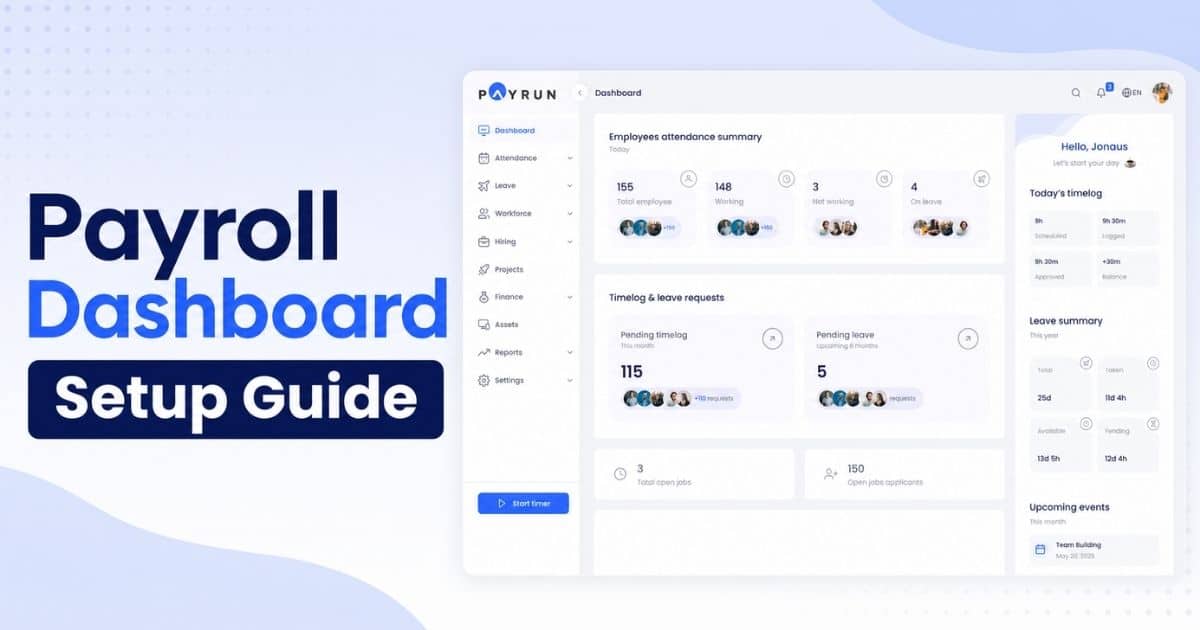
Payrun helps businesses automate repetitive payroll tasks, reduce manual errors, and maintain consistent payroll operations across growing teams. With configurable all-in-one HR and payroll workflow automation, organizations can streamline data collection, approval processes, payroll calculations, and compliance checks within a single platform.
The system centralizes payroll information, making it easier for HR and finance teams to manage employee records, track payroll activities, and maintain accurate documentation. Payrun's innovative HR features and automated workflows help eliminate bottlenecks, improve processing speed, and ensure payroll data remains up to date throughout every pay cycle.
Payrun also supports compliance management through audit trails, approval controls, and automated recordkeeping, helping businesses reduce administrative risk. Real-time reporting and workflow visibility give decision-makers better oversight of payroll operations. As organizations scale, Payrun as a trustworthy HR partner provides the flexibility, accuracy, and automation capabilities needed to support efficient, error-free payroll management.
FAQs
What Types Of Payroll Tasks Can Be Automated?
Payroll workflow automation can handle employee data collection, attendance synchronization, payroll calculations, tax deductions, overtime processing, approval routing, payslip generation, and report creation. Automating routine payroll activities reduces administrative workload, improves consistency, and helps payroll teams complete pay cycles more efficiently and accurately.
How Does Payroll Workflow Automation Reduce Payroll Errors?
Automation reduces payroll errors by eliminating repetitive manual data entry and applying predefined calculation rules consistently. Built-in validation checks identify missing information, duplicate records, and calculation discrepancies before payroll processing. This structured approach helps improve payroll accuracy, compliance, and employee confidence in payroll operations.
Is Payroll Workflow Automation Suitable For Small Businesses?
Yes, payroll workflow automation is highly beneficial for small businesses. Automated processes reduce time spent on payroll administration, minimize costly errors, and support compliance requirements. As the business grows, automated workflows can scale easily without requiring significant increases in payroll staff or administrative resources.
How Can Businesses Measure The Success Of Payroll Automation?
Businesses can evaluate payroll automation through key performance indicators such as payroll processing time, error rates, approval turnaround times, compliance incidents, and administrative costs. Improvements in payroll accuracy, operational efficiency, employee satisfaction, and reporting visibility also demonstrate the effectiveness of automation initiatives.
`What Should Businesses Consider Before Implementing Payroll Workflow Automation?
Before implementation, businesses should assess existing payroll workflows, data quality, compliance obligations, integration requirements, approval structures, and reporting needs. Clear objectives, stakeholder involvement, and employee training are also important for successful adoption. Proper planning helps maximize efficiency and ensures a smooth transition.