Cloud HR Vs On Premise Systems – Which Deployment Model Works Better
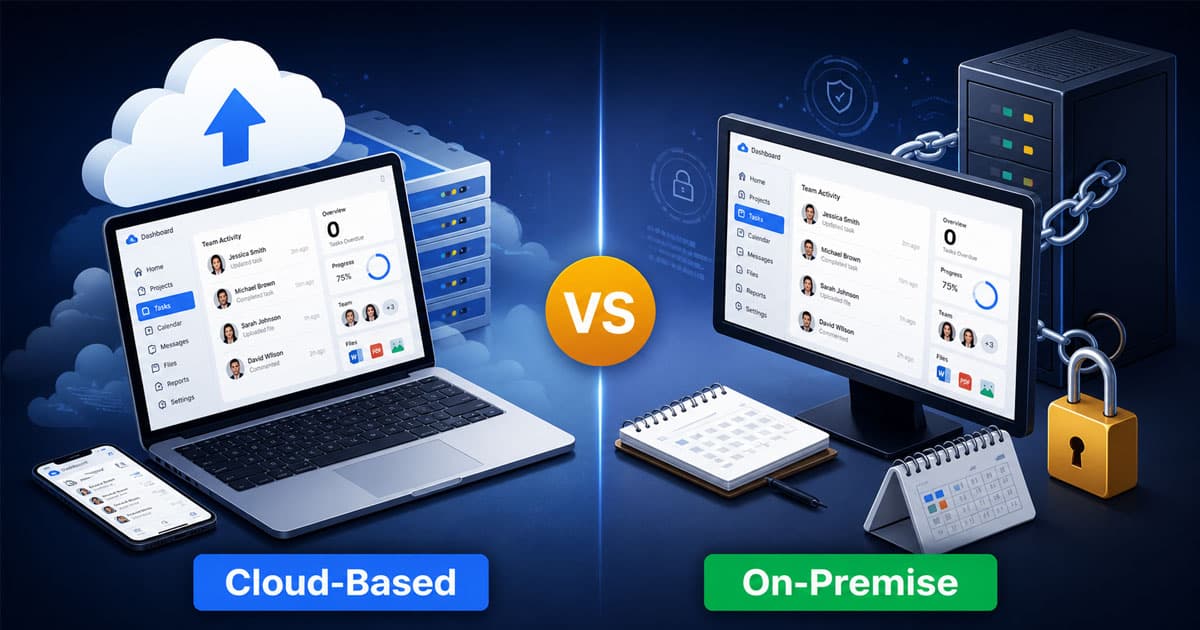
Table of Contents
Choosing between cloud HR and on premise systems affects everything from your IT budget to how quickly you can onboard new employees. Cloud based HR solutions host your data on external servers managed by a vendor, while on premise HR software runs on servers physically located within your own facilities. Neither approach is universally better. The right choice depends on your organization’s size, industry regulations, IT capabilities, and growth plans. This comparison breaks down the key differences across cost, implementation, security, scalability, and maintenance to help you make an informed decision for your HR operations.

What Does Cloud HR Mean
Cloud HR refers to HR software delivered through cloud computing, where data and applications run on remote servers instead of local systems. Cloud HRMS platforms help manage the organization's HR operations such as payroll, attendance, and employee records from any location, often through innovative HR features in modern platforms like Payrun.
Unlike on premise setups, cloud based alternatives reduce dependency on physical infrastructure and support easier scalability. Businesses can access critical systems securely with internet connectivity while avoiding heavy upfront investments.
Implementation services from vendors simplify setup and migration, making adoption faster for growing teams. Cost considerations also become more predictable with subscription models. Many IT leaders prefer cloud HR for its flexibility, efficiency, and ability to support modern workforce demands.
What Does On Premise HR Mean
On premise HR refers to HR software installed and managed within a company’s own servers and infrastructure. All employee data, systems, and processes stay inside the organization, giving full control over data storage, security, and customization.
An internal IT team handles setup, system monitoring, security patches, and ongoing maintenance. This model often requires higher upfront costs, including hardware, software licenses, and networking equipment.
On-premises systems suit organizations with strict data security needs or stable workloads, where greater control and customization outweigh the flexibility offered by cloud-based solutions.
Cloud HR Vs On Premise HR Systems - Key Differences
The core distinction between cloud-based systems and on-premises systems comes down to where your HR software lives and who manages it.
| Factor | Cloud HR | On Premise HR |
|---|---|---|
| Deployment Model | Hosted on cloud platforms | Installed on on premises infrastructure |
| Setup | Quick with simple implementation services | Slower with internal setup |
| Costs | Lower upfront costs, subscription based | High upfront costs and software licenses |
| Maintenance | Managed by cloud vendors | Handled by internal IT team |
| Data Security | Shared responsibility model | Full control over data security |
| Remote Access | Easy remote access via internet connection | Limited remote access |
| Scalability | Flexible with cloud infrastructure | Limited, needs hardware upgrades |
| Updates | Automatic security patches | Manual updates required |
| Best Fit | Medium sized businesses needing flexibility | Medium sized businesses needing control |
Both deployment models can deliver effective human resource management system capabilities. Cloud solutions offer convenience and faster deployment. On-premises solutions provide greater control and customization options. The trade-offs between these approaches shape decisions about cost structure, security measures, and long-term flexibility.
Cost Structure And Financial Impact
Financial considerations often drive the cloud vs on premise decision. The two models distribute costs very differently, affecting both short-term budgets and long-term planning.
Cloud HR System Costs
Cloud based HRMS follows a subscription pricing model with predictable monthly or annual fees. Most cloud providers charge between $7 and $25 per employee per month depending on feature depth and modules selected, which aligns well with HR software designed for small and medium businesses that need affordability and scalability.
This approach means lower upfront costs since you avoid purchasing servers, networking equipment, and software licenses. The subscription typically bundles hosting, infrastructure maintenance, security patches, and customer support into one payment. Organizations shift from initial capital expenditure to operational expenses, making budgeting more straightforward.
Hidden costs can appear with premium support tiers, data storage overages, or additional module fees. Still, total cost of ownership studies suggest organizations can reduce expenses by roughly 34% over three years compared to on premise alternatives.
On Premise HR System Costs
On premise systems require substantial initial investment. You need servers, database software, application licenses, and physical infrastructure including power, cooling, and secure facilities.
Beyond the upfront costs, ongoing maintenance runs between 18% and 22% of your original investment annually. Your organization must budget for dedicated IT staff, hardware refreshes, disaster recovery planning, and system monitoring. Software license renewals add recurring expenses that can surprise organizations used to thinking of on premise as a one-time purchase.
For companies with existing robust IT infrastructure and stable workloads, on premise can become cost effective over extended periods. However, hardware failures and technology obsolescence introduce unpredictable costs that complicate long-term financial planning.
Implementation Speed And Deployment Process
How quickly you can get your HR systems running affects time to value and operational efficiency. The two deployment models differ significantly in this regard.
Cloud HR Implementation
Cloud HR platforms typically deploy within weeks to a few months. Since cloud vendors manage all infrastructure, your team focuses on configuration, data migration, and user training rather than server setup.
Research indicates cloud HR implementations average 7 to 14 months for full deployment, considerably faster than on premise alternatives. Minimal internal IT resources are required during the process. Pre-configured templates, standard workflows, and vendor expertise accelerate the timeline.
Faster implementation means quicker return on investment. Organizations gain access to modern HR management capabilities without extended planning phases or complex infrastructure projects.
On Premise HR Implementation
On premise HR software implementations typically require 11 to 19 months from initiation to go-live. Your IT department must procure hardware, configure networks, establish security protocols, install databases, and deploy application layers before users can access the system.
Internal teams handle installation, integration testing, and user training. Project management becomes more complex with multiple workstreams running simultaneously. Custom configurations and integrations extend timelines further.
Organizations with experienced IT teams and clear requirements can manage these projects effectively. However, the extended deployment period delays benefits and ties up internal resources for longer periods.
Security And Data Control Considerations
Data protection for sensitive employee data ranks among the top concerns when evaluating HR systems. Cloud and on premise deployments handle security responsibilities differently.
Cloud HR Security
Cloud providers invest heavily in enterprise-grade security infrastructure. Most maintain certifications like ISO 27001 and SOC 2, employ dedicated security teams, and implement continuous monitoring across their platforms, all of which directly supports robust employee data protection in HR systems.
The shared responsibility model means cloud vendors handle infrastructure security, encryption, threat detection, and applying security patches. Your organization manages access policies, user permissions, and internal security practices.
Cloud security often exceeds what internal teams can achieve independently. Automatic updates address vulnerabilities quickly without requiring your IT team to schedule maintenance windows. For organizations concerned about data residency, many cloud providers offer regional hosting options to meet compliance requirements.
On Premise HR Security
On premise systems provide full control over data storage, access protocols, and security measures. Your internal IT team decides exactly where employee data resides, how backups work, and which encryption standards apply.
This control matters for highly regulated industries where data protection requirements are strict. Government agencies, defense contractors, and healthcare organizations sometimes require on premise solutions to meet compliance mandates.
However, complete control means complete responsibility. Your organization must staff security specialists, maintain threat monitoring systems, execute regular audits, and manage incident response. Gaps in any of these areas create vulnerabilities. On premise systems that fall behind on security patches face significant risk.
Scalability And Business Flexibility
Your organization’s growth plans and operational flexibility requirements influence which deployment model fits best.
Cloud HR Scalability
Cloud HRMS offers flexibility that on premise systems cannot match. Adding users, activating new modules, or expanding to additional locations happens through subscription adjustments rather than infrastructure projects, which is especially valuable when you simplify remote team management with cloud HR tools.
Cloud infrastructure scales elastically. Seasonal hiring surges, acquisitions, or geographic expansion require no hardware purchases. Distributed teams and remote work arrangements benefit from cloud based systems that provide secure access from any location with internet connectivity.
Resource allocation adjusts dynamically. You pay for what you use rather than provisioning for peak capacity that sits idle most of the time.
On Premise HR Scalability
Scaling on premise HRMS requires purchasing additional servers, expanding storage capacity, and potentially upgrading network infrastructure. Each scaling decision involves procurement cycles, installation time, and integration testing.
Organizations must predict future needs and build capacity ahead of demand. Over-provisioning wastes resources and budget. Under-provisioning creates performance bottlenecks that frustrate users and limit HR operations.
For companies with stable headcounts and predictable growth, careful capacity planning can work effectively. However, rapid business changes or unexpected growth spurts strain on premise systems in ways that cloud shines at handling.
Maintenance And System Updates
Ongoing maintenance requirements differ substantially between deployment models and affect your IT team’s workload significantly.
Cloud HR Maintenance
Cloud vendors handle all infrastructure maintenance, software updates, and feature enhancements. Updates roll out automatically, often without any user-visible downtime.
When tax laws change or new compliance requirements emerge, cloud HR platforms push updates to all customers simultaneously. Your organization benefits from continuous improvement without scheduling update projects or testing compatibility with custom configurations.
This reduces the burden on your IT department considerably. Technical staff can focus on strategic initiatives rather than routine maintenance tasks.
On Premise HR Maintenance
On premise systems place full maintenance responsibility on your internal IT team. Software updates, security patches, database optimization, and hardware maintenance require ongoing attention.
Major version upgrades can be disruptive. Testing, user acceptance, and deployment scheduling create project overhead. Legacy systems that fall behind on updates become increasingly difficult to maintain and vulnerable to security issues.
Specialized technical expertise is required for effective maintenance. Organizations must invest in training or hire staff with relevant skills. Maintenance windows and potential system downtime during upgrades require careful coordination with HR operations.
Business Size And Industry Considerations
Different organizations find different deployment models more suitable based on their specific circumstances.
Small and medium businesses typically benefit from cloud solutions. These organizations often lack large IT teams and prefer predictable costs over heavy initial investments. Cloud based HR eliminates infrastructure management burden while providing access to sophisticated HR software for small and medium businesses features.
Large enterprises with established IT infrastructure may find on premise systems more appropriate. These organizations often have the technical staff and budget to manage complex deployments. Greater customization options allow tailoring systems to specific workflows.
Highly regulated industries sometimes require on premise solutions for compliance reasons. Data residency requirements, audit mandates, and industry-specific security standards may favor on premises infrastructure.
Remote-first organizations strongly favor cloud systems. Secure access from any location, mobile capabilities, and support for distributed teams align with modern work patterns that premise systems struggle to accommodate without additional investment, especially when using HRM software to manage a remote workforce.
Cloud HR Vs On Premise - Which Should You Choose
Choose cloud HR when you need rapid deployment and want to minimize IT management overhead. Cloud based systems work well for organizations prioritizing lower upfront costs, remote access capabilities, and automatic compliance updates. Growing businesses benefit from elastic scalability that adapts to changing needs without infrastructure projects.
Select on premise HR when complete control over employee data and extensive customization capabilities are essential. Organizations with stable workloads, predictable scaling needs, and strong internal IT capabilities can make on premise work effectively. Industries with strict data residency requirements may have limited alternatives.
Hybrid infrastructure approaches can combine benefits of both models. Some organizations keep sensitive data or highly customized modules on premise while running standard HR functions through cloud services. This flexibility allows matching deployment model to specific requirements.
How Payrun Helps Businesses Navigate This Decision
Payrun provides a modern cloud based HR solution designed specifically for growing businesses in the UK and Ireland. The platform delivers enterprise-grade data security without requiring your organization to manage complex on premises infrastructure.
Scalable architecture supports businesses from small teams through large organizations, adjusting as your headcount grows. These capabilities align with what a modern HR management system for growing teams should provide. Comprehensive HR features cover payroll, attendance tracking, simplified leave management for HR teams, and employee self-service through a unified platform accessible from anywhere.
Payrun eliminates heavy upfront investments while providing full functionality through competitive subscription pricing. As a trustworthy partner in HR management, its expert support team helps businesses transition smoothly from legacy systems to cloud based solutions, handling the complexity so your team can focus on strategic HR management rather than infrastructure concerns.
FAQs
Which Businesses Benefit Most From Cloud HR Systems
Small and medium businesses gain the most from cloud HR platforms due to lower IT overhead and predictable subscription costs, making it easier to evaluate the best HR software options for small businesses. Organizations with remote or distributed teams benefit from anywhere access capabilities. Companies experiencing rapid growth appreciate elastic scalability. Businesses without dedicated IT departments find cloud services eliminate infrastructure management burdens entirely.
Which Organizations Prefer On Premise HR Systems
Large enterprises with established IT infrastructure often prefer on premise solutions for more control and customization options. Government agencies, defense contractors, and healthcare organizations with strict compliance requirements may mandate on premises deployments. Companies with significant existing hardware investments sometimes find extending current infrastructure more cost effective.
How Cloud HR Vs On Premise Impacts Data Security And Compliance
Cloud providers typically maintain enterprise-grade security with continuous monitoring, automatic updates, and compliance certifications. On premise systems offer complete control over security measures but require internal expertise to implement effectively. Both approaches can meet compliance requirements when properly configured, especially when supported by robust employee management software for modern HR teams that centralizes data and controls access.
What Are The Cost Differences Between Cloud HR And On Premise Systems
Cloud HR involves subscription fees typically ranging from $7 to $25 per employee monthly with minimal upfront investment. On premise requires substantial initial capital expenditure for hardware and licenses plus ongoing maintenance costs running 18-22% annually. Studies suggest cloud can reduce total costs by 34% over three years.
How Scalability Differs In Cloud HR Vs On Premise Solutions
Cloud platforms scale instantly through subscription adjustments without hardware purchases. On premise scaling requires procurement cycles, installation, and testing. For many organizations, replacing multiple disconnected tools with an all-in-one HR platform further enhances this scalability advantage. Cloud supports unpredictable growth patterns while on premise works best for stable, predictable capacity needs.
Which Deployment Model Offers Better Integration With Existing Tools
Both models support integrations, though approaches differ. Cloud platforms often provide pre-built connectors and APIs designed for common business tools. On premise systems allow deeper customization but require more internal development effort. Your existing technology stack influences which approach integrates more smoothly.