Employee Self Service Payroll For Growing Organizations
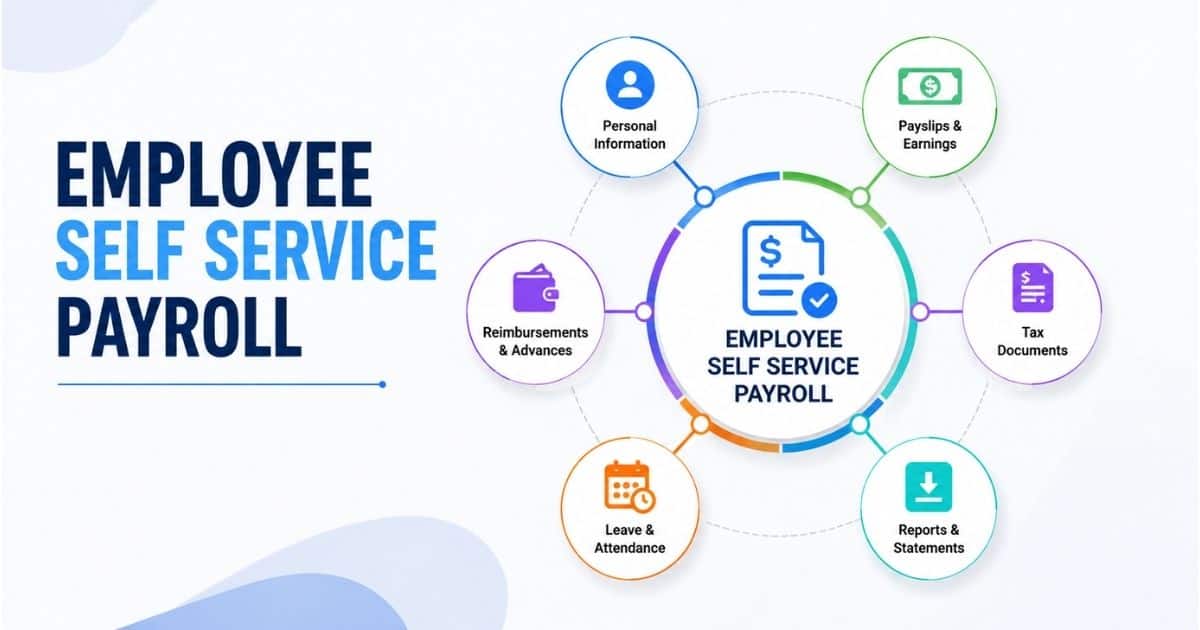
Table of Contents
Employee self-service payroll has become an essential tool for growing organizations that want to streamline payroll operations while improving the employee experience. As teams expand, managing pay stubs, tax documents, leave balances, and payroll inquiries manually can place significant pressure on HR and payroll departments. Employee self-service payroll solutions give employees secure access to their payroll information through a centralized portal, reducing administrative workloads and increasing transparency.
Instead of relying on HR teams for routine requests, employees can view payment records, download tax forms, update personal information, and access payroll-related documents whenever needed. For growing businesses, this improves efficiency, reduces errors, and saves valuable time. Employee self-service payroll also supports better workforce management by providing convenient access to important information while helping organizations maintain accurate and organized payroll processes at scale.

What Is Employee Self Service Payroll
Employee self-service payroll is a digital portal or app where employees can view payslips, download pay stubs, update personal details, manage selected tax information, request time off, and access payroll information without waiting for HR intervention. It is part of the broader employee self-service, or ess, experience, but it focuses specifically on pay, tax, time, leave, benefits, and employee records that affect payroll.
General employee self-service may include policy documents, company directories, benefits enrollment, onboarding tasks, and HR information. Payroll self-service goes deeper into paycheck visibility, deductions, tax forms, time entries, leave balances, and the data that flows into payroll processing. A well-designed employee self-service portal ensures that when connected correctly, employee updates are not just stored in a profile. The changes apply to payroll workflows after the right validation or approvals.
Why Growing Organizations Need Employee Self Service Payroll
Growth changes payroll from a back-office routine into a business-critical process. More locations, schedules, pay types, and employees create more questions, more changes, and more risk unless the organization adds scalable self-service processes early, often supported by HR software for small and medium businesses.
Rising Payroll Complexity As Headcount Grows
At 25 employees, payroll may still feel manageable with spreadsheets, email, and manual checks. By 50 employees, there are usually more pay rates, bonuses, overtime calculations, dependents in benefits records, and different leave patterns. By 100 employees, even a small number of payroll questions per person can create a heavy administrative load.
Consider a company that grows from 30 to 150 employees in three years. At first, HR can email copies of payslips, update an address manually, and answer direct deposit questions one by one. Later, payroll staff may spend two or three days before each pay run chasing timesheets, checking bank changes, and confirming leave status. A self-service portal gives employees faster access while helping payroll teams process information in a more consistent way.
Cost And Time Savings In Payroll Administration
ESS payroll systems reduce the administrative burden on HR and payroll teams by minimizing routine data entry and document retrieval. When combined with automated payroll software, organizations can further streamline calculations, compliance checks, and payment processing. Workzoom reports that employee self-service portals can reduce HR administration time by 40% to 60%, especially for routine questions and updates.
For a 100-person organization, assume each employee creates just 10 minutes of payroll-related admin per month through requests for stubs, tax forms, bank updates, or leave balances. That is more than 16 hours of HR time monthly. If self-service cuts that by half, HR gets nearly a full workday back every month for strategic tasks such as workforce planning, onboarding improvement, and policy updates.
By empowering employees to manage their own data through self-service systems, organizations can significantly reduce administrative workloads, allowing HR to focus on more strategic tasks. By empowering employees with self-service access to their payroll and HR information, organizations can reduce administrative burdens on HR departments, allowing them to focus on strategic tasks.
Employee Expectations For Digital Access
Employees already use banking, shopping, and scheduling apps outside work. They expect the same convenience when they need to view a paycheck, download pay stubs, check benefits, or update contact details. A 2025 HiBob survey found that 65% of U.S. employees prefer digital payroll over manual payroll processes.
Employee self-service systems provide 24/7 access to HR and payroll data, allowing employees to manage their information anytime and anywhere. With self-service payroll systems, employees can access their personal information, time-off requests, pay stubs, and benefits enrollment from any device, providing convenience and flexibility.
This is especially important for remote, shift-based, and frontline employees who may not sit near HR. When staff can access employee self-service through a secure login from a desktop or phone, especially when paired with smart attendance tracking software, they do not need to wait until the next business day to get basic info.
Compliance, Audit Trails, And Risk Reduction
Growing organizations need evidence of who changed what, when it changed, and whether approvals were completed. A strong employee self-service payroll system creates timestamps and audit trails for changes to bank details, address records, tax status, leave requests, and employee information.
Validation rules also reduce risk. For example, a portal can reject an incomplete bank account number, flag an invalid tax identification format, or require an approval before a sensitive change is enabled for the next payroll cycle. Maintaining accurate employee payroll records within this environment gives payroll teams more control without forcing every task through manual email.
New hires can submit tax forms electronically, expediting the onboarding process. That single change can reduce first-payday issues because payroll teams receive required forms immediately instead of waiting for paper documents.
Improved Employee Engagement And Trust
Transparency in ESS payroll allows real-time access to earnings, deductions, and leave balances, fostering trust in the workplace. Employees can see how gross pay becomes net pay, which benefits deductions were taken, and whether approved leave has been reflected correctly.
Empowering employees with self-service HR and payroll software increases engagement and builds trust by allowing them to manage their own data and decision-making processes. Access to personal data, time-off balances, and benefits through self-service systems helps employees feel in control of their work life, thereby boosting employee engagement.
HiBob’s payroll research also found that 44% of employees have noticed a payroll error at some point, even though many still say they feel confident about payroll accuracy. Clear explanations beside fields such as overtime rate, tax withholding, and benefit deductions can reduce confusion and help employees understand whether pay calculations are correct.
Features Of An Effective Employee Self Service Payroll Portal
An effective portal should be simple enough for employees to use without training and controlled enough for payroll teams to trust. The best systems combine secure access, clear workflows, accurate records, and an intuitive experience, often delivered through modern payroll software with automation and self-service features.
Secure Access To Payslips And Payroll History
Employees should be able to log in securely and view current and historical payslips. Employees can view and download current and historical pay stubs and tax documents securely online. That access helps employees provide income proof for loans, rentals, visa applications, or personal financial planning without needing to contact HR for copies.
Payslips should clearly separate earnings, deductions, employer contributions, and year-to-date totals. The language should be easy to understand. Employees should not need to decode internal payroll codes to understand why their pay changed.
A simple download button for PDF stubs can remove many recurring requests from HR. It also ensures employees get consistent documents rather than screenshots or manually prepared summaries.
Self Service Updates To Personal And Banking Details
Employee self-service payroll systems allow employees to enter and manage their HR and payroll information themselves, which can include updating contact information, direct deposit details, and benefits enrollment. This can cover home address, phone number, emergency contact, communication preferences, and selected bank or tax details.
Sensitive changes should include safeguards. Bank updates may require confirmation messages, approval workflows, or review by payroll before the change affects the next pay run. This keeps the process easy for employees while protecting the business from fraud or accidental errors.
Self-service HR technology enables employees to enter and manage their own HR and payroll information, which increases accuracy and reduces errors caused by data reentry. When employee information flows directly into payroll after approval, HR avoids copying data from emails into another system.
Digital Access To Tax Forms And Year-End Documents
A payroll portal should store year-end wage statements, tax documents, and other required payroll records in one secure location. Employees should be able to retrieve older copies when they need them for personal tax filings, audits, mortgages, or employment verification.
Security is essential because these documents include sensitive income and identity data. Encryption, access controls, and audit logs help ensure that each employee can only view their own records, while HR and payroll administrators have access appropriate to their roles.
Self-service HR technology can streamline processes such as benefits enrollment, tax updates, and communication, leading to faster and more efficient operations within HR departments. During tax season, digital access reduces inbound questions and helps employees act faster.
Time, Attendance, And Leave Management Integration
Payroll accuracy depends on time data. Employees should be able to record work hours, review timesheets, request time off, and check leave balances through the same service they use for payroll information, supported by clear distinctions between time tracking and attendance tracking.
Approved time entries should flow into payroll calculations for hourly pay, overtime, shift differentials, and allowances. Well-implemented attendance management systems reduce manual reentry and give managers a clearer view of scheduling, absences, and team capacity before payroll is finalized.
Managers also need fast approvals. If a manager can approve leave or timesheets from a mobile device, payroll teams spend less time chasing missing information close to cutoff.
Mobile Access And Employee Experience Design
A growing company may have field workers, remote workers, part-time employees, and staff without regular desktop access. Mobile access is no longer optional. The portal should make it easy to view pay, update employee data, check leave, and submit requests from any device, ideally through an all-in-one HR platform like Payrun.
Navigation should use clear labels such as Pay, Time Off, Benefits, Personal Details, and Tax Forms. Short help text can explain what a deduction means or why a field is required. The goal is ease, not complexity.
How Employee Self Service Payroll Improves Accuracy And Compliance
Payroll accuracy improves when information comes from the source, follows consistent rules, and remains traceable. Employee self service payroll supports compliance by reducing manual handling, improving data quality, and creating reliable records for review.
Manual Data Entry Error Reduction
Traditional payroll processes often rely on emails, spreadsheets, or handwritten forms. Every handoff creates a risk that someone will mistype a number, miss an attachment, or update the wrong employee record. BSI notes that manual data entry error rates can range from 1% to 8%, depending on the process and controls.
Self service reduces those handoffs. Employees enter and review their own information at the source, while validation rules check for missing or inconsistent data. Self-service payroll features enable employees to review their paychecks before submission, helping to identify and correct errors, which increases data accuracy and reduces payroll discrepancies.
A missed payment caused by one wrong bank digit can take hours to investigate, reverse, communicate, and correct. A portal that checks account format before submission can prevent that issue before payday.
Consistent Application Of Payroll Rules
A connected payroll system applies pay rules, tax rates, deductions, and leave policies from a central configuration. That matters when employees move between roles, locations, pay grades, or employment types and is a core part of effective payroll processing for growing businesses.
If overtime rules, allowance policies, or benefit deductions sit in different spreadsheets, inconsistencies are hard to avoid. With centralized payroll information, approved changes can update payroll logic in a controlled way.
Employees also benefit when they can view the rules that affect their pay. A short explanation of overtime thresholds, leave accruals, or pre-tax benefit deductions gives employees autonomy and reduces unnecessary disputes.
Tax And Labor Law Compliance Support
Payroll compliance depends on complete and current data. Work location, residency, tax declarations, benefit elections, and employment status can all affect withholding, contributions, and reporting.
When employees submit updated tax forms or withholding information through self service, payroll teams are less likely to use outdated instructions. The system can store each change with a timestamp, creating evidence for audits or regulator questions.
For organizations expanding into new regions, consistent workflows help reduce local variation. Clear approvals for sensitive updates also make it easier to show that payroll followed company policy and legal requirements.
Security And Data Privacy Protection
Employee payroll records contain salary, bank information, tax identifiers, address details, and personal data. A secure portal should use encryption, strong authentication, and role-based access so employees only see their own records, while managers see only the team information required for their work.
Alerts are also valuable. If banking information, passwords, or contact details change, the employee should receive a notification so unauthorized access can be spotted quickly.
Secure digital processes reduce the need to move physical papers around the office. That improves privacy and gives HR better control over where sensitive data lives.
A Reliable Single Source Of Truth
Disconnected tools create conflicting records. One spreadsheet may show an old address, another system may show a different leave balance, and payroll may have a third version of the same employee data.
A single source of truth helps leaders make better decisions using accurate headcount, overtime, labor cost, and leave data. It also helps HR, payroll, finance, and managers work from the same information by replacing disconnected HR tools with one platform.
Paylocity’s State of Payroll research found that 64% of organizations report at least 1% payroll leakage monthly, and organizations with fragmented systems in the 50 to 249 employee range spend about 12 hours per month correcting payroll issues compared with about 5 hours when systems are connected.
Best Practices For Rolling Out Employee Self Service Payroll In Growing Organizations
A successful rollout is not only a software launch. It is a change in how employees, managers, HR, and payroll share responsibility for accurate data, timely approvals, and better day-to-day service.
Clear Objectives And Success Measures
Start with measurable goals. For example, reduce payroll questions by 30% in six months, reach 80% employee login adoption within 90 days, or cut manual address changes by half in the first quarter.
Track a small set of indicators: number of self-service logins, payslip downloads, data changes submitted by employees, helpdesk tickets, and payroll corrections. These measures show whether employees are using the system or still relying on old processes.
The objectives should support the company’s growth plans. If the business is entering new locations, hiring faster, or standardizing HR processes, the employee self service payroll rollout should directly support those priorities.
Employee-Centric Workflow Design
Map common journeys before launch. These include first login, pay stub download, bank update, leave request, tax form submission, and benefits enrollment. Include employees, managers, HR, and payroll staff in the review, and apply principles from broader HR workflow automation to keep steps simple and scalable.
Each workflow should use simple labels, fewer screens, and clear status messages. For example, after an employee submits a bank change, the screen should show whether the update is pending approval or added to the next payroll cycle.
A pilot group can reveal issues quickly. Test with office employees, frontline staff, managers, and new hires. Their feedback can improve forms, help text, and navigation before the wider rollout.
Communication And Training Campaign Plan
Employees need to know what is changing, why it matters, and how to use the portal. A communication plan should include pre-launch messages, launch-day instructions, and follow-up reminders.
Use short guides for specific tasks, such as how to download stubs, update an address, view leave balances, or request time off. Include screenshots, a contact option for support, and a clear login link.
Managers can help adoption by reminding teams to use self-service instead of sending routine payroll questions to HR. This keeps the change practical and reinforces the new way of work.
Change Management And Employee Concerns
Some employees may worry about technology, privacy, or making mistakes. Address those concerns directly. Explain what information employees can change, which updates need approvals, and how sensitive data is protected.
Self-service should be framed as giving employees faster access and more control, not shifting risk onto them. HR still oversees policies, exceptions, and sensitive changes.
Keep support available during the first few pay cycles. Helpdesk contacts, office hours, printed guides, and assisted logins can help employees who are less comfortable with technology.
Feedback And Usage Data Iteration
After launch, review adoption and support patterns. If many employees ask where to find tax forms, the navigation may need improvement. If many bank changes are rejected, the form may need better validation or clearer instructions.
Short surveys can capture ease of use, clarity, and satisfaction. The most useful feedback often comes from repeated friction points rather than one-off requests.
Set a quarterly review cadence. As the organization grows, the portal may need new workflows, additional languages, better mobile guidance, or refined approval rules.
How Payrun Empowers Employee Self Service Payroll For Growing Organizations
Payrun supports growing organizations that need payroll, employee management, leave, timesheets, expenses, hiring workflows, and administrative controls in one dependable platform. It is built for teams that want clear processes without adding unnecessary complexity.
With Payrun, employees can access payslips and relevant payroll information, while HR teams manage centralized employee profiles, salary details, timesheets, leave data, and approvals. This gives employees better visibility and helps HR maintain accurate records across the employee lifecycle, leveraging Payrun's broader HR management features.
Payrun’s timesheet and real-time attendance timeline features help teams track work activity, review attendance, and make informed payroll decisions. Its leave management software supports requests, approvals, holiday management, and team-level visibility, so payroll teams can account for approved absences before each pay run.
Payrun also helps HR teams manage expenses and reimbursements with submission workflows, approval status visibility, and clearer records. Its centralized employee record management system and streamlined leave management for HR teams work alongside hiring and recruitment workflows that support structured pipelines and onboarding, so new employee information can be set up cleanly from the start.
For growing clients, including SaaS and software companies, Payrun's HR and payroll platform provides the practical foundation for employee self-service payroll: centralized data, reliable payroll processes, employee access to payslips, manager approvals, and administrative control. Its positioning as HR software for small businesses and its mission as a trustworthy partner in HR management mean the result is less time spent on manual follow-up and more confidence in every pay cycle.
Frequently Asked Questions
How Does Employee Self Service Payroll Affect Payroll Cutoff And Processing Times
Employee self-service payroll helps payroll teams close each cycle faster because employees submit updates, review information, and resolve issues before a clear cutoff time. There are fewer last-minute emails, fewer missing documents, and fewer manual corrections close to payday. Organizations often see smoother pay runs because payroll teams work with cleaner data earlier in the process.
What Types Of Employee Information Should Be Editable By Employees
Employees can usually update contact details, home address, emergency contacts, direct deposit information, preferred communication details, and selected tax or benefit elections. More sensitive fields, such as base salary, pay grade, manager assignment, and employment status, should remain controlled by HR or payroll administrators. Higher-risk updates should use approval workflows.
How Can Organizations Support Employees Who Are Less Comfortable With Technology
Provide printed guides, short video walkthroughs, live orientation sessions, and assisted login support during the first few pay periods. Keep instructions focused on common tasks, such as viewing payslips, updating addresses, and checking leave balances. Local champions can also help. Managers or HR representatives can walk employees through the portal until self-service becomes routine.
What Happens To Employee Self Service Access When Someone Leaves The Organization
Access should follow company policy and legal requirements. Many organizations deactivate standard access at termination but provide limited read-only access for a defined period so former employees can download final payslips and year-end tax forms. The policy should balance security with document access requirements.
How Should Payroll And HR Teams Handle Errors Submitted By Employees
HR and payroll teams should have a clear review process for employee-submitted errors. The process should explain who checks the issue, how corrections are approved, and whether the change affects the current or next pay cycle. Common mistakes should guide improvements. If employees repeatedly enter incorrect bank formats or choose the wrong tax status, improve field labels, validation rules, and help text so the same error is less likely to happen again.
.jpg)