HR Software Features Checklist For Small Businesses
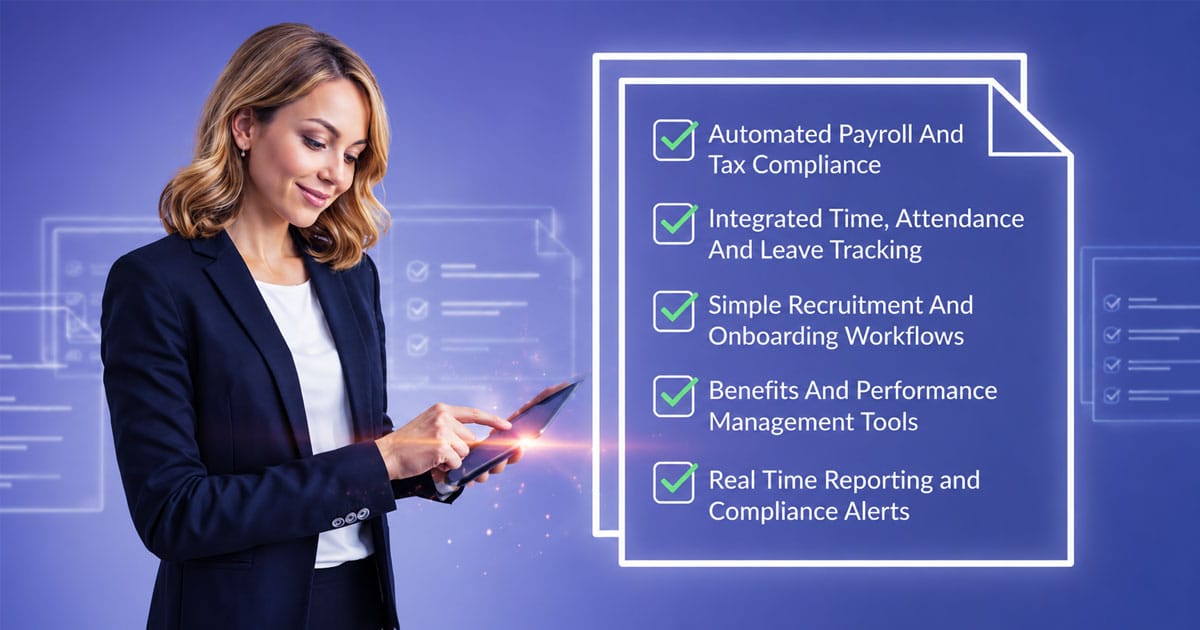
Table of Contents
Selecting the right HR software can feel overwhelming when dozens of vendors promise similar features. According to industry research, HR software has evolved from simple record-keeping systems into comprehensive business platforms that integrate recruitment, payroll, performance management, and employee engagement. For small business owners managing between 10 and 100 employees, the challenge is identifying which software features deliver genuine value without paying for enterprise-level tools you will never use.
This checklist walks you through the essential HR software features every growing business needs. You will learn what to prioritize in human resource management systems, how to avoid common purchasing mistakes, and why certain features matter more than others for your specific situation. Whether you are moving away from spreadsheets for the first time or replacing outdated software solutions, this guide helps you make a confident decision.

What Small Businesses Must Look For In HR Software
Finding the right HR software starts with understanding your day-to-day challenges. A recent study found that HR teams using modern software can reduce manual processes by up to 40%, freeing time for strategic initiatives instead of administrative firefighting. The features below represent the solid foundation every growing business needs.
Centralized Employee Database And Records
A centralized database stores personal details, contracts, right-to-work documents, emergency contacts, salary history, and job changes in one secure location. This single source of truth replaces scattered folders, email attachments, and shared drives that often lead to outdated or conflicting information.
Think about running a quick headcount or salary report. With an HR database, you can pull this in just a few clicks instead of piecing it together from multiple spreadsheets at month end. The employee records stored here feed directly into payroll runs, performance reviews, and onboarding workflows.
Security matters significantly for sensitive fields like salary and bank details. Look for role-based access controls, encryption at rest, and audit logs that track who changed what and when. This data security foundation protects your business during disputes or inspections while giving employees access to their own information when they need it.
Payroll Automation With Tax Compliance Support
Payroll management carries high stakes for small businesses. A single mistake in net pay or tax calculations can damage employee trust and trigger compliance issues with HMRC or Revenue. Manual data entry during payroll processing creates unnecessary risk when automated systems can handle calculations consistently.
Modern payroll software should include automatic tax and National Insurance calculations, support for pension auto-enrolment, and statutory payment handling. Look for direct deposit capabilities, bank file generation, online payslip delivery, and support for both monthly and weekly pay cycles. Automated payroll that pulls hours and salary data directly from your HR system eliminates the re-entry errors that plague manual processes.
Tax compliance features should handle RTI submissions for HMRC in the UK and revenue reporting in Ireland. These automated submissions help small firms stay on top of deadlines without manually compiling data each period. The goal is reducing payroll errors while maintaining legal compliance without requiring specialized accounting knowledge.
Time, Attendance And Leave Tracking Tools
Digital time tracking through browser and mobile applications replaces paper timesheets and ad-hoc messages about who worked when. Leave management features handle holiday calendars, sickness logging, and various leave types including paid, unpaid, sick, and parental options.
The connection between time tracking and payroll processing prevents overpayments and missed deductions, especially for hourly workers. When approved time off synchronizes automatically with payroll, you eliminate the manual reconciliation that causes problems each pay period.
Consider a small retail team where tracking overtime matters for labor costs. With proper workforce management tools, managers can see who is off during school holidays when planning rotas, track overtime accurately, and apply carry-over rules consistently. These time consuming tasks become manageable rather than overwhelming.
Recruiting, Applicant Tracking And Onboarding Features
Even small businesses need applicant tracking capabilities to manage the hiring process efficiently. Simple recruiting tools let you post roles, log candidates, record interview notes, and track offers without purchasing a separate ATS. Scheduling interviews becomes straightforward when everything lives in one system.
Structured onboarding checklists ensure new employees receive a consistent experience. A checklist might include contract signing, right-to-work checks, IT account setup, and training sessions. Digital documents and e-signatures mean a new starter can complete forms before day one, speeding up their first week and reducing HR staff workload.
Offboarding deserves equal attention with steps for recovering equipment, removing system access, and completing final pay. This reduces compliance risks and confusion during employee exits. The employee lifecycle from hire to departure flows smoothly when managed within a single HR management system.
Employee Self Service Portal
An employee self service portal lets staff update personal details, download payslips, request leave, and see upcoming shifts without contacting the HR department. This reduces repetitive admin for owners and office managers who would otherwise handle constant document requests.
Picture a part-time worker logging in on Sunday night to check hours and holiday balance without emailing anyone. That convenience improves employee experience while freeing your HR team for more valuable work. Self service tools handle routine employee requests that previously required manual intervention.
Permissions and approvals ensure that some actions route to managers rather than changing instantly without review. Employees can submit leave requests or expense claims while managers retain oversight of what gets approved. This balance between autonomy and control keeps HR operationsrunning smoothly.
Compliance Monitoring And Alerts
HR software helps with legal obligations such as employment contracts, right-to-work checks, working time rules, and payroll reporting. Built-in compliance support reduces the risk of missing deadlines or failing inspections.
Audit trails for changes to pay, roles, and personal data show who changed what and when. This documentation proves valuable during disputes or regulatory reviews. Rather than manually compiling evidence, you can generate reports showing exactly how decisions were made and recorded.
Look for systems that provide alerts before certifications expire, contracts need renewal, or probation periods end. These proactive reminders prevent the oversight that creates compliance risks for growing businesses.
How Robust Features Improve Small Business HR Operations
The right software features transform HR operations from reactive firefighting into proactive business management. Research indicates that automating repetitive HR tasks can reduce administrative work by significant margins, letting HR professionals focus on talent management and employee development instead of paperwork.
Reduce Manual Work And Human Error
Manual processes create opportunities for error at every step. Typing salary data from one spreadsheet into another, copying employee information across systems, or calculating leave balances by hand introduces mistakes that accumulate over time.
HR systems that connect payroll, time tracking, and employee data eliminate duplicate entry points. When an employee updates their address in the self service portal, that change flows through to benefits administration, payroll processing, and tax withholding calculations automatically. This single-entry approach dramatically reduces the errors that damage employee trust.
Consider payroll processing specifically. When your time tracking data feeds directly into payroll calculations, you avoid the scenario where someone manually enters 38 hours instead of 48 hours and an employee receives the wrong pay. These automated connections save time while improving accuracy.
Improve Employee Experience And Engagement
Employee engagement suffers when staff cannot easily access basic information about their employment. If requesting a day off requires sending three emails and waiting two days for a response, frustration builds. If finding a payslip means asking the HR manager to search through folders, employees feel unsupported.
Modern HR platforms improve the daily experience for everyone. Managers get visibility into team schedules and pending approvals. Employees can handle routine tasks independently. The HR department can focus on strategic initiatives rather than answering the same questions repeatedly.
Self service tools and mobile access meet employees where they work. Someone checking their payslip on the train home, or a remote worker submitting an expense claim from their kitchen table, expects these capabilities from any modern employer. Meeting those expectations supports retention.
Enforce Consistent HR Policies
Inconsistent policy application creates legal risk and employee resentment. If one manager approves overtime differently than another, or if leave calculations vary based on who you ask, problems multiply as your company expands.
HR software enforces policies automatically and consistently. The same overtime rules apply to everyone. Leave calculations follow the same formula regardless of which manager approves the request. This consistency protects your business while ensuring fairness.
Centralized policy documentation within the HR portal means employees can reference current guidelines without asking. When policies change, updates reach everyone simultaneously rather than through inconsistent word-of-mouth communication.
Save Time On Routine Tasks
Time spent on admin tasks represents time not spent on growing your business. Small business owners wearing multiple hats often find HR administration consuming hours that should go toward customers, products, or strategic planning.
Automated workflows handle onboarding, offboarding, and lifecycle events without requiring manual coordination. When you hire someone, the system can automatically create calendar invites for training sessions, send welcome emails, provision equipment requests, and create tasks for the manager. Without automation, HR staff must manually email IT, finance, and managers, and someone inevitably forgets a step.
The cumulative effect of saving 10 minutes per task across dozens of weekly tasks adds up to hours available for higher-value work.
Enable Data Driven Decision Making
Reports and analytics features provide insights into HR metrics like turnover rates, employee satisfaction, and performance trends. This enables data-driven decision-making rather than relying on gut feeling alone.
Key performance indicators visible through dashboards let you spot patterns before they become problems. If absence rates spike in a particular team, or if turnover increases among employees with specific tenure, you can investigate and address root causes.
Analytics features also support compensation decisions. Understanding how salary increases affect morale among high performers versus lower performers helps you allocate budget effectively. This quantitative approach prevents scenarios where across-the-board raises are perceived as insulting by top performers.
Prepare For Growth And Workforce Changes
Choosing HR software solutions that scale with your business prevents painful migrations later. A platform that works for 15 employees should handle 50 or 100 without requiring you to start over with a new system.
Scalability means both capacity and capability. As your company expands, you need more user accounts and storage. But you also need features that matter more at scale, like advanced reporting, multi-location support, and integration with other business systems.
Evaluating how the platform handles growth now, while your needs are simpler, saves significant disruption later. Ask vendors about their largest customers and whether the features you need at 50 employees are available in your current pricing tier.
Advanced HR Features Worth Prioritizing
Once core HR functions run smoothly, advanced features provide competitive advantage. These capabilities separate basic HR tools from the best HR software that supports long-term organizational success.
Performance Management And Goal Tracking
Simple but structured performance management tools suit small teams better than complex enterprise systems. Look for goal setting, quarterly check-in templates, and shared notes that keep feedback documented rather than informal.
Centralizing performance reviews and objectives makes tracking progress easier over time. When considering pay raises or promotions, having documented history of achievements and development areas supports fair, defensible decisions.
Modern systems include features like simultaneous review participation where managers and direct reports complete assessments at the same time rather than sequentially. AI-driven workflow features can advance reviews to the next stage automatically. These efficiencies matter when HR professionals manage performance across dozens of employees.
Employee development connects directly to performance. Development modules that track completed training, certifications, and renewal dates ensure your team maintains required qualifications. Learning management systems built into HR software mean managers can identify skill gaps from reviews and immediately recommend relevant training.
Benefits And Compensation Management
Even basic employee benefits like pension contributions, insurance schemes, or wellness stipends need accurate tracking. Benefits administration within your HR system ensures correct deductions and employer contributions each month while maintaining compliance.
Centralized benefit records reduce the “how many days do I have left” messages that consume HR time. Employee wellness programs, when tracked properly, demonstrate your investment in staff beyond just salary.
Compensation management features help you understand labor costs by department, role, or location. This visibility supports budget planning and helps you identify when salaries fall below market rates, which retention analytics can flag as a departure risk indicator.
Reporting And Dashboard Analytics
Built-in reports and dashboards allow HR teams to generate insights quickly without manual compilation from multiple systems. Standard reports cover absence rates, turnover, headcount by department, and gender pay data with outputs in CSV or PDF formats.
The ability to answer questions quickly matters for small business owners. How many people joined this quarter? What is our average tenure? Which department has the highest overtime costs? Accessing this information in minutes rather than hours changes how you manage your business.
Real-time dashboards reveal systemic bottlenecks and emerging trends. If data shows 40% of employee requests concern the same policy confusion, that insight tells you where documentation needs improvement.
Mobile Access And Remote Work Support
Remote or hybrid teams expect to access HR tools from phones and tablets in 2025. Mobile access is particularly useful for retail, hospitality, trades, and field service teams who rarely use desktop computers.
Simple mobile experiences include clocking in on arrival, submitting a sick note, reading company policies, and approving leave requests from anywhere. Cloud-based platforms accessible from modern browsers work smoothly on mobile without requiring separate app downloads.
The reality of modern work means someone might check their schedule on the bus, submit expenses from a client site, or approve a request while working from home. HR platforms that support these scenarios meet employee expectations.
Integration With Payroll And Accounting Systems
Integrations with accounting software, communication apps, and identity providers remove duplicate data entry and separate logins. Connecting HR and payroll data with accounting platforms enables automatic posting of salary journals.
The practical impact of strong integration prevents data conflicts. If the payroll system says an employee is in department A but another system says department B, managers face confusion about reporting structures. Unified integration prevents these inconsistencies.
Look for open APIs or published integration lists when evaluating providers. Even if you only need basics today, choosing HR software integrates smoothly with other tools prevents future headaches as your tech stack grows.
AI Assisted Workflows And Automation
AI-powered features are becoming standard in HR platforms. Intelligent ticket classification can sort employee requests by urgency, sentiment, and type, then route them to the most qualified specialist. This intelligent routing ensures faster, more accurate resolutions.
No-code workflow customization allows HR teams to build automation recipes for repetitive processes like onboarding or approval workflows without coding expertise. You can create workflows where hiring triggers automatic calendar invites, welcome emails, equipment provisioning, and manager tasks.
Conversational AI agents handle routine queries 24/7 across multiple channels. Questions about benefits, policies, time-off procedures, and payroll get immediate answers without requiring human intervention, with complex issues escalating appropriately.
Common Small Business HR Software Pitfalls To Avoid
Choosing new HR software requires avoiding mistakes that create more problems than they solve. Research shows that failed software implementations often result from misaligned expectations rather than technical failures.
Choosing Too Complex Or Enterprise Only Tools
Enterprise platforms designed for companies with thousands of employees overwhelm small teams. Features you will never use clutter the interface, training takes longer, and pricing reflects capabilities you do not need.
Small businesses benefit from HR software for small companies specifically designed for their scale. These platforms include the features that matter without the complexity that creates adoption barriers. Your HR manager should not need weeks of training to run basic payroll.
Look for software for small businesses rather than scaled-down enterprise versions. The difference shows in interface simplicity, pricing structure, and support responsiveness.
Ignoring Security Or Compliance Capabilities
HR systems contain sensitive information including social security numbers, salary data, and medical information. Choosing a platform without adequate data security creates unnecessary risk.
Verify that any platform under consideration offers encryption, role-based access controls, and compliance certifications relevant to your industry and location. Enterprise-grade security with dedicated HR workspaces protects personally identifiable information and ensures regulatory compliance.
Compliance support should match your jurisdiction. UK businesses need HMRC integration while Irish businesses need Revenue compatibility. Generic international platforms may not handle local requirements adequately.
Prioritizing Price Over Feature Fit
The cheapest option often costs more in the long run. Missing features mean manual workarounds that consume HR staff time. Inadequate payroll capabilities create compliance risks that carry financial penalties.
Evaluate total cost of ownership including implementation time, training requirements, and the value of features included. A slightly higher monthly fee for automated payroll and compliance alerts may save thousands in prevented errors and penalties.
The right HR platform delivers value through efficiency gains rather than just low subscription costs.
Overlooking Mobile And Remote Access
Platforms without mobile capabilities create friction for employees and managers who work outside offices. In 2025, mobile access is an expectation rather than a luxury.
Test mobile experiences during evaluation. Can employees clock in from their phones? Can managers approve requests while away from their desks? If the platform requires desktop access for common tasks, adoption will suffer.
Neglecting Vendor Support And Training
Implementation success depends on support quality. Vendors that disappear after the sale leave you struggling with configuration questions and workflow problems.
Ask about support hours, response times, and training resources before purchasing. Independent reviews from other small businesses reveal whether vendors actually deliver on support promises. Good onboarding assistance accelerates your return on investment.
Step By Step HR Software Evaluation Checklist
Systematic evaluation prevents regretful purchases. Use this checklist to compare HR platforms against your specific needs rather than generic marketing claims.
Define HR Pain Points And Goals
Start by documenting your current HR challenges. Are payroll errors causing employee complaints? Does leave management consume excessive time? Do you lack visibility into workforce costs?
Understanding your pain points ensures you evaluate features that address real problems. A platform with excellent recruiting tools provides little value if your biggest challenge is payroll accuracy.
Set measurable goals for your new system. Reducing payroll processing time by 50%, eliminating manual leave tracking, or consolidating employee data into one system give you benchmarks for success.
List Mandatory And Nice To Have Features
Separate requirements into must-have and nice-to-have categories. Mandatory features might include automated payroll, leave management, and employee records. Nice-to-have features might include performance reviews, analytics dashboards, and applicant tracking.
This prioritization prevents you from choosing platforms that excel at optional features while lacking essentials. It also helps you compare pricing fairly since you can evaluate what mandatory features cost versus added expenses for extras.
Reference the features covered earlier in this article to build your list. Consider which features address your documented pain points most directly.
Compare Pricing, Scalability And Support
Request detailed pricing from shortlisted vendors including per-employee costs, implementation fees, and charges for features you need. Hidden costs for payroll processing, support, or integrations inflate total expense significantly.
Evaluate scalability by asking about pricing at 25, 50, and 100 employees. Some platforms become prohibitively expensive at scale while others maintain reasonable per-employee rates.
Support comparison should include response time guarantees, support hours relative to your business hours, and available training resources. Ask for references from customers of similar size in similar industries.
Weigh Integration And Extension Options
Document your current tech stack including accounting software, communication tools, and any specialized industry applications. Verify that candidate platforms integrate with these systems or offer APIs for custom connections.
Poor integration means duplicate data entry, inconsistent information across systems, and manual reconciliation work. Strong integration preserves efficiency gains from HR automation.
Consider future needs as well. If you plan to add specific tools later, confirm the HR platform supports those integrations.
Review Security And Compliance Standards
Verify security certifications, data hosting locations, and compliance with relevant regulations. UK businesses should confirm GDPR compliance and UK data residency options. Ask about encryption, access controls, and audit logging capabilities.
Request documentation about security practices and compliance certifications. Reputable vendors provide this information readily while evasive responses suggest inadequate security investment.
HR Software Features Best Practices
Implementing HR software effectively requires more than purchasing the right platform. These best practices maximize your return on investment.
Align Features With Business Size And Growth Plans
Choose features appropriate for your current size while ensuring the platform supports growth. A 15-person company does not need enterprise workforce planning, but should choose a platform that offers it when you reach 50 employees.
Avoid both over-purchasing and under-purchasing. Paying for features you will not use wastes money while lacking features you need creates workarounds that cost time.
Review your 3-5 year growth plan when evaluating platforms. If you plan to double headcount, ensure pricing remains reasonable and features remain adequate at that scale.
Prioritize Payroll Accuracy And Compliance Controls
Payroll errors damage employee trust faster than almost any other HR mistake. When implementing new HR software, prioritize payroll accuracy testing before going live.
Run parallel payroll for at least one pay period, comparing new system outputs against manual calculations. Verify tax calculations, statutory deductions, and net pay amounts match expectations.
Compliance controls should automate reporting requirements for your jurisdiction. HMRC submissions, pension reporting, and year-end documentation should flow from the system without manual compilation.
Automate Routine HR Tasks Without Losing Oversight
Automation frees time but should not eliminate visibility. Configure workflows that automate routine steps while maintaining manager approval for significant decisions.
Leave requests might route automatically to the appropriate manager while large expense claims require additional review. Onboarding might send automatic welcome emails while contract signing requires HR confirmation.
Balance efficiency with control based on your risk tolerance and management philosophy. The goal is reducing admin tasks while maintaining appropriate oversight.
Ensure Data Security And Role Based Access
Configure role-based permissions carefully during implementation. Different roles need different access levels. HR managers need full employee records while team leads need only their direct reports.
Sensitive information like salary data, disciplinary records, and medical information should have restricted access. Configure these permissions before inviting users to the system rather than cleaning up access problems later.
Regular access reviews ensure permissions remain appropriate as roles change. Someone promoted from individual contributor to manager needs different system access.
Use Reporting And Analytics To Guide Workforce Decisions
Build regular reporting into your HR processes from day one. Monthly reviews of absence rates, turnover, and labor costs identify trends early while they remain manageable.
Establish baseline metrics during implementation so you can measure improvement over time. Document current payroll processing time, error rates, and time spent on routine tasks to demonstrate ROI after implementation.
Share relevant reports with stakeholders. Managers benefit from team-level data while executives need organization-wide trends. Configure reporting access that serves each audience appropriately.
How Payrun Delivers A Complete HR Software Features Checklist
Payrun is a modern payroll and HR platform built specifically for small and medium-sized businesses in the UK and Ireland. Rather than scaling down enterprise software, Payrun was designed from the ground up for growing teams who need simplicity without sacrificing capability.
Automated Payroll And Tax Compliance
Payrun centers on compliant payroll processing with RTI submissions for HMRC and Irish Revenue support. Automated salary calculations, deductions, and statutory contributions reduce errors compared to manual processing while ensuring tax compliance.
Employees receive online payslips automatically, and payroll data feeds directly from time tracking and HR records. This integration eliminates the re-entry that causes mistakes and delays.
Integrated Time, Attendance And Leave Tracking
Payrun Time provides clock-in and clock-out functionality, overtime rules, and automatic feeds into payroll. Leave management handles requests, approvals, and holiday visibility so managers and employees see the same information.
Time data flowing directly into payroll means employees are paid accurately for hours worked, including overtime calculations. Leave approvals synchronize with payroll to ensure correct payments each period.
Simple Recruitment And Onboarding Workflows
Hiring and recruitment workflows within Payrun help you manage candidates from application through onboarding. New employees can complete forms before their start date, and structured onboarding checklists ensure consistent experiences.
Centralizing recruitment within your HR platform maintains one source of truth for candidate and employee data rather than separate systems that create information gaps.
Employee Self Service And Mobile Access
Payrun provides cloud-based access from modern browsers with employee portals that work smoothly on mobile. Staff can view payslips, check balances, and submit requests independently.
This self-service approach reduces HR administrative burden while meeting employee expectations for convenient access to their information.
Benefits And Performance Management Tools
Employee management within Payrun includes detailed profiles, centralized data access, and the administrative controls growing businesses need. Benefits tracking ensures correct deductions and employer contributions.
Performance conversations and development tracking help you manage talent effectively as your team grows.
Real Time Reporting And Compliance Alerts
Payrun offers reports for HMRC submissions and revenue reporting that help small firms stay on top of deadlines. Administrative dashboards provide visibility into payroll data and employee information.
Rather than manually compiling reports from multiple sources, you can generate the insights you need quickly and confidently.
Explore Payrun’s website to see how features, pricing, and implementation work for teams of different sizes. Whether you are moving from spreadsheets or replacing outdated software, Payrun provides the solid foundation growing UK and Irish businesses need.
FAQs
What HR Features Are Most Critical For Small Teams?
Small teams should prioritize a secure employee database, compliant payroll processing, basic time and attendance tracking, leave management, and simple document storage. These core features handle daily operations without overwhelming lean HR resources. Advanced features like pulse surveys, detailed performance reviews, or sophisticated analytics features can be added once basics run smoothly and the team has adopted the system comfortably.
Can HR Software Replace A Dedicated HR Person?
HR software automates administrative tasks but does not replace human judgment for complex situations. For very small businesses, the right HR software can delay the need to hire dedicated HR staff by handling routine work efficiently. As organizations grow beyond 30-50 employees, most benefit from at least part-time HR professionals who use software as a tool rather than a complete replacement.
Does Payroll Automation Reduce Errors For Small Businesses?
Yes, payroll automation significantly reduces errors compared to manual processing. When calculations happen automatically based on verified time data and preset rules, the mistakes from manual data entry and formula errors disappear. Studies indicate that manual payroll processing creates errors affecting up to 1-2% of payments while automated systems dramatically reduce this rate.
How Important Is Mobile Access In HR Software?
Mobile access has become essential rather than optional in 2025. Employees expect to check schedules, view payslips, and submit requests from their phones. For businesses with deskless workers in retail, hospitality, or field services, mobile access is critical since these employees rarely sit at desktop computers. Platforms without mobile capabilities create friction that reduces adoption and satisfaction.
How Do HR Tools Help With Compliance?
HR software helps with compliance through automated calculations that follow current regulations, audit trails documenting changes to sensitive data, built-in reporting for required submissions, and alerts before deadlines approach. Rather than relying on manual tracking of contract renewals, certification expirations, or reporting deadlines, the system monitors requirements and notifies you proactively. This reduces the compliance risks that create penalties and legal exposure for small businesses.