Remote and hybrid work arrangements expanded dramatically after 2020, and by 2026, most teams operate across multiple time zones spanning continents from Asia to North America and Europe. This shift created a significant challenge for managers who can no longer observe work happening in a shared office space. Employees juggle tasks across various tools, and manual spreadsheets or ad hoc reports prove unreliable for capturing actual hours worked.
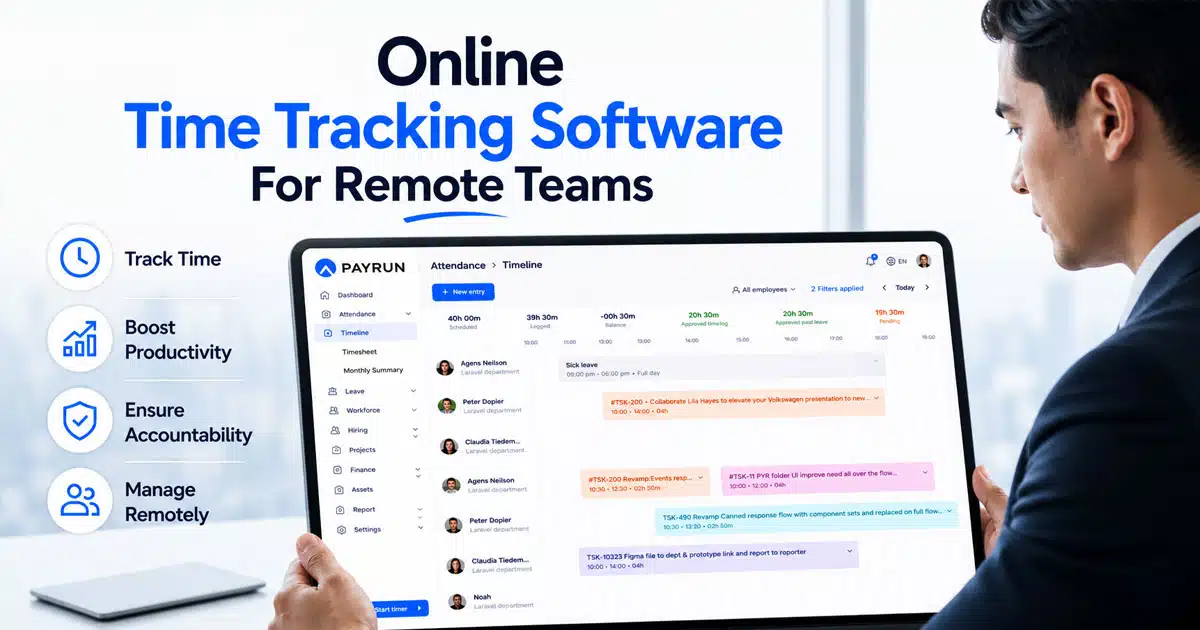
Online time tracking software emerged as the cloud-based solution that records hours and activities in real time from any device, creating a single source of truth for distributed organizations. Time tracking software is essential for businesses to accurately record employee hours, manage payroll, and improve productivity by analyzing time spent on tasks. When accurate time data pairs with payroll and compliance workflows, real business value appears. This article details seven specific reasons remote teams benefit from this technology, along with implementation guidance and answers to frequently asked questions.
What Is Online Time Tracking Software
Online time tracking software refers to web-based or cloud-hosted services that let employees record working time, tasks, and projects from laptops, desktops, tablets, or smartphones. Data is stored centrally in secure servers, updated in real time, and accessible to managers, HR, finance, and team members with appropriate permissions. This approach differs fundamentally from manual spreadsheets or physical punch clocks, which suffer from error rates exceeding 25% according to productivity studies.
Typical capabilities include one-click timers, daily or weekly timesheets, project and client tagging, approval workflows, and straightforward reporting for hours and costs. Many time tracking applications offer features like invoicing, project management, and integration with other productivity tools to streamline workflows. The best time tracking apps in 2026 are evaluated based on criteria such as ease of use, reporting features, and the ability to edit or manually add time entries.
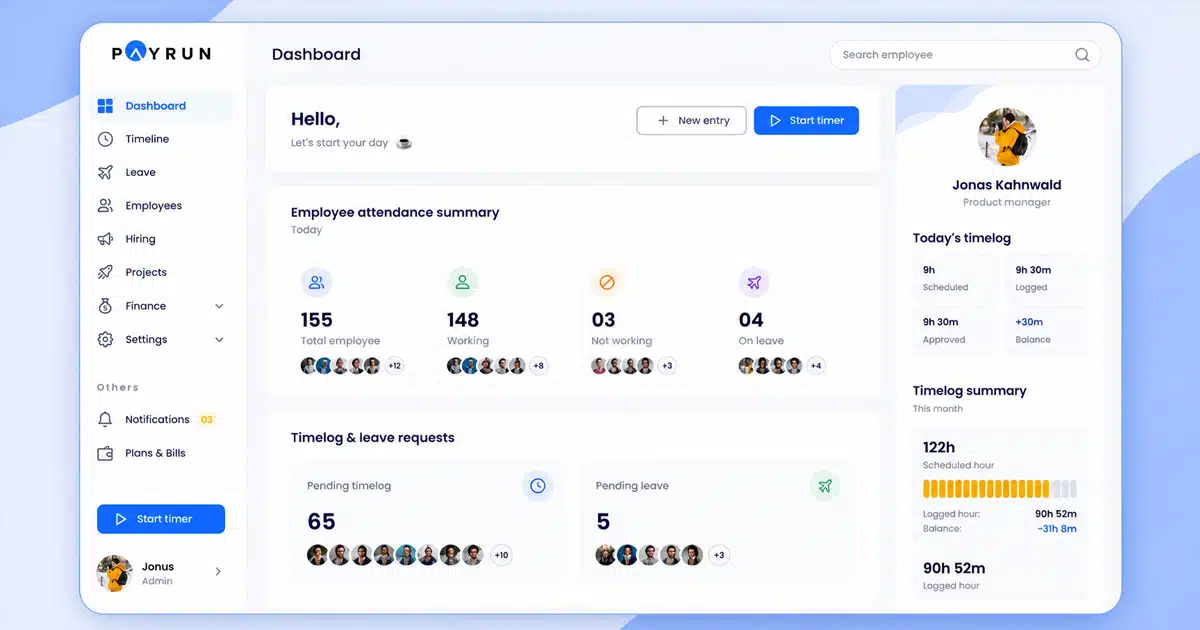
Tools like Payrun focus specifically on connecting time tracking with automated payroll processing so that approved hours flow directly into salary and wage calculations, eliminating the manual exports that traditionally consumed hours of administrative effort each month.
7 Importance Of Online Time Tracking Software For Remote Teams
This core section explains seven concrete reasons online time tracking has become indispensable for remote teams operating in 2026. Each importance point includes practical remote work examples from distributed developers, customer support agents, marketing agencies, and product teams. The focus remains on benefits for both team members and managers, emphasizing productivity gains and fair workload distribution rather than surveillance or control.
1. Improved Productivity And Focus Across Distributed Teams
Real-time digital timers help remote employees see exactly where their workday goes, reducing context switching and minimizing time lost in chat applications and unnecessary meetings. Time tracking software can significantly enhance productivity by providing insights into how time is spent on various tasks, allowing users to identify areas for improvement. When individuals understand their own patterns and use timeline-based productivity tracking, they can protect focus time and structure their days more effectively.
Consider a software development team that uses time tracking to discover daily standups and status calls consume 25 percent of the workday. This visibility prompts changes to meeting length and frequency, reclaiming 10 to 15 hours weekly per developer. Historical time reports reveal patterns like deep work hours in the morning that managers can protect through calendar blocks and async communication policies.
Visibility into work patterns allows teams to focus on high-value tasks, often completing 25% more tasks compared to non-trackers. Modern employee timeline tracking supports this approach, which centers on self-management and improvement rather than micromanagement. Giving employees access to their own time data empowers them to make informed decisions about how they structure their work.
2. Clear Visibility Into Projects, Clients, And Costs
Tagging entries by project, client, or task makes it straightforward to see which workstreams consume the most effort across a remote team. Real-time visibility into project progress helps maintain project budgets and prevents scope creep from going unnoticed until costs spiral beyond acceptable limits. Time tracking software can help teams manage their workload more effectively by providing data on time allocation, which can inform better project planning and resource management.
A marketing agency using three months of tracked time data discovered that a fixed-fee client consistently ran 40% over budget. Armed with this information, the agency renegotiated the contract and improved margins by 20%. Managers can compare planned hours versus actuals on specific projects to improve future estimates and staffing decisions, making capacity planning far more reliable.
Visual dashboards and weekly summaries show non-technical leaders how straightforward this visibility can be. Historical data from time logs enables more accurate project estimates and more realistic deadlines for future initiatives, transforming guesswork into evidence-based planning.
3. Accurate Payroll, Billing, And Compliance
Online time tracking feeds directly into modern payroll software, ensuring hourly staff, contractors, and overtime calculations are handled correctly without manual calculation errors. Automation reduces payroll errors by up to 43% and helps maintain records for labor law compliance. Time data automatically transfers to payroll, saving time and reducing manual entry errors that previously caused payment disputes and administrative headaches.
Consider a fully remote support team working across India, the UK, and the UAE where different local regulations require precise records of hours, breaks, and overtime. GPS-verified timesheets ensure compliance with regional labor laws while providing audit-proof documentation. Using time tracking tools can help businesses ensure accurate billing by allowing them to track billable hours and generate invoices based on actual time worked.
Approved timesheets serve as legal records in audits or disputes, which becomes especially important for international contractors and labor law checks in 2026. Payrun takes approved digital time data and automatically applies pay rules, allowances, and deductions to generate accurate payroll runs, connecting time tracking directly with payroll management.
4. Enhanced Accountability Without Micromanagement
Agreed-upon time tracking policies make work expectations explicit for remote employees, replacing guesswork with clear records of effort. Focusing on hours plus outcomes encourages responsible autonomy rather than constant checking or intrusive surveillance tools. This balance supports a healthy remote culture where trust forms the foundation of team relationships, especially when supported by HRM software for remote workforce management.
A product team uses time data in weekly reviews to understand bottlenecks instead of criticizing individuals. When QA testing consistently logs 120% of planned hours, the conversation shifts to resource allocation rather than individual performance concerns. Privacy concerns arise with time tracking software that includes employee monitoring features, such as tracking app usage or taking screenshots, which is why transparent policies matter.
Misuse of tracking through secret monitoring can damage trust significantly. Organizations benefit most when they advocate for transparent policies and ensure employees have access to their own records. The goal is building accountability through clarity, not surveillance.
5. Better Capacity Planning And Workload Balance
Managers of remote teams often misjudge who is overwhelmed and who has available capacity because they cannot observe office behavior or casual conversations. Aggregated time tracking data reveals when certain roles like QA testers or designers consistently log more hours than planned, signaling a need to hire or rebalance tasks across the team.
Time tracking software can help you analyze work trends and make smarter business decisions, whether you’re working solo or in a small team, especially when it generates detailed employee time log reports. A company planning its Q3 2026 roadmap can use historical hours per feature to allocate realistic time and avoid chronic overtime that leads to burnout and turnover.
This approach supports healthier workloads, reduces burnout by 25 to 35 percent according to industry research, and ensures strategic projects receive the attention they need. Understanding team capacity before committing to deadlines prevents the unrealistic promises that damage client relationships and employee wellbeing.
6. Transparent Collaboration Across Time Zones
Time entries linked with brief task notes create an asynchronous activity log that colleagues in other regions can review when they start their day. A designer in Singapore and a developer in Canada coordinate via shared time entries and comments, reducing long email threads by 60% and accelerating project handoffs significantly.
Mobile apps allow team members to log hours on the go, which is essential for remote attendance tracking for distributed teams operating across continents. This transparency also helps new team members ramp up faster by studying how work actually progresses week to week. Filtering by person, date range, and project lets collaborators quickly understand progress without scheduling synchronous meetings.
The reduction in meeting overhead compounds over time. Teams that previously spent hours in handoff calls discover that annotated time entries communicate status more effectively while respecting different working hours and personal schedules.
7. Data-Driven Decisions For Remote Work Policies
Leadership teams in 2026 constantly refine remote and hybrid policies, and time data offers concrete evidence about what works. Companies using digital time management often see a 30% increase in profitability when they align policies with actual work patterns rather than assumptions.
A company experimenting with a 4-day workweek pilot uses time tracking data to compare total hours, output, and overtime before and after the change. The results show stable productivity with 20% less overtime, providing the evidence needed to make the policy permanent. Organizations can analyze trends such as how flexible start times affect evening overtime or how focus days improve project delivery dates.
Combining time tracking vs attendance tracking data and payroll statistics through platforms like Payrun gives a comprehensive view of labor costs versus outcomes for strategic planning. This evidence-based approach replaces opinion-driven debates with factual discussions about what actually improves results.
Key Features To Look For In Online Time Tracking Software
Not all time tracking tools suit remote teams equally, so buyers in 2026 should prioritize features that support flexible locations and devices, using a comprehensive employee time tracking app guide to compare options. This section outlines must-have, nice-to-have, and compliance-related capabilities without diving into specific brand comparisons or pricing tables. The focus remains on practical features that connect with payroll and support distributed work patterns.
Real Time Tracking And Simple Timesheets
One-click timers, quick task selection, and end-of-day timesheet views prove essential for adoption, especially for non-technical staff who need a user friendly interface. Automated timers and timesheets reduce manual entry errors that plague organizations relying on spreadsheet-based systems. Many time tracking tools offer both manual and automatic time tracking options, allowing users to choose the method that best fits their workflow, as outlined in a complete guide to time tracking software.
Weekly and monthly timesheet summaries help both employees and managers double-check entries before approvals. The best time tracking apps allow users to track time in real-time, edit time entries, and generate reports for better project management. Offline capture with automatic sync proves useful for staff who may experience unstable internet connections while working remotely.
Project, Client, And Task Tagging
Tagging serves as the backbone of meaningful reporting, allowing hours to be grouped by project, client, activity type, or cost center. This structure enables later insights into profitability, capacity, and billing clients accurately based on actual effort invested. Task management integration ensures time entries connect with broader project workflows.
Project time tracking requires a simple, standardized naming convention so remote teams avoid messy, inconsistent project lists. Some time tracking software includes features for invoicing and project management, which can streamline billing processes for freelancers and small businesses managing multiple clients simultaneously.
Approvals, Roles, And Permissions
Managers should be able to review and approve timesheets on a weekly or biweekly cadence, with clear workflows and notifications that prevent bottlenecks. Role-based permissions remain critical so HR, finance, and team leads see appropriate data without exposing sensitive salary information to unauthorized viewers.
Audit logs of changes support compliance, especially when time data feeds payroll and client invoices. Custom reports allow stakeholders to access the specific information they need without wading through irrelevant details. These reporting capabilities form the foundation of transparent yet secure time management.
Integrations With Payroll, HR, And Work Tools
Modern teams expect their time tracking to connect with collaboration platforms, project management tools, and accounting systems. Many time tracking software solutions integrate with popular project management tools, enhancing workflow efficiency and data synchronization. Integrations with accounting and payroll systems are common among time tracking software, facilitating seamless invoicing and financial management.
Direct integration with payroll software like Payrun eliminates manual exports, reduces errors, and speeds up monthly processing, especially when paired with smart attendance tracking software. Browser extension support and calendar sync reflect how people already work in 2026, reducing the friction of switching between applications to log hours.
Security, Privacy, And Transparency
Data protection requirements in 2026 include encryption, regional data hosting options, and adherence to regulations like GDPR. Organizations must clearly communicate to employees what data is tracked, why it is collected, and who can view it to maintain trust throughout the workforce.
Overly invasive monitoring features create resistance and damage culture. Payrun’s philosophy centers on accurate hours for pay and planning rather than surveillance, aligning with smarter employee productivity tracking that supports the transparent approach that builds rather than erodes employee trust.
How To Implement Online Time Tracking In A Remote Team
The success of time tracking software depends more on implementation and culture than on features alone. This section walks through practical steps a remote-first company can take from policy design to rollout and ongoing iteration. The tone acknowledges common employee reservations and provides approaches to address them constructively.
Define Clear Objectives And Policies
Leadership should first decide what they want from time tracking, whether that means better estimates, accurate payroll, or compliance with specific labor laws. Creating a written policy covering who tracks time, what should be tracked, expected level of detail, and how data will be used prevents confusion and resistance later.
Policy review dates every 6 or 12 months ensure guidelines stay relevant as the company grows. Clear objectives help teams understand why tracking matters, transforming it from an administrative burden into a valuable business practice.
Choose A Tool That Fits Your Workflow
Mapping team workflows before selecting software includes understanding devices used, existing tools, and frequency of project changes, then comparing options against leading timesheet apps for employees. User experience can vary significantly among time tracking apps, with some offering intuitive interfaces while others may have a steeper learning curve. A pilot period with a few teams tests usability, reports, and integration with payroll before company-wide rollout.
Time tracking software pricing models typically include subscription-based plans, which can range from free tiers to monthly fees based on user count or features. Many time tracking applications offer a free version with limited features, while paid plans can start as low as $1.99 to $40 per user per month, depending on the software’s capabilities. Payrun positions itself as a natural choice for organizations that prioritize smooth payroll and compliance alongside time tracking, acting as an all-in-one HR platform.
Communicate Benefits And Address Concerns
Employees should hear early and clearly that time tracking exists to make workloads fair, pay accurate, and expectations transparent. A kickoff call or written guide explaining exactly what will be tracked, what will not be tracked, and how privacy is protected sets appropriate expectations from day one.
Inviting feedback during the first weeks and being open to adjusting guidelines where reasonable demonstrates respect for employee concerns. This collaborative approach increases adoption rates and reduces the resistance that undermines tracking initiatives.
Provide Training And Support
Short video walkthroughs, step-by-step guides, and FAQs tailored to roles like managers, employees, and payroll staff reduce friction during adoption. Hands-on demonstrations during onboarding sessions help new hires adopt the tool without confusion or frustration.
Appointing a few internal time tracking champions who can answer day-to-day questions in Slack or Teams provides accessible support. Desktop apps and mobile app options ensure everyone can access training materials on their preferred devices.
Review Data Regularly And Improve Processes
Managers should review weekly or monthly reports not only to check hours but to identify patterns and process issues that affect team performance. Turning insights into experiments, such as shortening recurring meetings or adjusting team size on overloaded projects, demonstrates the practical value of tracking.
Leadership should periodically share high-level time insights with the wider company to reinforce transparency and encourage continued participation. Regular reviews transform time tracking from a compliance exercise into a continuous improvement tool.
Common Challenges With Online Time Tracking For Remote Teams
Even well-intentioned implementations face resistance or inconsistency, particularly in remote environments where habits form without daily oversight. This section covers typical obstacles and practical approaches to overcoming them so that time tracking and the resulting employee time log reports become a helpful habit rather than a burden. These challenges are common and solvable with the right approach.
Employee Resistance And Trust Issues
Some remote workers associate time tracking with surveillance or fear that every minute will be judged harshly. Strategies like co-creating guidelines with employee input, focusing on outcomes rather than minute-by-minute activity, and providing personal access to time reports address these concerns directly.
Managers who model healthy behavior by tracking their own time and discussing what they learn from it normalize the practice. When leaders demonstrate that tracking serves planning and improvement rather than punishment, resistance typically decreases significantly.
Inconsistent Or Incomplete Time Entries
Missed or late entries undermine the value of reports and payroll accuracy, creating extra work during pay periods. Gentle reminders, calendar blocks, or in-app notifications prompt daily completion rather than relying on month-end catch-up sessions that produce unreliable data.
Simple workflows and minimal required fields reduce friction and improve data consistency. When manual entry feels quick and painless, compliance rates rise from 60% to over 95% according to implementation studies.
Overly Complex Category Structures
Remote teams sometimes create too many projects and task codes, making it difficult for people to choose the right option quickly. This complexity leads to approximately 25% abandonment rates as employees give up on accurate categorization.
Keeping the taxonomy simple at first and evolving only when there is a clear reporting need prevents this problem. Appointing an owner responsible for periodically cleaning up old or duplicate categories maintains system usability over time.
Time Zone And Scheduling Confusion
Remote teams working across regions face confusion when time entries, meetings, and payroll periods reference different time zones. Setting a default company time zone for reporting while allowing local time entry for individuals resolves most issues.
Tools should clearly display time zone context in reports and exports so finance and HR avoid mistakes when processing payroll or generating client invoices, a key requirement in effective remote attendance tracking. This attention to detail prevents costly errors in multi-timezone operations.
Integrating Time Data With Payroll And Invoicing
The operational headache of manually exporting spreadsheets and re-entering hours into payroll or billing systems consumes 10 to 20 hours monthly in many organizations. Choosing software that offers direct integration or structured exports that match existing payroll and accounting formats eliminates this waste.
Payrun exemplifies a platform designed to reduce this friction by accepting approved hours directly into payroll automation workflows. Capturing every minute of work ensures all billable time is tracked, improving profitability while reducing administrative overhead.
Why Remote Teams Choose Payrun For Online Time Tracking
Payrun serves as a payroll-centric platform that includes online time tracking designed for remote and hybrid teams operating in 2026, alongside a wide range of innovative HR features. The platform enables employees to log hours online through a straightforward web app, managers to approve timesheets quickly through clear workflows, and finance teams to run accurate payroll in a single connected system.
The platform handles automation of recurring pay periods, processing of overtime and allowances based on tracked time, and generation of clear reports for compliance and audits. Features like geofencing and mobile clock-ins ensure accurate time recording for remote or field employees, while a GPS attendance system verifies on-site work for field teams when location verification matters.
Payrun’s approach prioritizes transparency, security, and ease of use so organizations can build a healthy, trust-based time tracking culture, reflecting its role as a trustworthy HR management partner. Pricing for time tracking software can vary significantly, with some tools charging a flat rate for a set number of projects rather than per user, which can be beneficial for teams managing multiple projects simultaneously. The platform supports resource management, leave management for remote teams, dedicated leave management software, and detailed reporting through customizable reports that serve both operational and strategic needs, all delivered through cloud HR tools for remote team management.
Frequently Asked Questions
Is Online Time Tracking Legal For Remote Employees In 2026?
Yes, online time tracking remains legal when businesses use employee time tracking software responsibly. A time tracker or employee time tracking app must follow labor laws, respect privacy, and avoid misuse of features like facial recognition feature or excessive employee monitoring. Many tools, including QuickBooks Time and similar time management apps, offer compliance-friendly time tracking features. Clear policies, consent, and transparency ensure lawful use. Whether using free time tracking software or advanced reporting tools, companies must focus on ethical automated time tracking and proper data handling, guided by an up-to-date employee time tracking app guide.
How Often Should Remote Team Members Log Their Time?
Remote employees should log work hours daily using a time tracker tool or automatic tracking system. Automated time tracking simplifies this by capturing time spent on project tasks without constant manual input. Tools with straightforward time tracking and basic features help teams stay consistent. Regular time entries improve reporting tools accuracy, support managing projects efficiently, and ensure better team management. Frequent tracking also helps maintain accurate payroll and reliable performance insights.
Can Online Time Tracking Work For Salaried Employees?
Yes, time tracking software works well for salaried employees by improving personal productivity and tracking work patterns. Automated time and tracking capabilities allow businesses to monitor project tasks and workload without focusing only on hours. Many tools offer advanced features like advanced reporting and export data options. Platforms such as QuickBooks Time Premium support salaried teams with flexible tracking capabilities and project management features while helping maximize productivity.
How Do We Prevent Time Tracking From Feeling Like Surveillance?
A positive approach focuses on transparency and purpose. Businesses should use employee time tracking software with clear communication and avoid invasive features. Choosing tools with user-friendly interfaces, free plans, and optional automated time tracking helps build trust. Instead of strict monitoring, focus on team management, managing projects, and improving workflow efficiency. Avoid overusing surveillance-style tools and emphasize productivity tools that support employees rather than control them.
How Does Time Tracking Software Improve Productivity?
Time tracking tools highlight time usage patterns, identify inefficiencies, and help teams focus on high-value tasks. Clear data leads to better planning and improved performance.