Free expense report template: employee, travel and mileage (with a filled-in example)
Table of Contents
An account manager drives to a client site, pays for parking, buys the client lunch and stays one night in a hotel. Three weeks later the receipts are in a car door pocket, the mileage is a guess, and finance can't tell which costs belong to which client.
The form itself is rarely the problem. The problem is that nobody agreed what goes on it, which receipts count, which mileage rate to use, or who signs it off. A good template answers all four before anyone spends a dollar.
Quick overview
An expense report is a dated list of business costs an employee paid personally, with a receipt and business purpose for each line, submitted for approval and reimbursement. Below are three free printable PDF templates (employee, travel and mileage), each with a filled-in example. Payrun HR software (payrun.app) handles the same job with expense types, expense claims with receipt uploads and an approval step, on every plan including Free for up to 5 users.
Mileage rates and reimbursement rules last checked against the IRS and GOV.UK on 19 November 2026.
Key takeaways
- Every line on an expense report needs a date, an amount, a business purpose and a receipt.
- Under an IRS accountable plan, employees account for expenses within 60 days and return any excess within 120 days, so the reimbursement isn't taxed as wages.
- The 2026 IRS business mileage rate is 72.5 cents per mile from 1 January to 30 June and 76 cents per mile from 1 July to 31 December.
- The UK approved mileage rate for cars is 55p per mile for the first 10,000 business miles from 6 April 2026 (45p before), then 25p.
- UK employers keep expense records for 3 years from the end of the tax year they relate to.
- Move from a template to software when you chase receipts every month or approvals sit in someone's inbox.
This guide covers what an expense report is, which of the three free templates to use, what every report should include, how to fill one in (with a worked example), the US and UK reimbursement rules, how to write an expense policy, and when a small team should move to software.

What is an expense report?
An expense report is a form an employee fills in to get paid back for business costs they covered themselves, such as travel, meals with clients, mileage in their own car or supplies. It lists each cost with its date, amount, category and business purpose, attaches the receipts, and goes to a manager for approval before finance reimburses it.
You'll see a few names for the same thing. In the UK it's usually an expense claim or expenses claim form. An expense reimbursement form is often a shorter version for a single purchase. An income and expense report is something different: it tracks a business's own money in and out, not an employee's claims. And an independent contractor usually bills expenses on an invoice rather than an employee expense report. If you're tracking company spending rather than employee claims, see our guides to expense tracking software and payroll and expense management.
Expense reports matter for two reasons beyond paying people back. They give you an audit trail for every reimbursed dollar, and in the US they decide whether a reimbursement counts as taxable pay. That's covered in the rules section below.
Which free expense report template do you need?
Pick the template that matches how your team spends. All three are free printable PDFs with no sign-up, and each has a blank page plus a filled-in example page so staff can see how a finished report looks.
Template | Best for | What it covers | Download |
|---|---|---|---|
Employee expense report | Everyday claims: client meals, supplies, parking, the odd hotel night | Date, expense type, description and business purpose, client or project, amount, receipt check, totals, cash advance, amount owed, signatures | |
Travel expense report | Multi-day trips | Trip details, a column per travel day for transport, lodging, meals and other costs, daily and trip totals, a mileage block, advance and amount owed | |
Mileage log and claim form | Staff who drive their own car for work | Date, start, destination, business purpose, miles, amount per trip, monthly total, with the 2026 US and UK rates printed on the form |
Print one per person per period, or fill the PDF in on screen and save a copy for your records. If your team already logs hours on paper, the same habit works here: our free timesheet templates use the same layout and sign-off fields.
What should an expense report include?
An expense report should include enough detail for a manager to approve each line without asking a question, and for an auditor to trace it later. In practice that's these fields:
- Employee details: name, employee ID, department and approver.
- Period: the dates the report covers, so nothing gets claimed twice.
- Date of each expense: the day it was paid, not the day it was entered.
- Expense type: one category per line, from a fixed list.
- Description and business purpose: who, what and why ("client lunch, 2 people, onboarding plan").
- Client or project: so costs can be billed back or tracked by job.
- Amount and currency: one amount per line, in the currency paid.
- Receipt: attached or marked, with a note if it's missing.
- Totals, advances and amount owed: total expenses, minus any cash advance, equals what you owe.
- Sign-off: employee signature, approver signature and the date finance paid it.
Use a short, fixed list of expense types so reports are easy to compare month to month. These are the categories most small teams need:
Expense type | Examples | What the approver checks |
|---|---|---|
Mileage | Driving your own car to a client or supplier | Business miles only, the correct rate for the date, start and end points |
Travel | Flights, trains, taxis, rideshare, parking, tolls | Booked within policy, receipt for each fare |
Lodging | Hotel nights on business trips | Itemized hotel bill, dates match the trip |
Meals | Meals while travelling, client meals | Who attended and why, within your daily limit |
Phone and internet | Business share of a phone bill, hotel Wi-Fi | Business portion only, agreed in advance |
Supplies | Small equipment, printing, stationery | Not already available from the office |
Training and events | Course fees, conference tickets | Pre-approved by the manager |
Decide who approves which amounts before the first report comes in. A simple HR approval workflow (line manager up to a limit, then a director) keeps claims moving. Keep reimbursements separate from payroll deductions and wages, so a repayment never looks like a pay rise in your employee compensation tracking.
How do you fill in an expense report?
Fill in an expense report as you go, not from memory at the end of the month. Six steps cover it:
- Keep every receipt. Take a photo the same day. Check: the receipt shows the amount, date, place and what was bought.
- Fill in the header. Name, employee ID, period, approver and the purpose of the expenses. Check: the period doesn't overlap your last report.
- Add one line per expense. Date, type, description and business purpose, client or project, and amount. Check: no line mixes personal and business costs.
- Work out mileage separately. Business miles multiplied by the rate for the date you drove. Check: you used the right rate for the period (see the rules below).
- Total it and subtract any advance. Check: total expenses minus the advance equals the amount owed.
- Sign, attach receipts and submit. Send it to your approver within your policy deadline. Check: every line marked "Y" has a receipt attached.
Worked example: a client visit
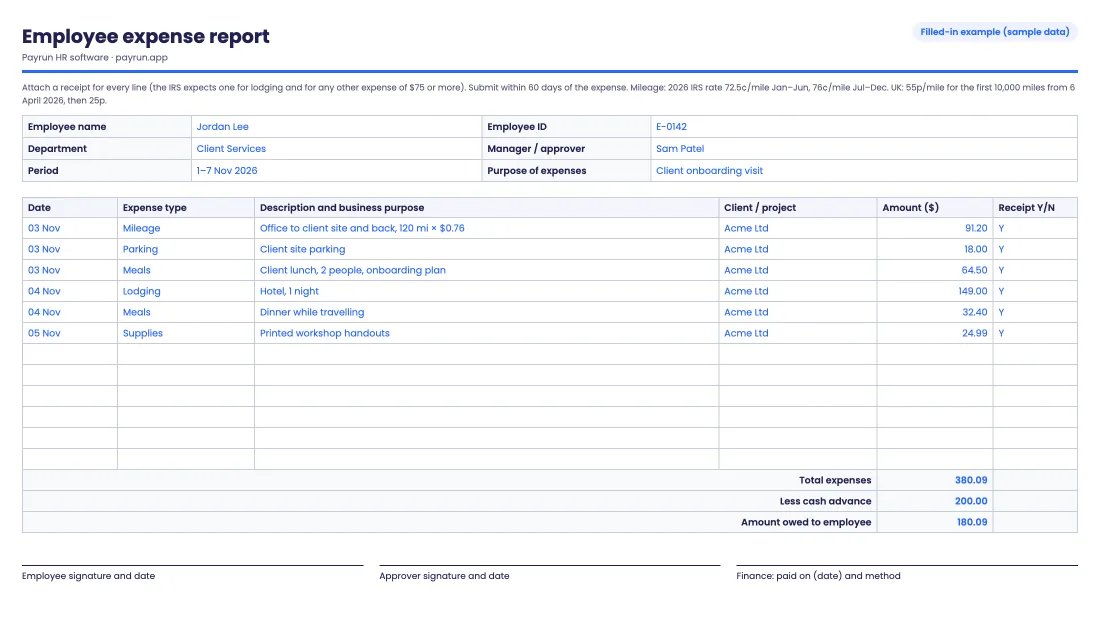
Jordan, an account manager, visits a client in November 2026 (sample data). Jordan drives 120 business miles, pays $18.00 for parking, buys a $64.50 client lunch, stays one hotel night for $149.00, has a $32.40 dinner and prints $24.99 of workshop handouts. Finance gave Jordan a $200 cash advance before the trip.
- Mileage: 120 miles × $0.76 (the IRS rate for July to December 2026) = $91.20.
- Total expenses: $91.20 + $18.00 + $64.50 + $149.00 + $32.40 + $24.99 = $380.09.
- Amount owed to Jordan: $380.09 − $200.00 advance = $180.09.
A UK employee driving the same 120 miles in their own car would claim 120 × 55p = £66.00 at the approved rate from 6 April 2026. The employee expense report template's example page shows this exact report filled in. Reimburse it in a separate payment or on the next payroll run, but keep it as its own line so the payroll records show it isn't wages and sits outside the net pay calculation.
What are the expense reimbursement rules in the US and UK?
The rules decide whether a reimbursement is tax-free and how long you keep the paperwork. These are the main points for small employers in the US and the UK.
Rule | United States (IRS) | United Kingdom (HMRC) |
|---|---|---|
When a reimbursement isn't taxed | Under an accountable plan: the expense has a business connection, the employee accounts for it within a reasonable time and returns any excess. Otherwise the payment counts as wages | Mileage paid within the approved amount (business miles × the approved rate) doesn't need reporting to HMRC. Other expenses and benefits have their own reporting rules |
Time limits | Treated as reasonable: account within 60 days of the expense and return any excess within 120 days | Set a submission deadline in your expense policy |
Receipts | Documentary evidence for lodging and for any other expense of $75 or more, showing amount, date, place and what it was for | Keep a record of when and why the employee travelled, with receipts where possible |
Mileage rate (car) | 72.5 cents per mile (1 Jan to 30 Jun 2026), 76 cents per mile (1 Jul to 31 Dec 2026) | 55p per mile for the first 10,000 business miles from 6 April 2026 (45p before), then 25p. Motorcycles 24p, bikes 20p |
Paying less than the rate | Employer's choice under its plan | The employee can claim Mileage Allowance Relief from HMRC on the difference |
How long to keep records | Generally 3 years from the date the related tax return is filed (Publication 463; Publication 583 has the detail) | 3 years from the end of the tax year they relate to |
Sources: IRS Publication 463, Travel, Gift, and Car Expenses, IRS standard mileage rates, GOV.UK, business travel mileage: rules for tax and GOV.UK, expenses and benefits record keeping, checked 19 November 2026. State and sector rules can add to these. This is a summary, not legal or tax advice.
For travel paid at a flat daily rate instead of actual meal costs, see our guide to IRS per diem rates. Expense reports are also one of the first places an auditor looks, so add them to your next payroll audit, and record reimbursements still owed at month end the same way you handle a payroll accrual.
How do you write an expense policy that makes reports easy?
An expense policy is a one-page set of rules that tells staff what they can claim, how and by when. Six decisions cover most small teams:
- What's reimbursable: list the expense types, and what isn't covered (personal travel, fines, alcohol beyond a client meal).
- Limits: for example a daily meal cap, a hotel nightly cap and economy travel.
- Receipt rule: receipts for every expense, or above a threshold you set. The IRS threshold for most expenses is $75.
- Deadline: submit within 30 days of the expense, which keeps you inside the IRS 60-day window.
- Approvers: who signs off, and the amount above which a second approver is needed.
- Payment timing: paid with the next payroll as a separate line, or by bank transfer within a set number of days.
Put the policy in your employee handbook and go through it during onboarding; it fits naturally into an employee onboarding checklist. Our HR policy templates and remote work policy template cover related rules, such as home internet and equipment for remote staff.
Is a template or expense software better for small teams?
A template works well for a handful of people with one approver and a few claims a month. Software starts to pay off once claims come from several people, receipts go missing, or approvals stall in email.
Need | Template (PDF or paper) | Expense software |
|---|---|---|
Receipts | Stapled or emailed separately, easy to lose | Uploaded to the claim line |
Approvals | Signature on paper or a reply in email | Approve or reject in one place, with a status |
Categories | Whatever each person writes | A fixed list of expense types |
Audit trail | Depends on your filing | Every claim, amount and decision recorded |
Totals and reporting | Added up by hand | Calculated per claim, filterable by status |
Cost | Free, plus admin time | Per user, or included in your HR software |
Cutting this kind of manual admin is one of the main benefits of HR automation. The same trade-off applies to most HR admin; our comparison of HR software vs spreadsheets covers when to switch. If budget is the worry, start with free HR software for small businesses, and read about the wider HR challenges small businesses face first.
How Payrun handles expense claims
Payrun HR software includes expense management on every plan, including Free. It covers the same steps as the template: categories, a claim with receipts, and an approval.
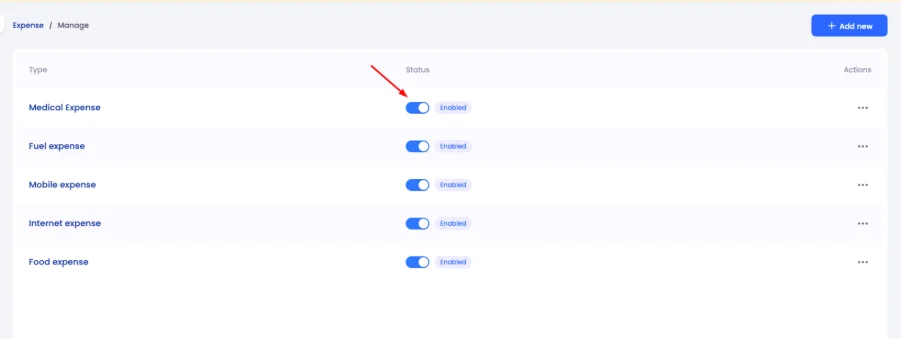
Expense types. Admins set up the categories staff can claim under Settings, then Expense: for example medical, fuel, mobile, internet and food. Each type has a status toggle, so you can retire a category without losing old claims.
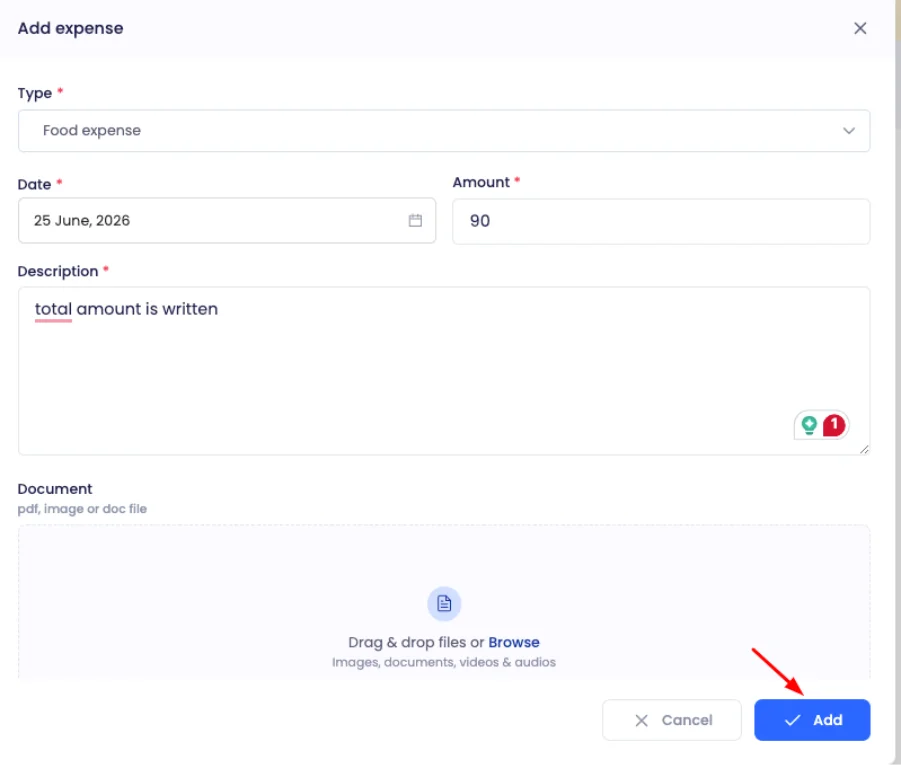
Expense claims. Under Finance, then Expenses, a claim gets a title and one line per expense: type, date, amount and description, with the receipt attached as a PDF, image or DOC file. A claim can hold several lines, and you can add a note for the approver.
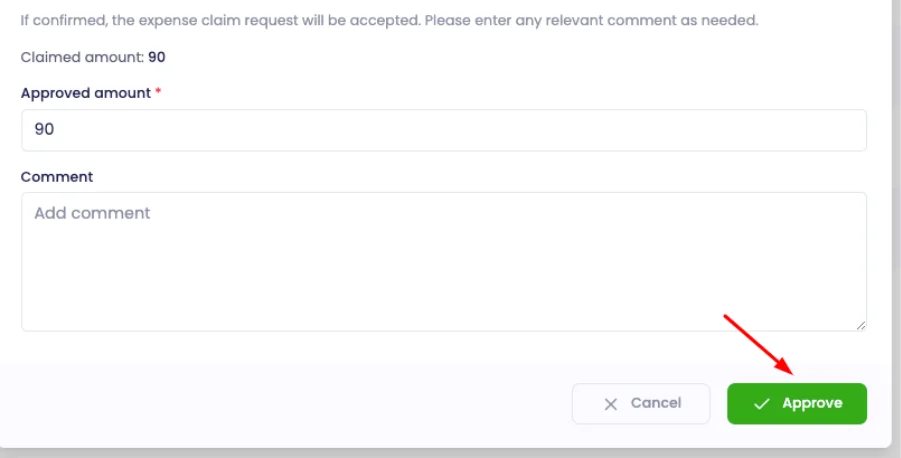
Approval. An approver opens a submitted claim, checks the claimed amount, sets the approved amount (it can be lower than the claim) and adds a comment. The status moves from Submitted to Approved, or the approver rejects it.
Payrun records and approves claims; it doesn't move money or file tax, so you still reimburse staff by bank transfer or through payroll. See the expense tracking and reimbursement feature page for the full module, and our guide to the payroll approval workflow for how approvals fit around pay runs. Staff can follow their own claims through the employee self-service portal, the same place they see payslips with self-service payroll.
5 expense report mistakes small teams make
- No business purpose on the line, so the approver has to ask, and an auditor can't tell a client lunch from a personal one.
- Receipts submitted months later, past the 60-day window that keeps US reimbursements tax-free.
- Personal and business costs on one receipt, with no note of the business share.
- The wrong mileage rate: 45p a mile in the UK after 6 April 2026, or the 72.5-cent US rate for trips after 1 July 2026.
- Reimbursements added to salary instead of a separate line, which creates payroll errors and makes repayments look like taxable pay.
Most of these disappear with a fixed category list, a submission deadline and one approver per team. If you also track hours, the same discipline helps with time tracking for small businesses.
How to start using an expense report template in 5 steps
- Download the template that fits: employee, travel or mileage.
- Write a one-page expense policy: what's covered, limits, receipts, deadline and approver.
- Agree a fixed list of expense types and put it in the policy.
- Set a monthly submission date and a payment date that fits your payroll process steps.
- Review the first month's reports together and fix any gaps in the policy.
If you'd rather keep claims, receipts and approvals in one system, expense management is included on every Payrun plan, including Free for up to 5 users. The Starter plan is $4.95 per user per month billed annually ($8.25 billed monthly). The 14-day free trial covers up to 10 users with no card and no contract, and afterwards the account can switch to the Free plan (up to 5 employees). See all plans on the pricing page.