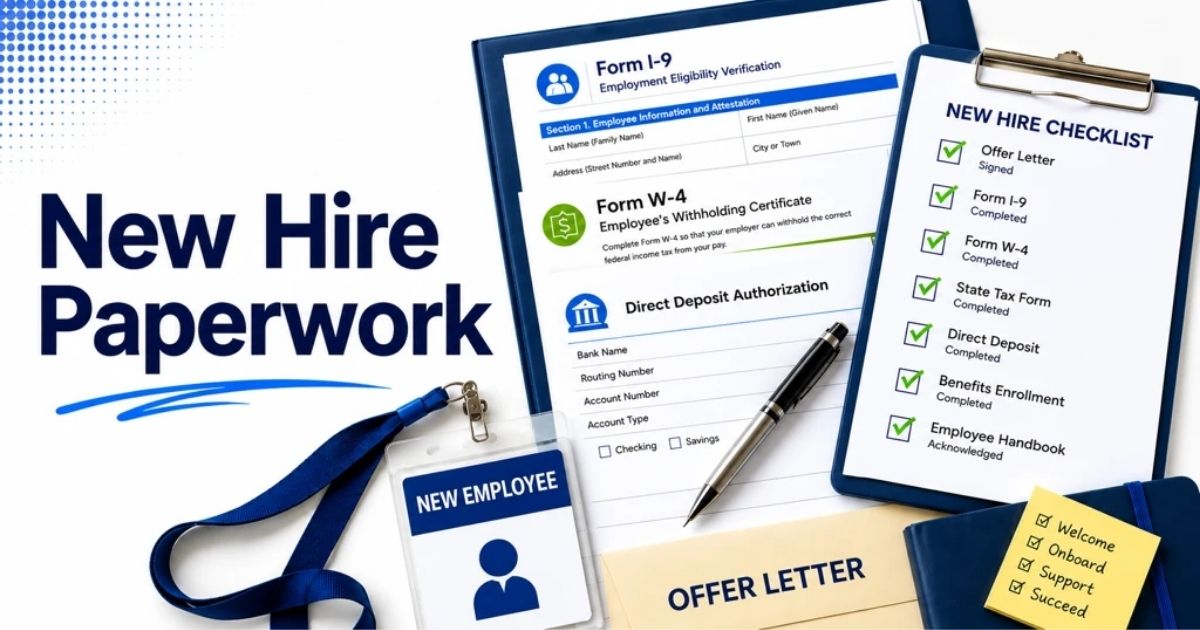
Employee onboarding checklist: before day one, first week and first 90 days
Table of Contents
A new account executive starts on Monday. The laptop is still in its box, nobody has created their email account, and their manager is in back-to-back calls. They spend two days reading the company website. On a $55,000 salary, those two days cost about $420 before any real work has started.
Small teams rarely get onboarding wrong because they don't care. They get it wrong because the tasks belong to nobody. Give every task an owner and a deadline, write it down once, and the second hire goes better than the first.
Quick overview
An employee onboarding checklist lists every task that takes a new hire from signed offer to fully productive, grouped by timing (before day one, day one, first week, first 90 days) and given an owner. A small team needs about 36 tasks, not 200. Payrun HR software (payrun.app) holds the record side: employee invitations, departments, asset handover and leave on every plan, plus employee files from Starter.
Legal summaries last checked against GOV.UK, HMRC guidance, USCIS, E-Verify, the IRS and the US Administration for Children and Families on 15 November 2026.
Key takeaways
- Onboarding starts when the offer is signed, not on day one. Most first-day problems (no laptop, no logins, no plan) come from skipping preboarding.
- Split the checklist into four stages and give each task one owner: the manager, HR or ops, IT or admin, the buddy, or the new hire.
- In the US, the new hire completes Section 1 of Form I-9 by their first day, and the employer completes Section 2 within 3 business days of the hire.
- In the UK, check the right to work before employment starts and give the principal written statement on the first day.
- A 30-60-90 day plan with three check-ins turns "how's it going?" into a review against agreed goals.
- The checklist can live anywhere. The employee data behind it should live in one record, so nobody types a new hire's details into four tools.
This guide gives you a free employee onboarding checklist (a new hire checklist with a printable PDF), what to do before day one, a first day checklist, the first week, a 30 60 90 day plan, the paperwork rules in the US and UK, and how to run new hire onboarding without a dedicated HR team.

What is an employee onboarding checklist?
An employee onboarding checklist is a list of every task needed to bring a new hire into the company, from the signed offer to the end of their first 90 days, with an owner and a deadline for each task. It turns the onboarding process into something you can repeat and hand over.
Three terms get mixed up, so it helps to separate them:
- Preboarding covers the time between the signed offer and day one: paperwork, equipment, accounts and a welcome message.
- New hire orientation (or new employee orientation) is a one-off session, usually on day one, that covers the company, policies and practical basics. Some teams call it an induction program.
- Onboarding is the whole process. It includes preboarding and orientation and runs until the person works independently, usually around 90 days.
Onboarding is the first stage of the employee lifecycle. Our guide to employee lifecycle management shows how it connects to reviews and, later, offboarding.
What should an employee onboarding checklist include?
A complete employee onboarding checklist covers four stages and five owners. Here is the summary. The full 36-task version is in the free printable PDF checklist.
Stage | Key tasks | Main owner | Done by |
|---|---|---|---|
Before day one | Signed offer, contract, right-to-work plan, personal and bank details, employee record, equipment, accounts, buddy, first-week schedule, welcome email | HR or ops, IT or admin, manager | The working day before the start date |
Day one | Welcome, equipment handover, logins tested, I-9 Section 1 (US) or principal written statement (UK), handbook, pay and leave basics, meet the buddy, first small task | Manager, HR or ops, buddy | End of day one |
First week | I-9 Section 2 (US), payroll setup, role training, 30-60-90 goals agreed, daily buddy check-ins, first real deliverable | Manager, HR or ops, buddy | End of week one |
First 90 days | Day 30, 60 and 90 check-ins, onboarding feedback, documents filed, probation decision if you use one, next-quarter goals | Manager, HR or ops | Day 90 |
Use the same list for every role and add three to five role-specific tasks. A shared checklist also stops new hire paperwork getting lost, because every form has a name next to it. Store it next to your HR policy templates so managers can find it.
What should you do before a new hire's first day?
Before a new hire's first day, finish the paperwork, the employee record, the equipment and the accounts, and send a welcome email with day-one details. This is preboarding, and it decides how day one goes.
- Get the offer signed and confirm the basics. Start date, hours, salary, place of work and who they report to. Check: the start date and salary match the signed offer.
- Plan the legal checks. In the UK, complete the right to work check before they start. In the US, send Form I-9 instructions so the new hire can complete Section 1 by day one. A background check, if you run one, belongs here too.
- Collect personal details. Address, emergency contact, bank details and tax information. Keep them in one place, under the same access rules as the rest of your employee data protection policy.
- Create the employee record. Department, job title, employment status, start date and manager. A central employee database means you enter this once, not in four tools.
- Order equipment and record it. Laptop, phone, headset, access card. Log the serial number and handover date so offboarding later has a list to check against.
- Create accounts with the right access. Email, chat, the tools for the role. Give access by role, not by copying a colleague's account. Our guide to an HR role and permission system explains why.
- Pick a buddy and plan week one. Choose someone who isn't their manager. An onboarding buddy program gives new hires a safe person to ask the small questions.
- Send the welcome email. Where to go, what time, who meets them, what to bring and the plan for day one.
Worked example: a 25-person agency hires a designer starting on the 1st, with the offer signed on the 10th. IT orders the laptop on the 15th (it arrives on the 22nd), accounts go live on the 29th and the manager sends the week-one plan on the 30th. Nothing is left for the morning of day one.
What belongs on a first day checklist?
A first day checklist covers four things: a proper welcome, working equipment and logins, the paperwork due on day one, and one small task the new hire can finish. Keep the day light.
- Welcome: the manager meets them on time, gives a tour and introduces the team.
- Equipment and logins: hand over the laptop, then test every login together before lunch.
- Day-one paperwork: I-9 Section 1 in the US, the principal written statement in the UK. See the rules table below.
- The handbook: walk through the 5 policies people actually ask about: working hours, leave, expenses, remote work and conduct. Point to the full employee handbook for the rest.
- Pay and time basics: pay dates, how to log hours (if they track time) and how to request leave. If hourly staff fill in timesheets, show them the format, for example one of our free timesheet templates.
- Self-service: show them where to see their payslips, leave balance and files in your employee self-service portal or mobile HR app.
- Buddy lunch and a first task: something small they can finish today.
- End-of-day check-in: 10 minutes with the manager. What's unclear? What's missing?
What should the first week of onboarding include?
The first week of onboarding should close the remaining paperwork, set up payroll, start role training and end with agreed 30-60-90 day goals. By Friday, the new hire should know what good work looks like in their role.
Day | Focus | Owner |
|---|---|---|
Day 2 | Role training and tool walkthroughs; shadow a colleague | Manager |
Day 3 | Finish I-9 Section 2 (US, within 3 business days of the hire); check payroll details | HR or ops |
Day 4 | First real piece of work, with the buddy on hand | New hire, buddy |
Day 5 | Week-one review: questions, access gaps, 30-60-90 goals agreed | Manager |
Set up payroll before the first pay run: use a payroll setup checklist and record salary and allowances with a start date, the same way you track employee compensation changes later. Confirm leave too. A starter who joins partway through the leave year usually gets a pro-rated allowance (see annual leave management). Shift workers go on the rota now; employee shift management covers the basics.
What does a 30 60 90 day onboarding plan look like?
A 30 60 90 day plan sets one goal per month: learn in the first 30 days, contribute by day 60, and work independently by day 90. Each stage ends with a short check-in against goals agreed in week one.
Stage | Goal | Example for an account manager | Check-in question |
|---|---|---|---|
Days 1 to 30 | Learn | Shadow 10 client calls; learn the CRM and reporting; meet every team lead | What still feels unclear? |
Days 31 to 60 | Contribute | Run 3 accounts with support; write the first monthly client report | Where do you need less help, and where more? |
Days 61 to 90 | Own | Run 8 accounts alone; suggest one process fix | Are you ready to work without a buddy? |
Write the goals as measurable outcomes, like a key performance indicator. If you use a probation period, book the review on day one and use the day-90 check-in for it. Borrow from our performance review questions, then roll the result into an individual development plan. If you run reviews in performance review software, log the 90-day review there.
What paperwork and legal checks does onboarding need in the US and UK?
In the US, every new hire needs Form I-9, a Form W-4 and a new hire report to the state. In the UK, every new hire needs a right to work check and a written statement of employment particulars, and HMRC needs to hear about anyone you pay through PAYE. The deadlines differ, so put each one on the checklist with its date.
Country | Requirement | Deadline |
|---|---|---|
US | Form I-9, Section 1 (employee) | No later than the first day of employment |
US | Form I-9, Section 2 (employer checks documents) | Within 3 business days of the hire (the first day of work for pay) |
US | Form W-4, so the employer withholds the correct federal income tax | Ask for it before the first payroll, so withholding is right from the first paycheck |
US | New hire report to the state where the employee works | Within 20 days of hire (some states require it sooner) |
US | E-Verify, a free online check of Form I-9 details against government records | Required for some employers, such as federal contractors covered by the E-Verify clause; check your state's rules |
UK | Right to work check | Before employment starts |
UK | Principal written statement, plus information on sick pay, other paid leave and notice periods | On the first day of employment |
UK | Wider written statement (pensions, training, disciplinary and grievance procedures) | Within 2 months of the start date |
UK | Tell HMRC about the new employee through a Full Payment Submission, using their P45 or HMRC's starter checklist | On or before their first pay day |
UK | Workplace pension: enrol staff aged 22 to State Pension age who earn at least £10,000 a year and normally work in the UK | Check eligibility when they start; GOV.UK sets the enrolment timing |
Sources, checked on 15 November 2026: USCIS, Completing Section 1 and Completing Section 2 of Form I-9; E-Verify, What is E-Verify; IRS, About Form W-4; Administration for Children and Families, New Hire Reporting; GOV.UK, Checking a job applicant's right to work, Written statement of employment particulars, Tell HMRC about a new employee and Workplace pensions for employers. This is a summary, not legal advice.
Two more checks: confirm the person is an employee, not a contractor, because the paperwork differs (see employee vs contractor), and store identity documents securely and only as long as you need them. Our payroll compliance checklist covers the yearly payroll review.
How do you onboard remote employees?
You onboard remote employees with the same checklist, plus three changes: ship equipment earlier, replace the office tour with scheduled video calls, and write down what an office would teach by osmosis.
- Ship equipment 5 working days early, with tracking, so a delayed courier doesn't ruin day one.
- Book every day-one meeting in advance, including a camera-on welcome call and a buddy call.
- Write the unwritten rules: core hours, response times, which channel to use for what. A remote work policy template covers most of it.
- Check in more often. Daily for the first week, then twice a week. Remote hires won't stop by your desk to ask.
Confirm holidays and working hours across time zones in week one. See remote workforce management and leave management for remote teams.
Spreadsheet, template or software: what works for onboarding a small team?
A shared checklist works for a few hires a year. Once you hire every month, the employee data behind it needs one home, or you'll type the same details into four tools.
Checklist template or spreadsheet | HR software with employee records | Dedicated onboarding software | |
|---|---|---|---|
Best for | 1 to 5 hires a year | Regular hiring at 10 to 100 people | High-volume hiring, larger HR teams |
Employee record | Separate file per person | One record from invitation to exit | Usually syncs to an HRIS |
Tasks and reminders | Manual | Varies by tool | Automated task flows |
Documents | Email and shared drives | Stored on the employee profile | E-signature and forms built in |
Cost | Free | Per user, per month | Often an extra subscription |
If you're weighing a dedicated tool, our employee onboarding software guide compares the options. Most small teams get further by fixing the record first: an employee management system that holds every person's details, files and equipment, with the checklist on top. Moving from spreadsheets? Use our HRIS migration checklist.
How does Payrun handle the records behind onboarding?
Payrun doesn't have an onboarding module with automated task lists. It holds the record side of onboarding, from the hiring pipeline to the employee profile, so you enter a new hire's details once.
An admin sends a new hire an invitation from the Employees page. The invitation sets the email, employment status, designation, employee ID, department, joining date and any assigned assets. Sending it creates the employee record and emails the invitation; the person shows as a pending invitation until they accept.
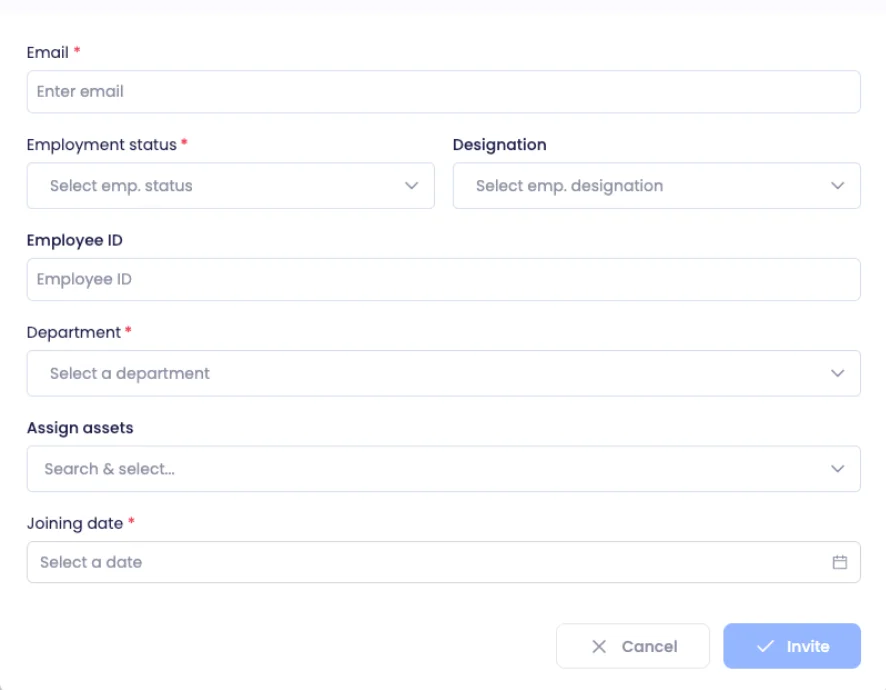
If you hire through Payrun, send the invitation from the Employees page once the candidate accepts your offer, using the same New invitation form. See Payrun hiring and recruitment and our applicant tracking system guide for the pipeline before that point.
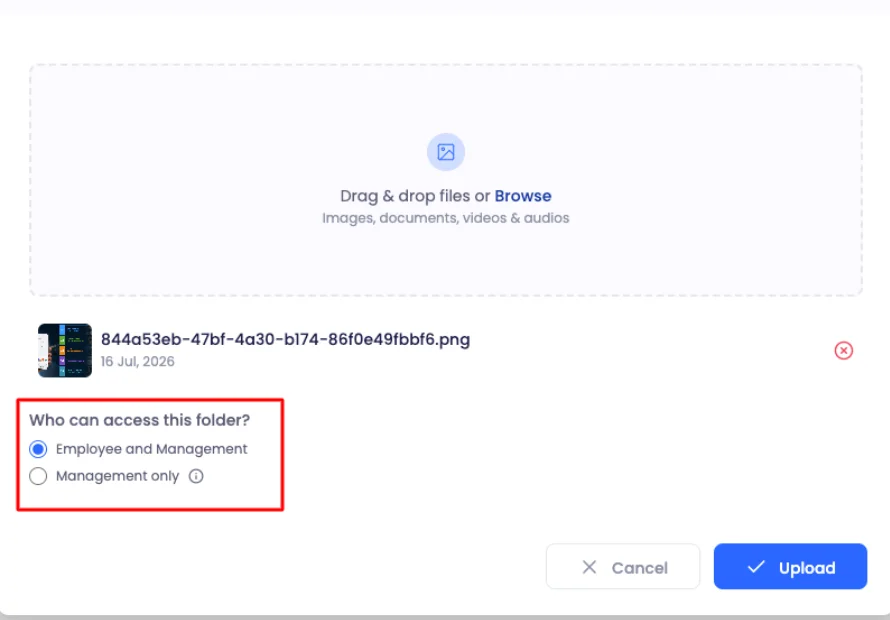
Contracts, ID copies and signed policies go in the Files tab on the employee's profile. For each upload you choose who can see it: the employee and management, or management only (HR managers, department heads and administrators). Management-only files show a lock icon.
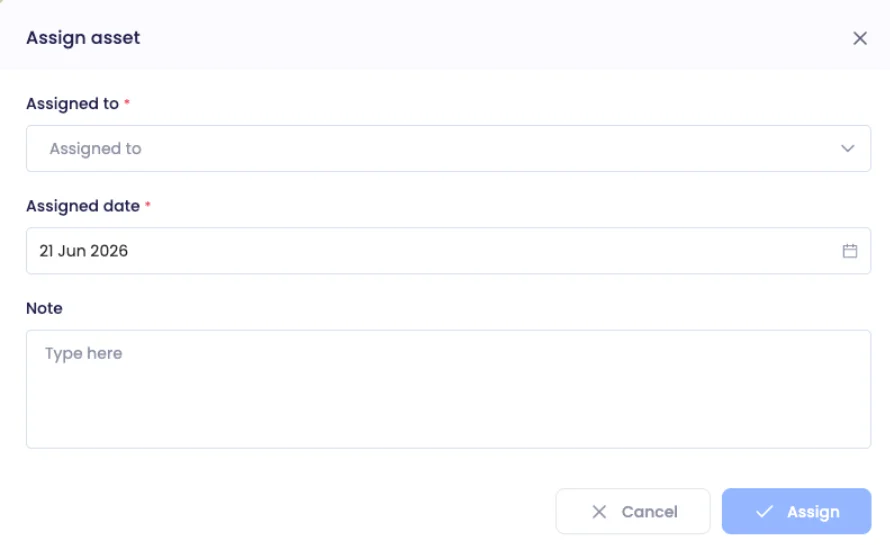
Equipment handover is logged on the Assets page with the employee, the assigned date and a note ("laptop issued with charger"). The status changes from Available to Assigned, which gives you a ready list for the offboarding checklist later. More on the asset management feature page.
Each leave policy applies to all employees, to chosen employment statuses or after a set time, so set the employment status correctly in the invitation. Editing the default policies works on every plan; creating a custom policy needs Ultimate. Roles (such as Employee, HR manager or Hiring manager) decide what each person can see. Keep the checklist itself in the PDF, a shared doc or a Payrun project board. For the record-keeping side, see our guide to employee record management or the employee management feature page.
5 onboarding mistakes small teams make
- Starting on day one. Equipment and accounts take days to arrange, so leaving them until the start date wastes the new hire's first week.
- No owner per task. "HR will sort it" means nobody sorts it when HR is one person with another job.
- Information overload on day one. Spread policies across the first week and keep day one for people and logins.
- No check-ins after week one. The welcome attention fades fast, so book the day 30, 60 and 90 check-ins on day one.
- Never updating the checklist. Ask every new hire at day 30 what was missing, and add it. Their answers also feed your employee retention strategies.
Compare your onboarding with common employee turnover causes, and ask one employee Net Promoter Score question at day 90 to track the trend.
How to start using this onboarding checklist in 5 steps
- Download the printable onboarding template and delete any task that doesn't apply to you.
- Write an owner next to every task: manager, HR or ops, IT or admin, buddy or new hire.
- Add your country's paperwork deadlines from the rules table above.
- Add 3 to 5 tasks for the specific role, taken from its job description or job analysis.
- Use it on your next hire, then update it with what they say at day 30.
If you'd rather keep the records in one system, employee profiles, invitations, departments, workshifts, leave policies, asset tracking and candidate management are on every Payrun plan. Employee files and pulse surveys start on the Starter plan at $4.95 per user per month billed annually ($8.25 billed monthly). The 14-day free trial covers up to 10 users with no card and no contract, and afterwards the account can switch to the Free plan (up to 5 employees). See all plans on the pricing page.